The story in brief
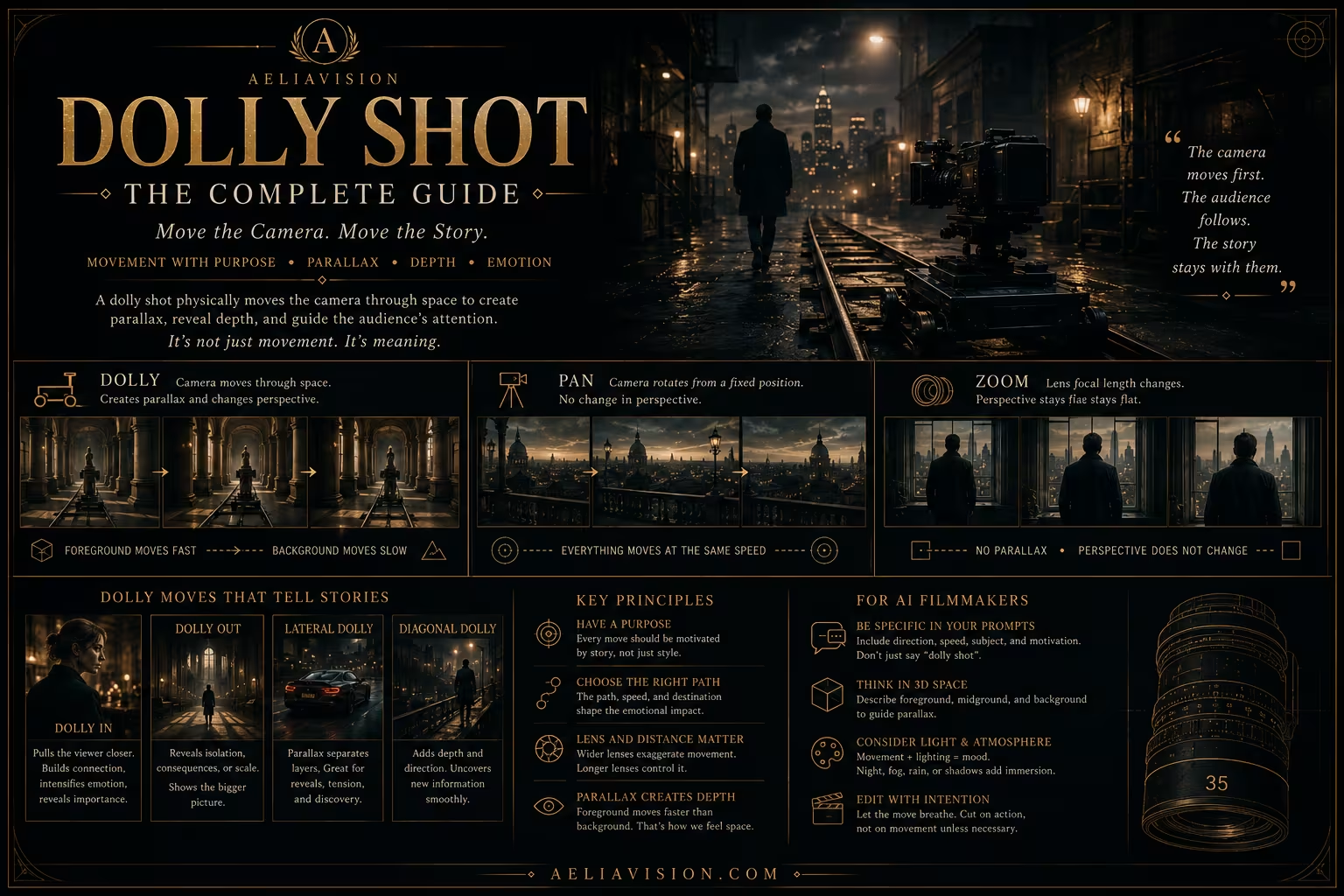
A dolly shot physically moves the camera through space, usually toward, away from, or alongside a subject. Unlike a zoom, this camera movement changes the viewpoint. Nearby objects shift across the frame faster than distant ones, creating parallax and a visible sense…
Inside this story
A dolly shot physically moves the camera through space, usually toward, away from, or alongside a subject. Unlike a zoom, this camera movement changes the viewpoint. Nearby objects shift across the frame faster than distant ones, creating parallax and a visible sense of depth.
That physical quality is the reason dolly shots remain important. A push-in can bring the viewer closer to a realization. A pull-out can reveal isolation. A lateral dolly can make foreground and background separate through parallax. The track can be smooth and precise, or it can carry the roughness of a hand-pushed cart. The movement is simple to describe, but the choice of path, speed, lens, and motivation determines what the shot means.
For AI filmmakers, dolly language tells an image-to-video model to translate the camera through the environment instead of enlarging the image digitally. A reliable cinematic AI prompt also names the subject, direction, speed, trigger, and destination. “Dolly shot” alone leaves too much undefined.
What a dolly shot actually is
A dolly is a camera move in which the camera travels physically along a surface or a planned path. Traditional dolly equipment uses wheels and track, but the same idea can be created with a slider, a vehicle, a crane, a gimbal, or a virtual camera. The defining feature is translation through space.
A dolly forward moves the camera toward the subject. A dolly backward moves away. A lateral dolly travels left or right, often parallel to a subject or across a set. A diagonal dolly combines these directions and can reveal more of the space.
The camera does not need to point straight ahead during a dolly. It can stay locked on a subject while the background shifts, or it can lead the subject through a location. The path and the camera’s aim are separate decisions.
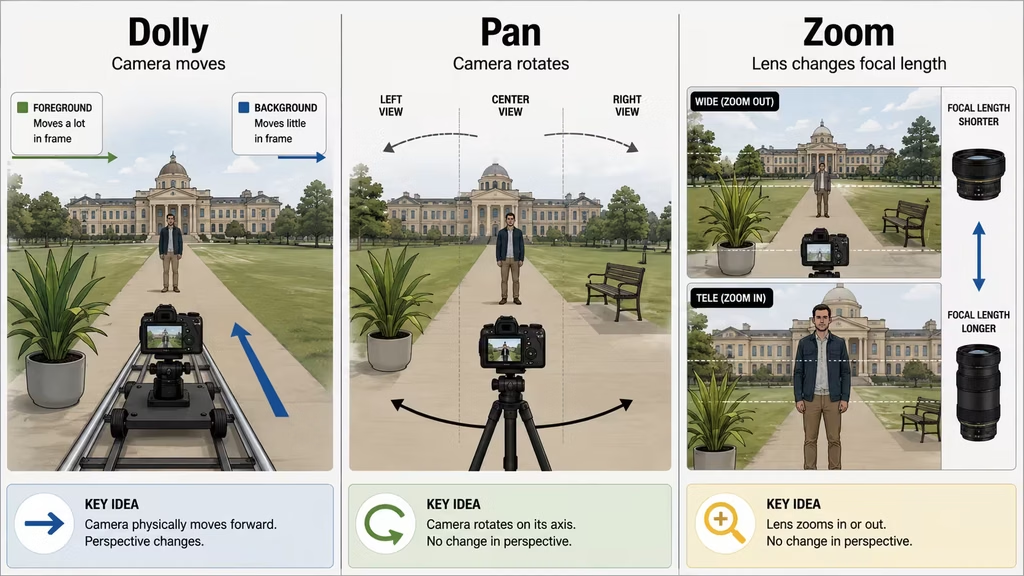
A dolly also differs from a pan. A pan rotates the camera from a fixed position. A dolly changes the camera’s position. That difference creates parallax. A foreground railing may slide quickly across the frame while a distant building moves slowly. The viewer reads that difference as depth.
Forward dolly and emotional attention
A forward dolly often works as a physical version of attention. The camera moves toward what now matters. In a drama, the move may begin when a character understands the cost of a decision. In a thriller, it may begin when the audience notices a detail that the character has missed. In a commercial, it may draw the viewer toward a product feature.
The movement does not have to end in a closeup. A slow dolly can move from a wide shot to a medium shot and stop while the environment remains important. The amount of movement should match the change in attention. A small realization may need only a small advance. A major reveal may justify a longer path.
Lens choice changes how much of the moving scene appears in frame, but camera position and travel distance control perspective. A wide lens includes more nearby foreground, so motion is easier to see, especially near the frame edges. A 50mm gives a narrower view. An 85mm isolates a smaller part of the scene, which may hide some foreground motion and make the move feel more restrained.
The camera should have a destination. It might arrive at a face, an object, a doorway, or a new relationship between characters. Without a destination, the dolly becomes movement for its own sake.
Useful prompt:
“Slow physical dolly forward toward the woman’s face as she recognizes the photograph, foreground table edge shifting with subtle parallax, camera stops on a medium closeup, no zoom.”
The prompt gives the model a target, a trigger, a speed, and a visual cue.
Backward dolly and separation
A dolly backward can reveal the world around a subject. The character becomes smaller while the environment gains weight. The move can show that a person is alone, trapped, overwhelmed, or suddenly insignificant.
A pull-out and a dolly backward are often used interchangeably, although a pull-out can describe several kinds of camera movement. When the camera physically retreats through space, foreground objects move toward the edges and the scene opens through parallax.
The emotional effect depends on what the retreat reveals. Pulling away from a couple may show the empty room around them. Pulling away from a victorious character may reveal the cost of the victory. Pulling away from a small product may reveal a larger lifestyle setting.
A slow retreat can feel mournful. A fast retreat can feel like escape or shock. If the camera backs away because a threat has been discovered, include that cause in the prompt. If it simply moves backward because the shot needs to become wider, the movement may feel empty.
Lateral dolly and parallax
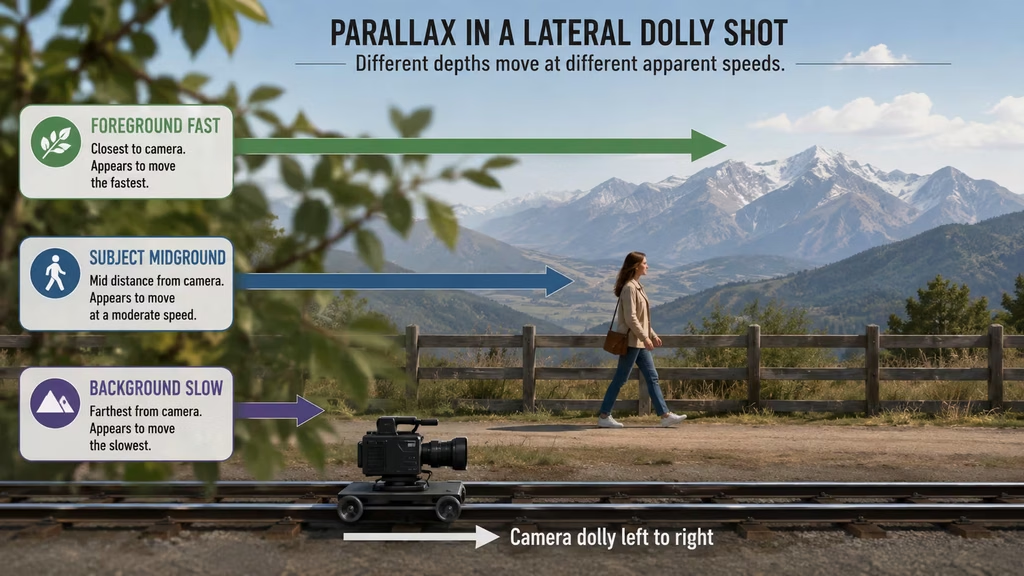
A lateral dolly travels sideways through a scene. It is one of the clearest ways to show depth because different layers cross the frame at different speeds.
Place a foreground object close to the camera, a subject in the midground, and a distant background. As the camera travels, the foreground moves quickly, the subject moves at a moderate rate, and the background drifts slowly. This layered movement creates a strong sense of three-dimensional space.
A lateral dolly can follow a walking subject, pass from one character to another, or reveal information hidden behind an object. It can feel calm and elegant when the speed stays steady. It can feel urgent when the camera moves quickly or when foreground objects interrupt the view.
The lens changes how much of the parallax remains visible in the frame. A 24mm or 35mm lens can include close foreground and wide depth layers, making their relative motion easy to see. An 85mm shows a narrower slice of the scene and may make the move look flatter if those layers fall outside the frame. If parallax is the point, include clear depth layers and enough field of view to see them move.
For AI video, say which layer should move and how:
“Slow lateral dolly to the right. A close branch slides quickly across the foreground, the woman remains centered in the midground, and the distant mountains drift slowly behind her.”
That is easier to generate than “cinematic dolly through nature.”
Dolly and tracking shots
A tracking shot follows a subject as they move. The camera may travel beside them, behind them, or in front of them. A dolly is the physical method or movement family; tracking describes the relationship between camera and subject.
A side-tracking dolly keeps a walking character in profile while the world passes behind. A follow dolly travels behind the character. A lead dolly moves backward in front of the character while maintaining their face in view. Each creates a different relationship with the action.
A side track can feel observational. The viewer watches the subject move through a world. A follow shot can feel intimate or anxious because the camera shares the character’s direction. A lead shot can feel confrontational because the character moves toward the viewer.
Prompt the relationship clearly:
“Side-tracking dolly moves parallel with the cyclist, keeping him in profile while storefronts slide behind him, smooth moderate speed, 35mm lens.”
Or:
“Lead dolly moving backward in front of the woman as she walks toward camera, her face remains sharp, the corridor recedes behind her, controlled Steadicam-like movement.”
Do not ask for a dolly and a tracking relationship that contradict each other. A camera cannot remain locked off while also traveling beside a subject. State the movement that matters most.
Dolly zoom versus dolly shot
A dolly zoom combines a physical camera move with a zoom in the opposite direction. The subject stays roughly the same size while the background stretches or compresses. It produces a strange change in perspective associated with shock, vertigo, or sudden realization.
A normal dolly changes the subject’s size as the camera approaches or retreats. A dolly zoom keeps the subject size nearly constant. The difference is important in a prompt.
Use “physical dolly forward” when you want the viewer to approach the subject. Use “dolly zoom” when you want the background to distort while the subject holds its size. If you write only “zoom in while dollying,” the model may produce an unstable blend.
A dolly zoom is a special effect. It should have a story reason. Use it when the character’s relationship to the world changes in a sudden, visible way. A standard dolly is more flexible and can support ordinary changes in attention.
Dolly shots in dialogue
A dolly can make a dialogue scene feel like it is tightening around a decision. Start with a two-shot that establishes the relationship. As the conversation changes, move closer to the character whose internal state matters.
You can also dolly sideways across a two-shot, allowing one character to pass behind a foreground object and reveal the other. That movement can create a natural transition between speakers without a hard cut.
Keep the axis in mind. A dolly path should not accidentally cross the 180-degree line and reverse the spatial relationship. If the camera moves across the line, make that crossing visible and motivated, or cut before the viewer loses the map of the room.
For AI generation, shorter clips are easier to control. Generate the opening two-shot and close reaction as separate images if the full move becomes unstable. Match the room, wardrobe, light, lens, and eyelines before joining them in the AI film pipeline.
Dolly shots in suspense
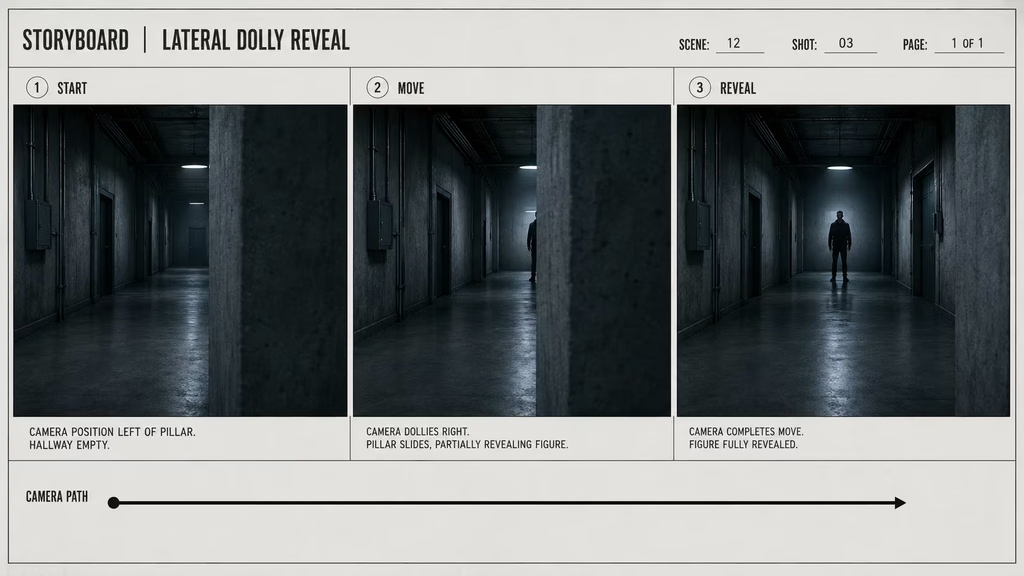
Suspense uses dolly movement to manage what the viewer can see. A slow advance toward a dark doorway reveals more of the entrance while delaying the full answer. A lateral move can uncover a person hiding behind a wall. A backward move can reveal that the character is not alone.
The movement should control information as well as distance. Decide what becomes visible at the midpoint and what remains hidden until the end. Use foreground objects to obstruct and reveal. A curtain, doorway, parked car, or passing person can make a dolly feel like a discovery rather than a simple approach.
Prompt example:
“Slow dolly left behind a concrete pillar. The camera begins on the empty hallway, then gradually reveals the suspect waiting at the far end. The pillar crosses the foreground, cool practical light, quiet tension, no sudden movement.”
The obstruction gives the move a clear visual structure.
Dolly shots for commercial work
A commercial dolly often introduces a product through its setting. The camera may begin with a person using the object, move across the room, and end on a close product detail. The movement connects the product to an experience.
The product must stay physically stable. Avoid prompts that ask it to float, change shape, or rotate without a support. Describe the surface beneath it, the light source, the direction of the move, and the final detail.
“Slow lateral dolly across a dark wooden table toward a black camera. The lens and metal body catch a soft side reflection as the camera stops on the focus ring. Product remains grounded on the table, 50mm perspective, restrained motion, realistic materials.”
The object stays in the world. The camera gives it attention.
Starting and ending frames
Plan a dolly as a small sequence rather than a single instruction. Write the starting composition, the path, and the destination.
For a forward dolly:
- Start with context and a readable subject.
- Move through a clear depth path.
- End on the detail or reaction that matters.
For a lateral dolly:
- Build foreground, midground, and background layers.
- Choose what the foreground hides or reveals.
- End when the new relationship becomes clear.
For a backward dolly:
- Begin with a subject that carries the attention.
- Let the environment enter gradually.
- End when the wider context changes the meaning.
A reference start frame can help an AI model preserve the identity and setting. An end frame can help if the tool supports a target image. Keep the path simple enough that the model can interpolate between them.
Speed and easing
Constant speed creates a measured, mechanical feeling. Ease-in and ease-out make the camera feel operated by a person or a precise motion-control rig. A sudden acceleration can signal urgency, but it can also look like a mistake.
Use a slow ease-in when the camera should seem to notice something. Use a steady middle section for observation. Ease out as the destination becomes important. For action, accelerate only when the story calls for it.
Words such as “smooth,” “controlled,” and “steady” help, but they should be paired with a duration or mood. “Slow six-second dolly forward” is more useful than “smooth cinematic camera movement.”
AI video models may not follow exact seconds, so treat the duration as a bias rather than a guarantee. A start state, end state, and clear speed relationship usually matter more than a precise number.
Common dolly mistakes
Treating every forward move as a push-in
A push-in is a type of forward move, but a dolly may also travel sideways, diagonally, or through a location. If the spatial path matters, describe it. If attention alone matters, a simple push-in may be enough.
Calling a zoom a dolly
A digital zoom enlarges the frame. It does not create true parallax. State “physical camera movement” and include foreground layers when depth is important.
No foreground or background
A lateral dolly through an empty, flat image has little depth to reveal. Add a close object, a subject in the middle, and a distant environment.
Movement without a destination
The camera should arrive at a meaningful composition. A move that ends halfway through an action feels unfinished.
Too much speed
Fast dolly movement can blur and warp. Keep the path moderate, especially with long lenses or AI video. Use a cut or a separate shot when the action needs to be extreme.
Ignoring the axis
A dolly can cross the line between characters and reverse the scene’s geography. Plan the move with the 180-degree rule in mind.
Letting the subject drift
If the camera is tracking a person, specify whether the subject stays centered, remains in profile, or moves through the frame. Otherwise, the model may change the relationship during the shot.
IMAGE PLACEHOLDER
Description: Four-panel dolly troubleshooting graphic: a digital zoom mistaken for a dolly, a flat lateral move with no depth layers, a move without a destination, and an over-fast warped camera path.
Image generation prompt:
Create a four-panel cinematography troubleshooting graphic about dolly shots. Panel one: fixed camera image digitally enlarges with no parallax, labeled “Zoom, not dolly.” Panel two: camera moves sideways through a flat wall with no foreground or background layers, labeled “No depth.” Panel three: camera travels through a scene but ends on an empty composition, labeled “No destination.” Panel four: fast camera path with smeared foreground and warped subject, labeled “Too fast.” Use clear red correction marks, muted professional film-school design, 16:9 layout.
Dolly prompts for AI video
Forward attention
“Physical dolly forward through the kitchen toward the father as he reads the message. Foreground chair shifts with subtle parallax, 35mm lens, slow controlled movement, camera stops on his reaction, no zoom.”
Side tracking
“Lateral dolly moves parallel with the woman walking through the market, 35mm lens, foreground stalls pass quickly, crowd in the midground, distant signs drift slowly, subject remains in profile and sharp.”
Pull-out reveal
“Camera dollies backward from the closeup of the injured runner, gradually revealing the empty stadium around him. The subject becomes smaller, the scale of the space changes the meaning, smooth slow retreat, natural perspective.”
Product move
“Slow physical dolly forward across a wooden table toward the watch, soft side light, controlled reflections, brushed metal remains stable, camera stops on the crown detail, 50mm lens, no floating and no digital zoom.”
AI reference-frame prompt
“Use the supplied still as the exact starting frame. Dolly slowly to the right behind the foreground doorway, preserving the character’s face, wardrobe, and light. Reveal the second character at the end of the move. Maintain screen direction and realistic parallax.”
Build the dolly into the shot plan
In the project’s cinematic visual language, record the dolly direction, relationship to the subject, lens, camera height, speed, trigger, and destination. Those choices turn a general movement into a usable shot instruction.
Treat the dolly as a spatial decision, not a decorative effect. A forward move can mark attention, a lateral move can reveal a relationship, and a backward move can widen the story’s context. Place the movement beside the emotional beat in the shot plan.
For AI films, keep the same Camera DNA and Environment DNA across the start and end. If the room changes while the camera moves, the audience notices the generation. Reference frames, depth layers, and short controlled clips make the move easier to match.
A practical dolly workflow
First, write what the camera needs to reveal or approach. Then draw the path. A simple arrow on a floor plan can prevent a confusing prompt.
Second, choose the lens. Use a wider lens when parallax and physical movement matter. Use a normal lens for a familiar approach. Use a longer lens for controlled observation.
Third, add layers. Put something near the camera, something in the middle, and something behind. The layers give the move visible depth.
Fourth, set the speed and easing. Slow and steady is a useful default. Add acceleration only when the story requires it.
Fifth, give the move a trigger and destination. The camera responds to an action, discovery, sound, or emotional shift and stops when the new information is clear.
Finally, test the cut before committing to a long clip. A dolly that works as an isolated shot may not match the shot before it. Check the axis, eyeline, subject scale, and lighting across the sequence.
Give the camera a destination
A dolly shot changes the viewer’s position in relation to the story. Moving forward can bring the audience toward a realization. Moving backward can reveal isolation or scale. Moving sideways can show depth, follow action, or uncover information through parallax.
Use a real dolly instruction when the camera should translate through the scene. Do not substitute a zoom when perspective and parallax matter. Choose the lens with the movement, build depth layers, state the speed, and give the camera a reason to move.
In AI video, the strongest dolly prompts describe a beginning, a route, and an end. They also protect the subject’s identity and the environment’s continuity. The model does not need a pile of cinematic adjectives. It needs a clear camera path and a scene worth moving through.
- Camera movement guide
- Camera angles guide
- Lens language guide
- Cinematic visual language guide
- 35mm lens guide
- 14mm lens guide
- Cinematic AI prompt guide
- AI film pipeline
- Practical check: record the start frame, trigger, speed, path, and end frame
- Separate subject action from camera action in the prompt
- Check lens, camera height, subject distance, focus, and available travel
- Match screen direction, eyelines, lighting, and continuity across the move
Continue reading
Further insights from the Journal
Have a story in mind?
Bring your next project into focus.
Tell us what you are creating and what you want the audience to feel.