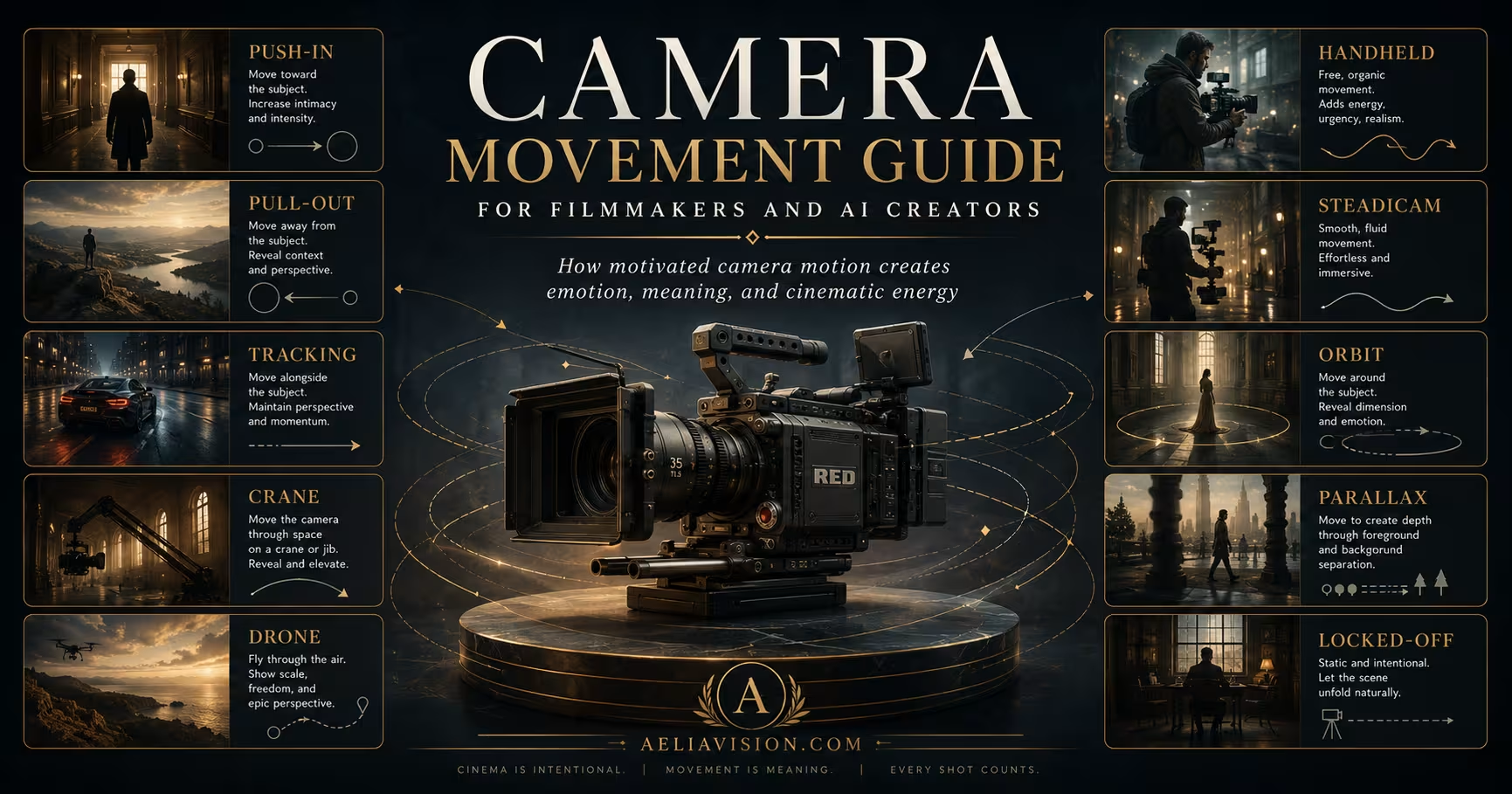
The story in brief
Use this camera movement guide to plan push-ins, tracking shots, pans, cranes, handheld work, dolly zooms, and motivated AI video prompts with continuity.
Inside this story
How motivated camera motion creates emotion, meaning, and cinematic energy
Table of contents
Camera movement is one of the most powerful tools in cinematic storytelling. It can pull the audience into a character’s mind, reveal a hidden world, increase tension, create elegance, express chaos, or make a scene feel uncomfortable by refusing to move at all. Movement changes the audience’s relationship to the scene. It decides whether we feel close, distant, stable, unstable, objective, trapped, curious, overwhelmed, or emotionally involved.
But camera movement should never be decoration.
A moving camera is not automatically cinematic. A random orbit, a slow push-in, a drone reveal, or a handheld chase can look impressive for a few seconds, but if the movement has no story reason, it quickly becomes empty style. The strongest camera movement is motivated. It moves because something in the story, character, space, rhythm, or emotion demands movement.
Before choosing a move, ask, “Why should the camera move right now?”
For filmmakers, this means designing motion around blocking, performance, lens choice, rhythm, and emotional change. For AI cinematic creators, it means writing prompts that explain the movement, its motivation and speed, what must remain stable, and the intended emotional effect.
This guide explains the most important cinematic camera movements, including push-in, pull-out, dolly, tracking, crane, drone, handheld, Steadicam, gimbal, orbit, parallax, pan, tilt, whip pan, rack focus, dolly zoom, long take, and locked-off shots. More importantly, it explains movement motivation: the storytelling reason behind the motion.
Why camera movement matters
Camera movement changes the audience’s psychological relationship to a scene. A camera that slowly moves toward a face tells the viewer to pay closer attention. A camera that pulls away from a character can make them feel abandoned by the world. A handheld camera can make a chase feel unstable and immediate. A smooth Steadicam shot can make movement feel graceful, dreamlike, or eerie. A locked-off shot can create tension precisely because the camera refuses to help the viewer escape.
Movement controls emotional distance. When the camera moves closer, the audience often feels more connected, pressured, or trapped. When the camera moves away, the audience may feel distance, loneliness, release, or revelation. When the camera follows a character, the viewer shares their journey. When the camera floats above them, the character may feel small inside a larger system. When the camera stays still, the frame can feel objective, formal, calm, or deeply unsettling.
Good camera movement usually answers at least one story question.
| Motivation Question | What the Movement Can Express |
|---|---|
| What changed emotionally? | A realization, fear, attraction, doubt, grief, or decision |
| What changed spatially? | A reveal, entrance, exit, discovery, or new geography |
| Who has power? | Dominance, vulnerability, pursuit, control, or loss of control |
| What should the viewer notice? | A face, object, clue, threat, background detail, or relationship |
| Should the audience feel stable or unstable? | Calm, panic, realism, dream state, confusion, or danger |
| Should we observe or participate? | Objective distance, subjective POV, immersion, or voyeurism |
A camera move becomes cinematic when it has a reason. Without motivation, movement becomes noise.
The core rule: movement must be motivated
Motivated camera movement means the camera moves because the story needs it to move. The motivation may come from character action, emotional change, spatial discovery, visual rhythm, power dynamics, or audience attention.
A push-in may be motivated by a character realizing the truth. A pull-out may be motivated by the discovery that the character is alone in a huge environment. A tracking shot may be motivated by a character moving through a dangerous space. A crane shot may be motivated by the need to reveal scale. A handheld shot may be motivated by panic, urgency, or documentary realism.
Unmotivated movement happens when the camera moves only to make the shot look expensive. This is especially common in AI video, where models often add random orbiting, floating, drifting, or zooming even when the scene should remain still. A good cinematic prompt should therefore include movement motivation.
Weak prompt:
Cinematic shot of a woman in a dark room, camera moves slowly, dramatic lighting.
Stronger prompt:
6-second slow dolly-in toward a woman sitting alone in a dark room as she realizes someone has been watching her. The camera moves closer to increase psychological pressure. She remains still, only her eyes shift toward the doorway in the final second. Soft practical lamp light, shallow depth of field, no random orbit, no sudden zoom, no face warping.
The second prompt is stronger because the movement has a purpose, emotional direction, subject behavior, and continuity constraints. It does not only ask for motion. It tells the AI why the motion exists.
Quick reference: camera movements and emotional meaning
This table is a starting point. The meaning of a camera movement changes depending on lens choice, speed, shot size, blocking, lighting, genre, and performance.
| Movement | Emotional Effect | Best Used For |
|---|---|---|
| Push-In / Dolly-In | Intimacy, pressure, realization, rising tension | Emotional discovery, confession, threat, decision |
| Pull-Out / Dolly-Out | Isolation, reveal, loss, emotional distance | Loneliness, context reveal, defeat, ending moments |
| Tracking Shot | Momentum, journey, immersion, pursuit | Walk-and-talks, action, exploration, process |
| Crane / Jib | Scale, elevation, destiny, grandeur, vulnerability | Epic reveals, large spaces, ceremonies, transitions |
| Drone | Geography, freedom, spectacle, distance | Landscapes, city reveals, travel, war scale |
| Handheld | Urgency, panic, realism, instability | Action, horror, documentary, emotional chaos |
| Steadicam / Gimbal | Grace, fluidity, controlled immersion | Long takes, walk-throughs, dance, elegant pursuit |
| Orbit / Arc Shot | Energy, transformation, subject importance | Hero moments, romance, music videos, power shifts |
| Parallax Move | Depth, spatial richness, motion energy | Side tracking, product shots, character movement |
| Pan | Attention shift, observation, reveal | Following action, reveals, scanning a space |
| Tilt | Vertical discovery, scale, hierarchy | Revealing height, monsters, buildings, bodies |
| Whip Pan | Shock, speed, surprise, comedy timing | Action transitions, reveals, jokes, sudden threats |
| Rack Focus | Attention shift, realization, visual clue | Revealing objects, changing emotional focus |
| Dolly Zoom | Disorientation, shock, psychological collapse | Fear, vertigo, trauma, major realization |
| Locked-Off Shot | Stillness, objectivity, tension, helplessness | Drama, horror, formal scenes, emotional distance |
| Long Take | Immersion, realism, choreography, tension | Complex action, drama, process, real-time scenes |
Push-in / dolly-in
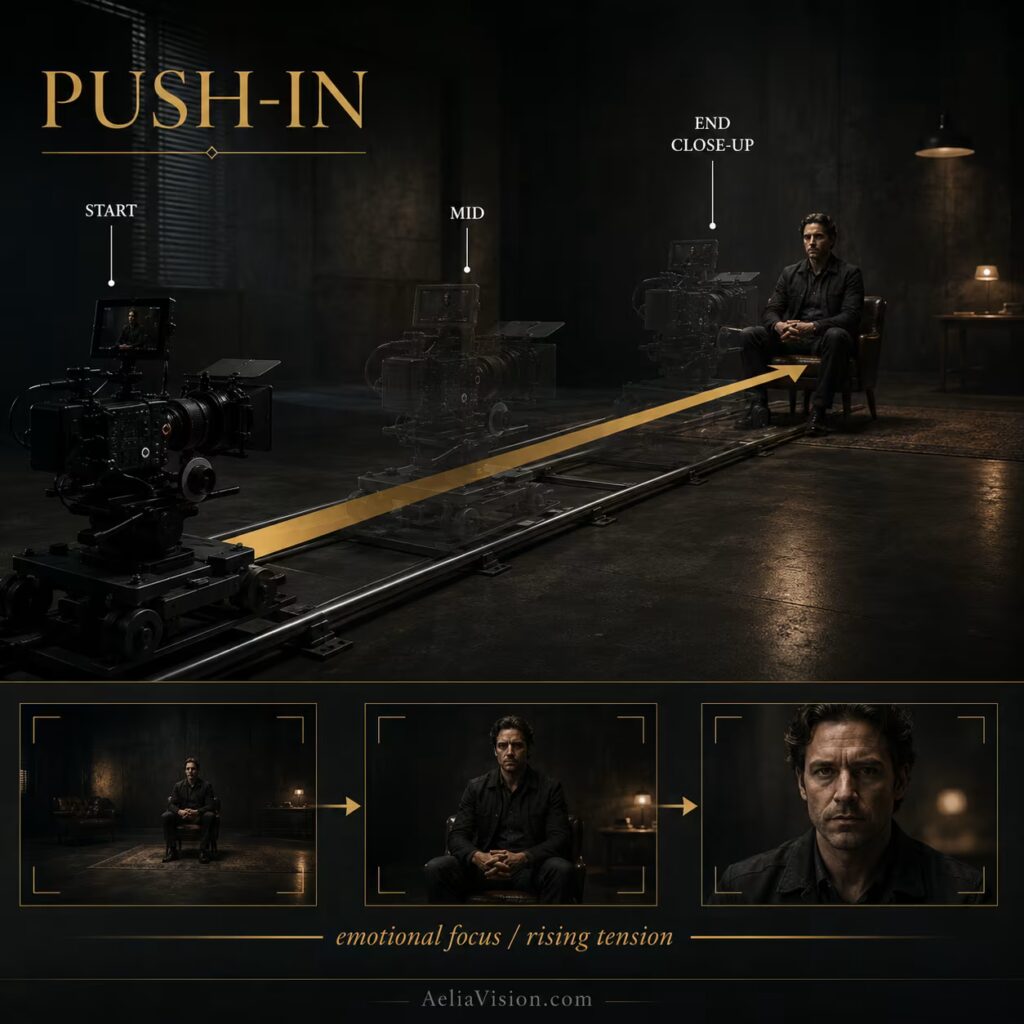
What is a push-in?
A push-in, also called a dolly-in, moves the camera physically closer to the subject. Unlike a zoom, which changes focal length from a fixed position, a push-in changes the camera’s position in space. This makes the viewer feel as if they are physically moving closer to the character, object, or moment.
A push-in can be subtle and almost invisible, or it can be dramatic and obvious. The slower the move, the more it often feels like psychological pressure building beneath the surface. It is one of the most effective movements for directing attention because it narrows the audience’s emotional focus without needing dialogue.
Emotional meaning
A push-in usually creates intimacy, focus, importance, pressure, or realization. It tells the audience, “This matters. Look closer.”
When used on a face, a push-in can suggest that the character is realizing something, hiding something, or being emotionally cornered. When used on an object, it can turn that object into a clue, threat, symbol, or decision point. When used on a doorway, shadow, or empty chair, it can create suspense because the camera seems to be drawn toward danger.
A push-in is not only a camera move. It is an emotional narrowing of attention.
When to use a push-in
Use a push-in when the story moment becomes more intense. It works well for confessions, realizations, fear, suspicion, attraction, grief, shock, and moments where the audience must enter the character’s inner state.
If a detective notices a small blood mark on a clean floor, a slow push-in can make that detail feel dangerous. If a mother hears terrible news and tries not to react, a push-in can bring the viewer closer to the emotion she is suppressing. If a villain quietly understands they have lost control, a push-in can turn stillness into pressure.
Common mistakes
The most common mistake is using a push-in on moments that do not deserve emphasis. If everything gets a push-in, nothing feels important. Another mistake is making the move too fast, which can feel like a digital zoom rather than an emotional approach.
In AI video, push-ins often become unstable unless you clearly specify that the camera should physically dolly forward, not zoom digitally. You should also define the duration, the start frame, the end frame, and what must remain stable.
AI video prompt example
Prompt:
6-second slow dolly-in toward a detective sitting alone in a dim office as he realizes the case is personal, 50mm full-frame lens, camera moves physically closer from a medium shot to a tight close-up, soft practical desk lamp, shallow depth of field, movement motivated by realization, subject remains still except for a small eye movement in the final second.
Negative prompt:
No digital zoom, no random orbit, no camera shake, no face warping, no background melting, no focus hunting, no sudden speed change.
Pull-out / dolly-out
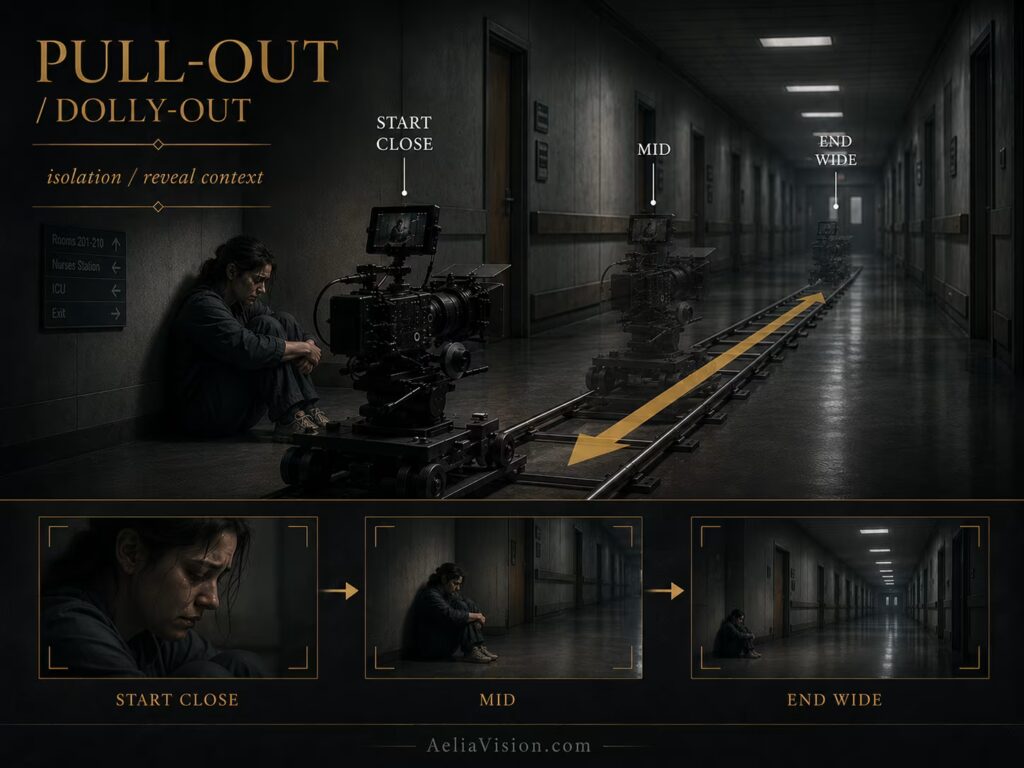
What is a pull-out?
A pull-out, also called a dolly-out, moves the camera physically away from the subject. It widens the emotional and spatial relationship between the viewer and the scene. If a push-in says “come closer,” a pull-out says “step back and see what surrounds this moment.”
This movement can reveal environment, expose vulnerability, release tension, or make a character feel smaller inside the world. It is especially useful when the emotional meaning of the shot depends on the space around the subject.
Emotional meaning
A pull-out often communicates isolation, revelation, loss, emotional distance, or context. It can make a character feel smaller as the environment grows around them. It can also reveal new information: a crowd, an empty room, a battlefield, a city, a body on the floor, or the scale of destruction.
Pull-outs are especially powerful at the end of scenes because they can emotionally release the viewer while leaving the character behind. The audience is pulled away, but the character remains trapped in the situation.
When to use a pull-out
Use a pull-out when the environment needs to overtake the subject. A grieving person sitting in a hospital corridor may feel more alone as the camera pulls back. A soldier standing after battle may feel smaller as the camera reveals the destroyed landscape. A character who thought they were safe may become vulnerable when the camera pulls out to reveal someone watching from the shadows.
A pull-out can also change the meaning of a shot by revealing that the personal moment is part of something larger. One person crying in a room becomes a larger tragedy when the camera pulls back to reveal a crowd outside, an empty house, or a city in ruin.
Common mistakes
A pull-out can feel empty if it reveals nothing meaningful. The movement should either change the emotional relationship, reveal important context, or shift power from the character to the environment.
In AI video, specify that the subject should remain consistent as the camera pulls away. Without that constraint, models may shrink, morph, lose the character, distort the background, or make the camera feel like it is zooming instead of physically retreating.
AI video prompt example
Prompt:
8-second slow dolly-out from a close-up of a young woman sitting on a hospital floor, camera retreats to reveal a long empty corridor around her, 35mm lens, cold fluorescent light, large negative space increasing her isolation, movement motivated by loneliness and emotional collapse.
Negative prompt:
No sudden zoom-out, no subject morphing, no hallway warping, no extra people appearing, no unstable scale, no floating camera.
Dolly and tracking shots
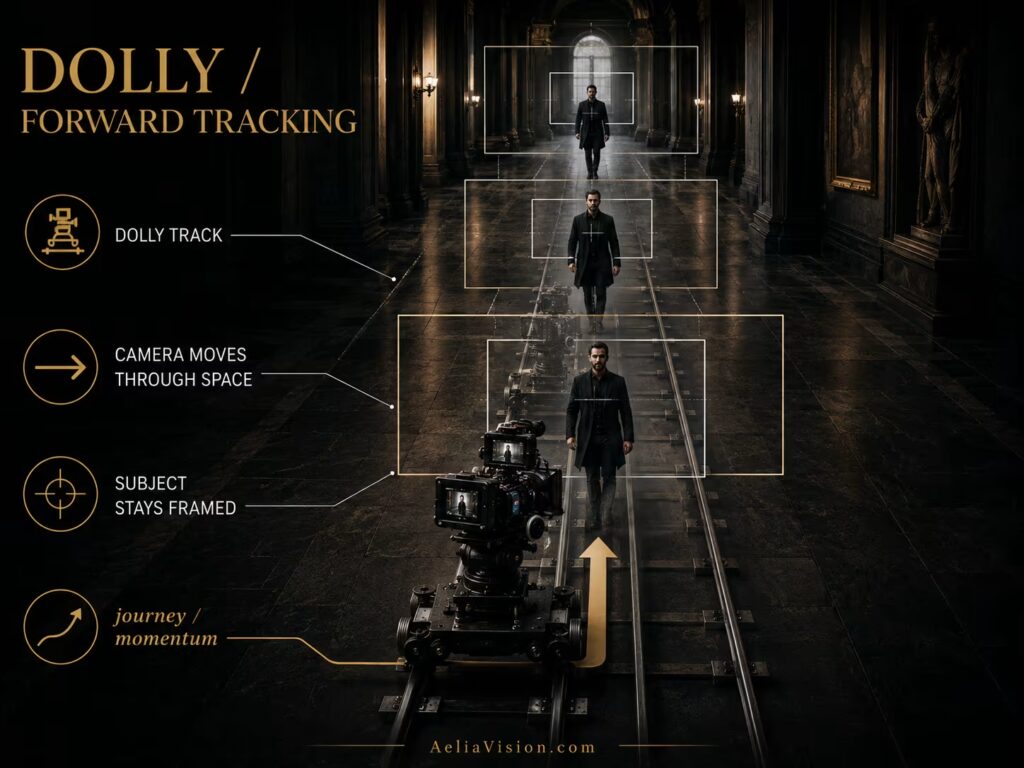
What is a dolly or tracking shot?
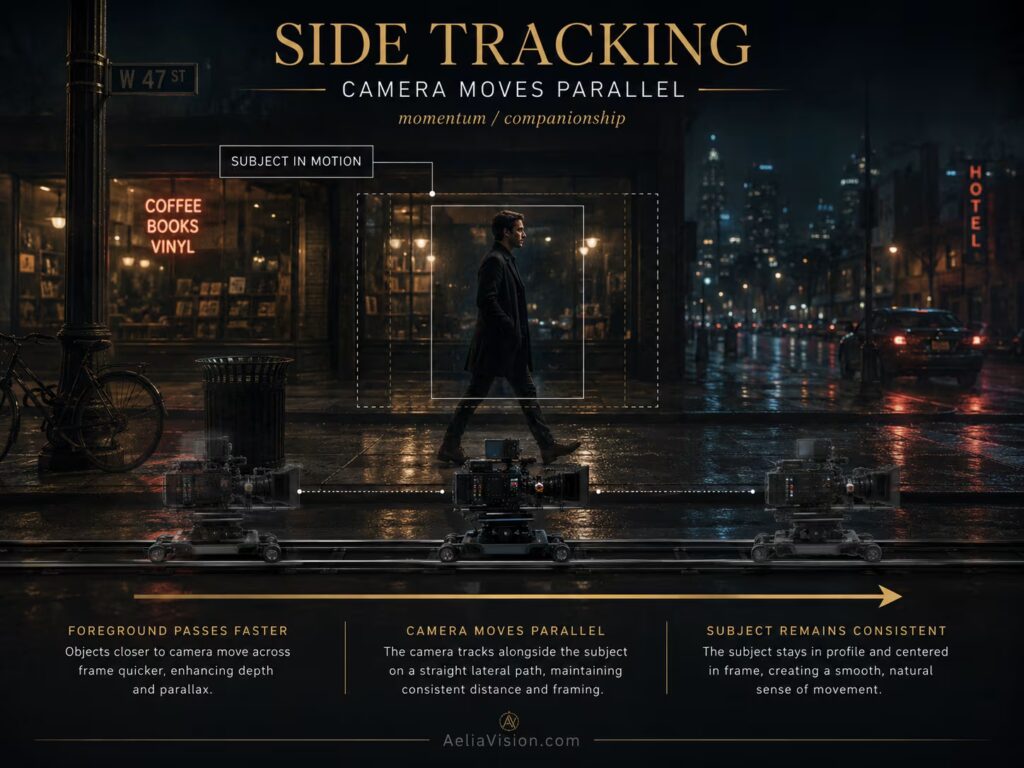
A dolly shot uses a camera platform, slider, wheels, or track system to move the camera smoothly through space. A tracking shot follows a subject or moves alongside action. The camera can move forward, backward, sideways, diagonally, or parallel to a character.
Tracking is one of the most practical movement types because it can follow a journey, reveal geography, or keep pace with a moving subject. It is not only a way to keep someone in frame. It is a way to turn movement through space into story.
Emotional meaning
Tracking shots create momentum. They tell the audience that the story is moving through space, not simply being observed from one position. A side tracking shot can feel elegant and composed. A forward tracking shot can feel exploratory or threatening. A backward tracking shot can feel like the viewer is being pulled through a scene by the character.
Tracking can also express relationship. If the camera walks beside a character, the viewer feels like a companion. If the camera follows behind, the viewer feels like an observer, witness, or pursuer. If the camera retreats as the character advances, the character may feel determined, dangerous, or emotionally unstoppable.
When to use a tracking shot
Use tracking when the subject is moving with purpose. It works well for walk-and-talks, investigations, process scenes, chases, battles, entrances, exits, and scenes where geography matters.
Tracking a chef through a busy kitchen can show environment, process, and character authority at the same time. Tracking a frightened child through a hallway can make the viewer feel trapped inside the journey. Tracking a leader through a workplace can show that the character understands and controls the space.
Common mistakes
The biggest mistake is tracking movement without a destination. The shot should have a beginning, development, and end beat. It should arrive somewhere emotionally or visually meaningful.
Another mistake is making the camera movement smoother or more dramatic than the scene requires. A legal office walk-and-talk may need controlled movement, while a war scene may need rougher energy. The texture of movement must match the emotional tone.
AI video prompt example
Prompt:
10-second side tracking shot following a chef moving through a busy restaurant kitchen, 28mm full-frame lens, smooth dolly movement parallel to the subject, foreground staff and steam passing in parallax, clear blocking, warm practical kitchen lights, movement motivated by process and professional control.
Negative prompt:
No random orbit, no floating camera, no subject drifting out of frame, no warped kitchen geometry, no inconsistent eyelines, no melted background.
Pan and tilt
What is a pan?
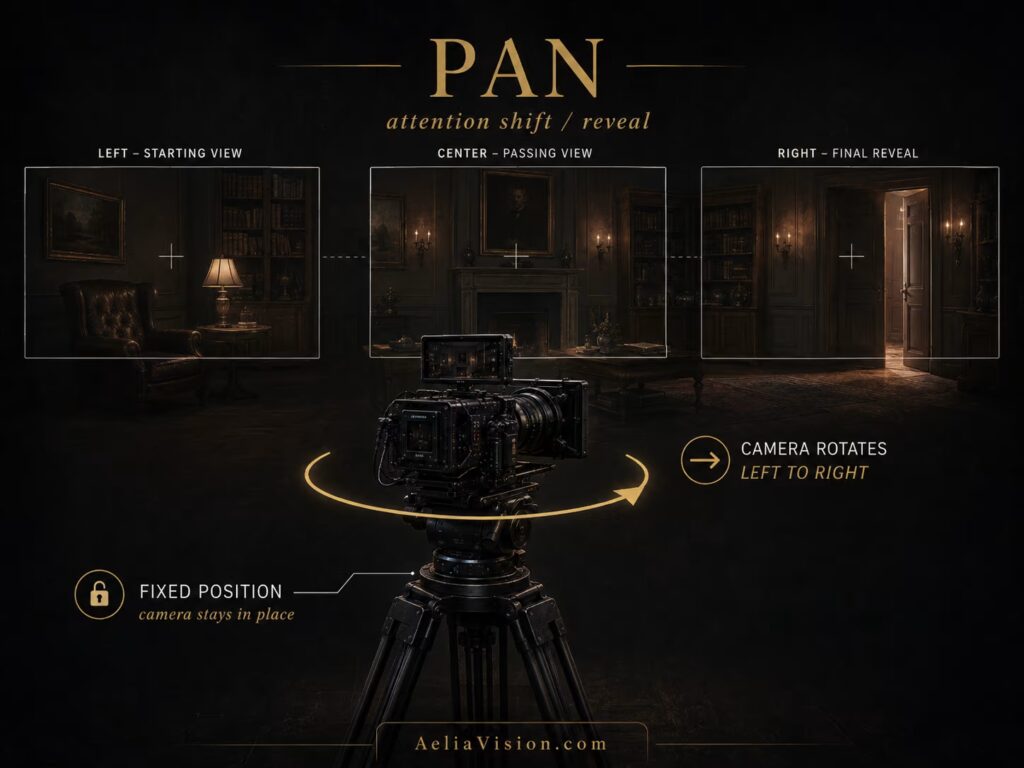
A pan rotates the camera horizontally from a fixed position. The camera does not travel through space; it turns left or right. A pan can follow a subject, reveal new information, scan an environment, or redirect attention.
What is a tilt?
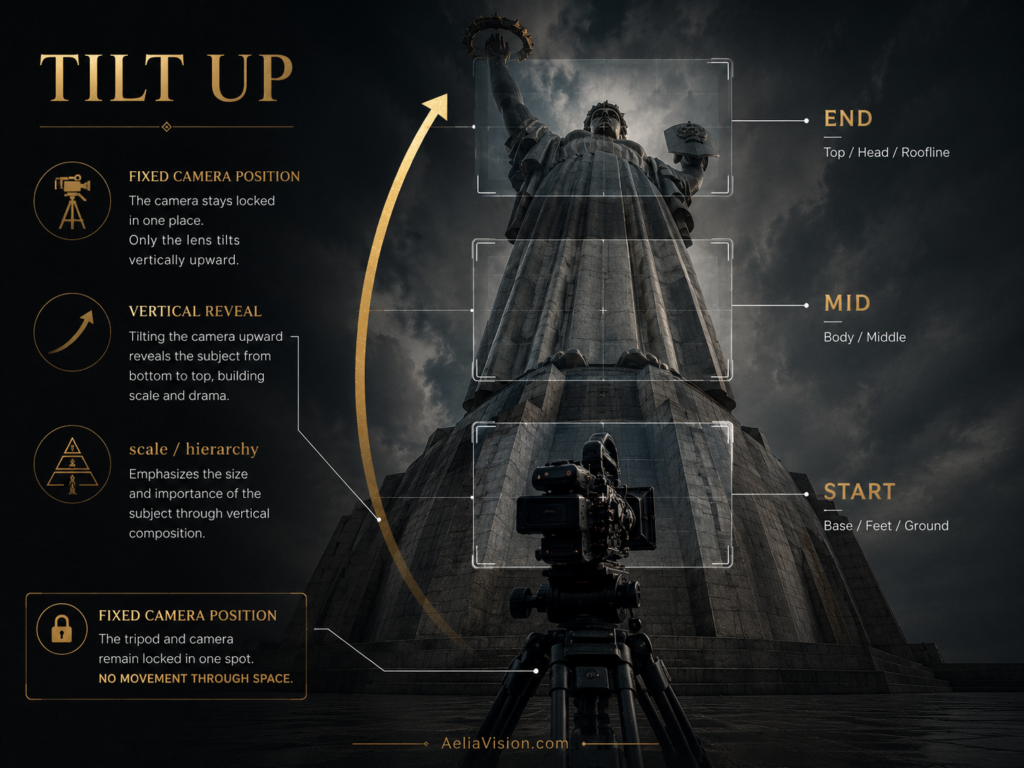
A tilt rotates the camera vertically from a fixed position. The camera looks up or down without physically moving. A tilt can reveal height, power, scale, threat, vulnerability, or vertical relationship.
Emotional meaning
Pans often feel observational. They can suggest curiosity, search, reaction, or discovery. A slow pan across an empty room can build suspense because the viewer waits for something to appear. A fast pan can feel reactive, as if the camera has suddenly noticed something.
Tilts often communicate hierarchy and scale. Tilting up a skyscraper, monster, statue, or ruler can make the subject feel powerful. Tilting down from a ceiling to a small character can make them feel vulnerable inside a larger space. A tilt can also connect two vertical story elements: a hand to a face, a body to a weapon, a tower to a person, or a sky to a battlefield.
When to use pan and tilt
Use a pan when the viewer’s attention needs to shift from one subject to another. Use a tilt when the scene contains vertical information that matters: a tower, a body, a staircase, a weapon, a monster, a divine figure, or a character looking up or down.
The movement should land on something meaningful. A pan that reveals a hidden figure, a tilt that reveals the size of a statue, or a downward tilt that discovers a body on the floor all create narrative value.
Common mistakes
Pans and tilts often fail when they are too slow to feel motivated or too fast to read clearly. They also feel weak when they reveal nothing important. The end of the move should land on a meaningful subject, object, or composition.
In AI video, pans and tilts can easily become random drifting. The prompt should specify direction, duration, start frame, end frame, and the subject the camera must land on.
AI video prompt example
Prompt:
5-second slow pan from left to right across an abandoned bedroom, 35mm lens, camera locked on tripod, movement reveals a cracked mirror and finally stops on a half-open closet door, suspenseful horror mood, movement motivated by searching the room.
Negative prompt:
No random camera drift, no shaky pan, no overshooting the closet door, no new objects appearing, no exposure flicker.
Crane and jib movement
What is a crane or jib shot?
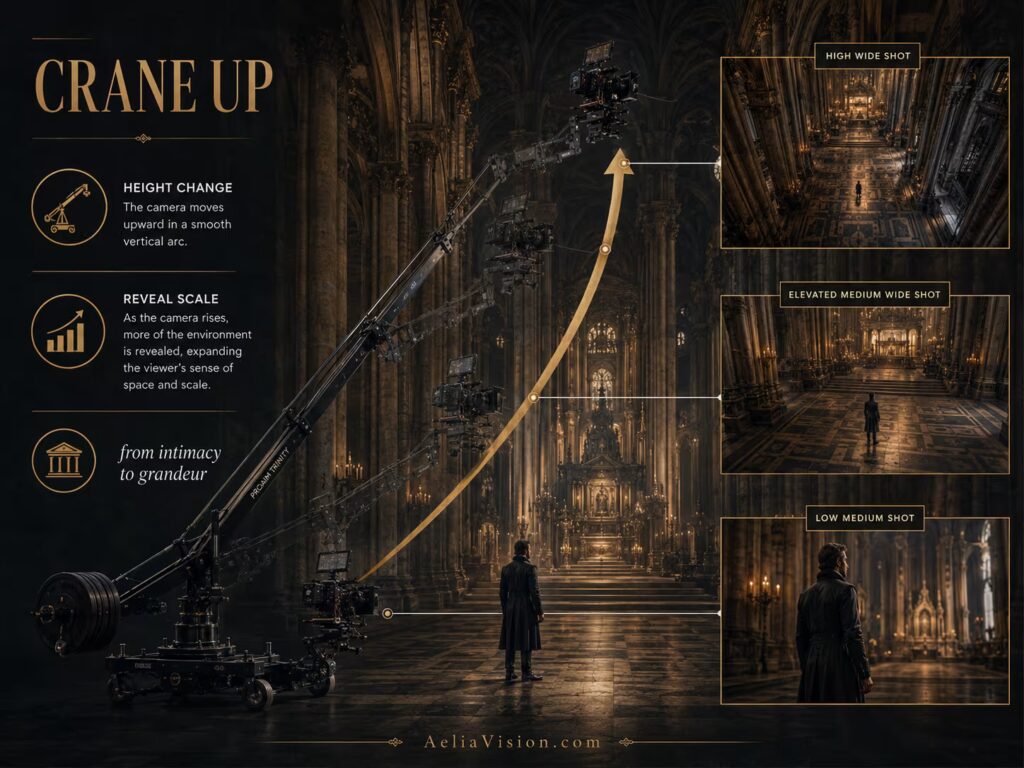
A crane or jib places the camera on an arm that can move vertically and often arc through space. This allows the camera to rise, descend, sweep, or shift perspective in a way that feels larger than human movement.
A crane can start close to the ground and rise above a crowd, or begin high and descend into a personal moment. It can reveal scale, change power relationships, or transition between emotional states. Because a crane changes height, it can change the viewer’s relationship to the subject more dramatically than a simple pan or dolly.
Emotional meaning
Crane movement often communicates grandeur, destiny, elevation, freedom, vulnerability, or revelation. A rising crane can make the world feel larger and more majestic. A descending crane can move from godlike distance into human intimacy. A crane that rises away from a character can make them feel small inside a massive environment.
The emotional meaning depends on direction. Moving upward can suggest transcendence, discovery, escape, or scale. Moving downward can suggest judgment, fate, intrusion, or arrival. A crane that begins close and rises wide can shift power from the individual to the environment. A crane that descends from a wide view into a face can shift power from the world back to the person.
When to use crane movement
Use a crane when height change is emotionally meaningful. It works well for epic reveals, battlefields, ceremonies, crowds, kingdoms, cathedrals, dance scenes, and transitions from intimate to large-scale storytelling.
A crane starting behind a grieving king and rising to reveal thousands of soldiers below can shift the scene from private grief to national consequence. A crane descending from a city skyline into one apartment window can move the audience from world-scale context into human-scale drama.
Common mistakes
Crane shots can become empty spectacle if the reveal is not meaningful. A crane should not rise only to show off production value. It should reveal scale, power, danger, geography, or emotional contrast.
In AI video, crane shots often become drone-like floating unless the prompt specifies a controlled vertical rise or descent. The subject must remain anchored in the frame, and the architecture or environment should remain stable.
AI video prompt example
Prompt:
10-second slow crane-up shot behind a young queen standing on a palace balcony, 24mm lens, camera rises from shoulder height to reveal thousands of soldiers in the courtyard below, sunrise haze, movement motivated by the reveal of responsibility and scale, queen remains foreground anchor.
Negative prompt:
No drone wobble, no random orbit, no floating camera, no warped architecture, no changing costume, no sudden zoom, no unstable crowd.
Drone movement
What is a drone shot?
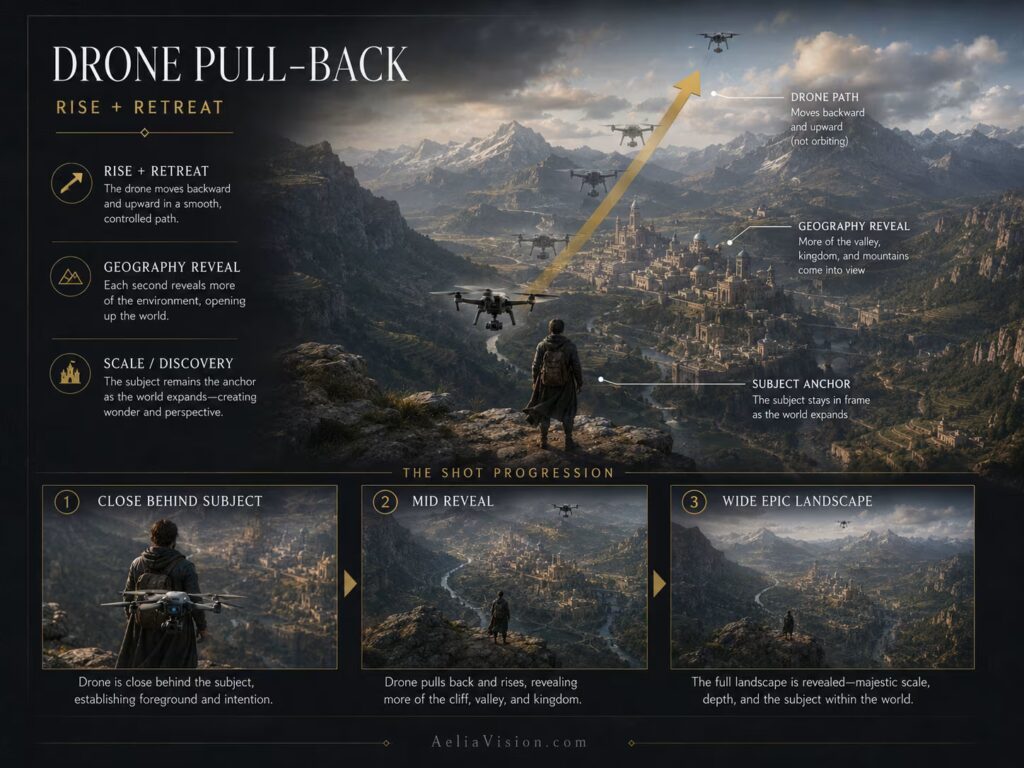
A drone shot uses a flying camera to move through open space, often outdoors. It can rise, descend, push forward, pull back, orbit, follow, or reveal geography from above. Drone shots are powerful because they can show locations from a perspective that feels impossible for a human body.
Drone movement is often associated with scale, travel, geography, freedom, and spectacle. However, it can also feel detached, lonely, or surveillance-like depending on height, speed, and distance.
Emotional meaning
Drone movement can communicate freedom, scale, isolation, spectacle, geography, surveillance, or distance. A rising drone shot can make a landscape feel epic. A drone pulling away from a character can make them feel tiny in the world. A drone following a car can create energy and speed. A top-down drone shot can feel detached, strategic, or observational.
The same drone movement can feel inspiring or lonely depending on context. A drone rising above a mountain traveler may feel adventurous. A drone rising above a refugee camp, battlefield, or empty road may feel tragic.
When to use drone movement
Use drone shots when geography matters. They are excellent for mountains, coastlines, cities, deserts, battlefields, roads, forests, large buildings, and travel sequences. Drone shots also work well for establishing a location before moving into character-level coverage.
A drone reveal should tell the viewer something useful: where we are, how large the world is, how isolated a character is, where danger is located, or how different spaces connect.
Common mistakes
The biggest mistake is using drone footage only because it looks beautiful. A drone reveal should not be a random postcard. It should reveal geography, scale, isolation, danger, or destination.
In AI video, avoid vague phrases like “cinematic drone shot” without direction. Specify movement path, altitude change, subject position, lens feeling, and reveal.
AI video prompt example
Prompt:
12-second drone pull-back from a lone traveler standing on a cliff, camera begins close behind the character and slowly retreats upward to reveal a massive valley kingdom below, 18mm wide lens, morning mist, movement motivated by discovery and epic scale.
Negative prompt:
No spinning drone orbit, no rollercoaster movement, no warped mountains, no disappearing subject, no unstable horizon, no fake miniature look.
Handheld camera movement
What is handheld movement?
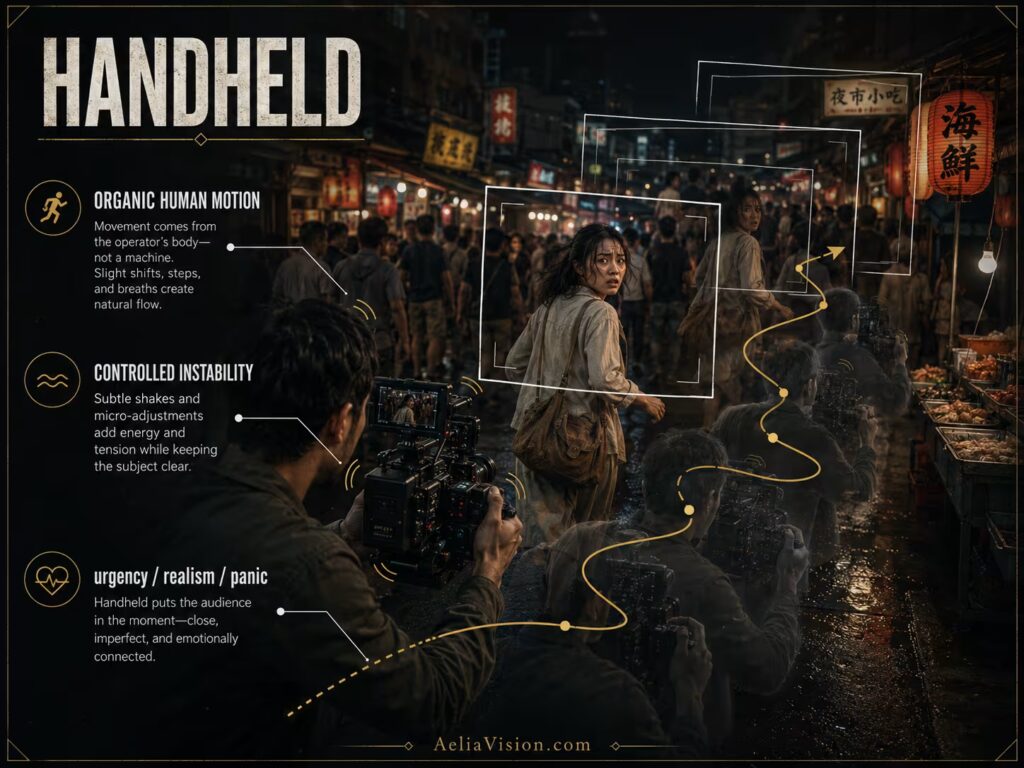
Handheld movement happens when the camera is physically held by the operator, usually by hand, shoulder, or compact rig. It introduces organic instability, human reaction, and imperfect motion.
Handheld can be rough and chaotic, or subtle and almost invisible. The emotional result depends on how much instability is used. A barely moving handheld camera can create human vulnerability. A violent handheld camera can create panic and chaos.
Emotional meaning
Handheld movement often communicates urgency, realism, panic, vulnerability, danger, or documentary immediacy. It makes the camera feel present inside the event instead of observing from a controlled distance.
In action, handheld can make the viewer feel thrown into chaos. In horror, it can make the viewer feel unsafe. In drama, a very subtle handheld drift can make emotion feel raw and human. In documentary-style scenes, handheld can make the moment feel found, immediate, and unscripted.
When to use handheld
Use handheld when the scene should feel unstable, immediate, physical, or emotionally exposed. It works well for chases, fights, war scenes, emergency situations, documentary-style realism, found footage, panic, and intimate emotional breakdowns.
Following a character through a crowded protest with handheld movement can make the viewer feel pushed and trapped inside the crowd. Holding close on a grieving person with subtle handheld drift can make the frame feel emotionally fragile.
Common mistakes
Too much shake can make the image unreadable and unpleasant. Random shaking without emotional purpose feels amateur. Handheld should still be controlled by intention. The camera may feel unstable, but the audience must still understand the subject, direction, and story.
In AI video, handheld often becomes jittery or glitchy. Prompt it as “controlled handheld,” “subtle shoulder movement,” or “natural footstep bob,” and specify that the subject must remain readable.
AI video prompt example
Prompt:
8-second controlled handheld follow shot through a dense night market, 24mm lens, camera behind a frightened character moving quickly through the crowd, natural shoulder movement, urgent documentary realism, warm practical lights, movement motivated by panic and pursuit.
Negative prompt:
No chaotic jitter, no frame tearing, no subject disappearing, no random whip pans, no floating camera, no synthetic motion blur, no warped faces.
Steadicam and gimbal movement
What is Steadicam or gimbal movement?
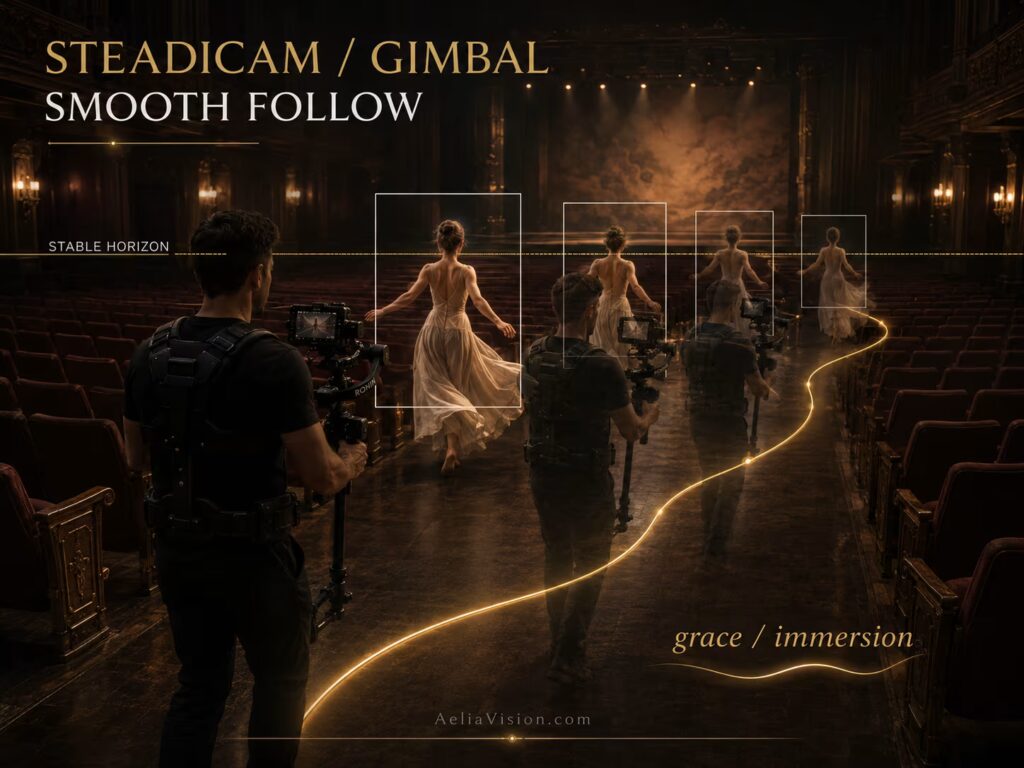
Steadicam and gimbal systems stabilize the camera while allowing it to move freely through space. Unlike handheld, the motion is smooth. Unlike a dolly, it is not limited to tracks. The camera can follow, circle, weave, enter rooms, pass through doors, and stay close to moving characters.
This type of movement creates the feeling of a camera that is alive but controlled. It can follow human movement while removing the roughness of handheld instability.
Emotional meaning
Steadicam and gimbal movement often feel graceful, fluid, immersive, polished, or dreamlike. The camera feels like it is gliding through the scene. This movement can be comforting, elegant, romantic, eerie, or suspenseful depending on speed, lens, lighting, and blocking.
A smooth floating camera through a hotel hallway can feel deeply unsettling because the movement is too calm for the danger it suggests. A smooth follow shot behind a dancer can feel lyrical and elegant. A gimbal move through a busy workspace can feel efficient, modern, and controlled.
When to use Steadicam or gimbal
Use Steadicam or gimbal movement for long takes, walk-and-talks, dance, music videos, elegant action, character entrances, immersive exploration, and scenes where the camera must follow complex blocking without visible shake.
It is especially useful when the movement should feel human but refined. The camera can travel with the subject while maintaining smoothness, stable framing, and visual elegance.
Common mistakes
Over-smoothing the movement can make the shot feel artificial or weightless. Not every scene should glide. A grief scene may need stillness. A panic scene may need handheld. A formal entrance may need smooth tracking. Choose the movement texture based on emotion.
In AI prompts, avoid vague “smooth cinematic camera” language. Say whether it is a Steadicam follow, gimbal walk-through, floating corridor move, or stabilized tracking shot.
AI video prompt example
Prompt:
12-second smooth Steadicam follow shot behind a young dancer walking through an empty theater, 35mm lens, camera glides at human height, passes through rows of seats, warm stage light ahead, movement motivated by quiet anticipation, stable horizon, graceful motion.
Negative prompt:
No handheld jitter, no floating drone feel, no random orbit, no sudden zoom, no focus hunting, no warped theater seats.
Orbit and arc shot
What is an orbit shot?
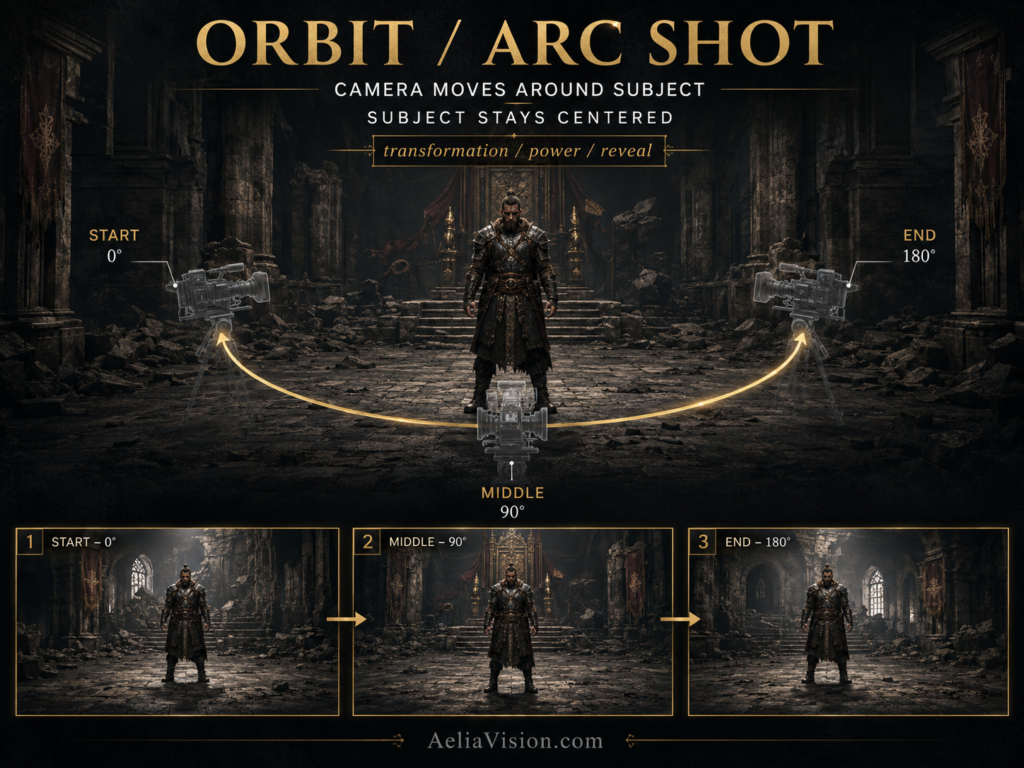
An orbit shot moves the camera around a subject in a circular or semi-circular path. It can be a full 360-degree move, a half-circle, or a subtle arc around the subject. The subject often remains near the center while the background changes around them.
An orbit is visually powerful because it changes the environment behind the subject while keeping the subject as the emotional anchor.
Emotional meaning
Orbit movement can communicate transformation, power, romance, confusion, energy, or revelation. It makes the subject feel important because the world appears to rotate around them. In a heroic context, an orbit can make a character feel central and iconic. In a psychological context, it can make the character feel trapped or overwhelmed.
The emotional meaning depends on speed and stability. A slow orbit can feel elegant, ceremonial, or romantic. A fast orbit can feel intense, unstable, or stylized.
When to use an orbit
Use orbit movement when the subject’s relationship to the surrounding world matters. It works well for hero reveals, romantic moments, music performances, magical transformations, product reveals, and psychological pressure.
Orbiting slowly around a character who has just accepted their fate can make the moment feel ceremonial and internal. Orbiting a product can reveal shape and material. Orbiting a character in a thriller can make the world feel unstable or suspicious.
Common mistakes
Orbit shots are often overused in AI video. A random orbit around a person standing still can feel like a default AI movement rather than a cinematic choice. Use orbit only when circular motion expresses transformation, importance, obsession, romance, power, or environmental reveal.
In AI video, orbit prompts must define the arc length, speed, direction, subject stability, and background continuity.
AI video prompt example
Prompt:
8-second slow 180-degree orbit around a warrior standing still in a ruined throne room, 35mm lens, camera arcs from front-left to front-right, background reveals broken banners and fallen crowns, movement motivated by the character accepting power, subject remains centered and stable.
Negative prompt:
No full random spin, no dizzy speed, no face morphing, no changing armor, no background melting, no unmotivated camera drift.
Parallax movement
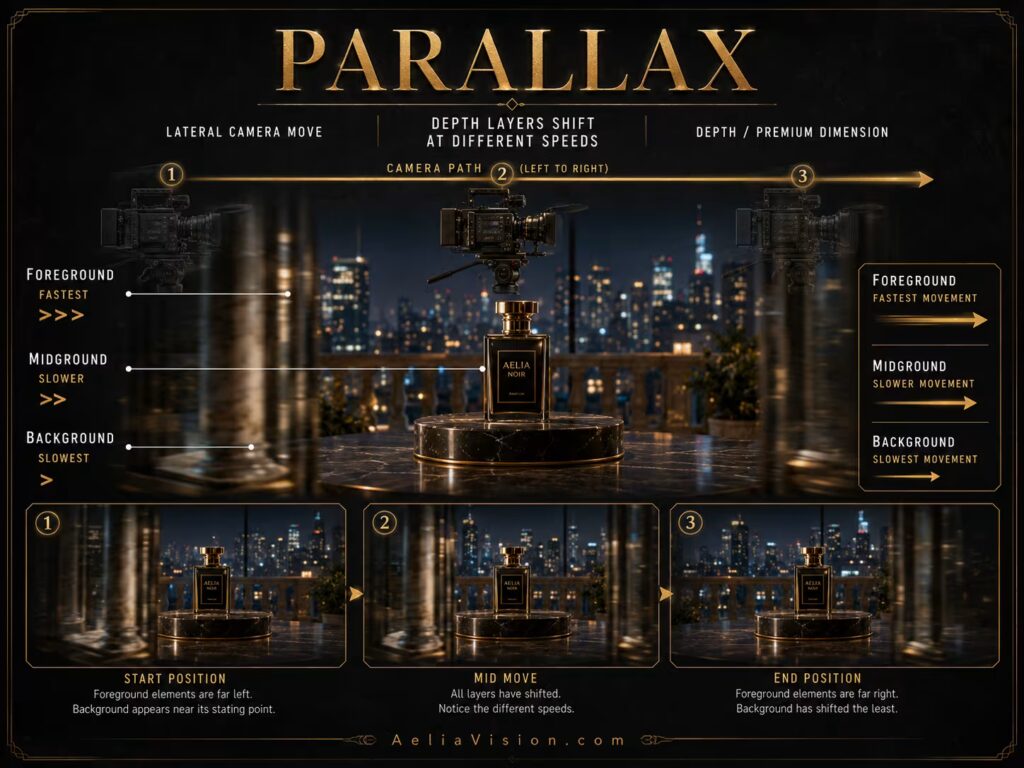
What is parallax movement?
Parallax happens when the camera moves laterally and foreground, midground, and background elements shift at different speeds. Close objects move quickly across the frame, while distant objects move slowly. This creates a strong sense of depth.
Parallax makes spatial layering visible. It allows the viewer to feel the distance between objects, subjects, and background planes.
Emotional meaning
Parallax adds depth, elegance, momentum, and dimensional realism. It can make a scene feel expensive, physical, and cinematic because the viewer senses the space between layers.
A subtle parallax move across foreground objects can make a product feel premium. A side-tracking parallax shot through a forest can make the world feel alive. A character walking while the background slides behind them can suggest emotional movement without needing dramatic action.
When to use parallax
Use parallax when you want to show depth, environment, or texture. It is excellent for side tracking, product shots, corridors, forests, markets, city streets, interiors with foreground objects, and scenes where the world should feel layered.
Parallax works best when the frame has clear foreground, midground, and background. Without those layers, lateral movement may feel flat.
Common mistakes
Parallax fails when the frame has no clear depth layers. If there is no foreground, midground, and background, the lateral movement has little to reveal. In AI video, parallax can also cause objects to warp, so prompts should specify stable geometry and clean depth layers.
AI video prompt example
Prompt:
6-second slow lateral parallax move across a luxury perfume bottle on a black marble table, 85mm macro lens, blurred foreground glass edge passes across frame, bottle remains sharp in midground, warm gold background highlights shift slowly, movement motivated by revealing product shape and premium texture.
Negative prompt:
No product warping, no label distortion, no floating bottle, no changing reflections, no unstable background, no fake smear blur.
Whip pan
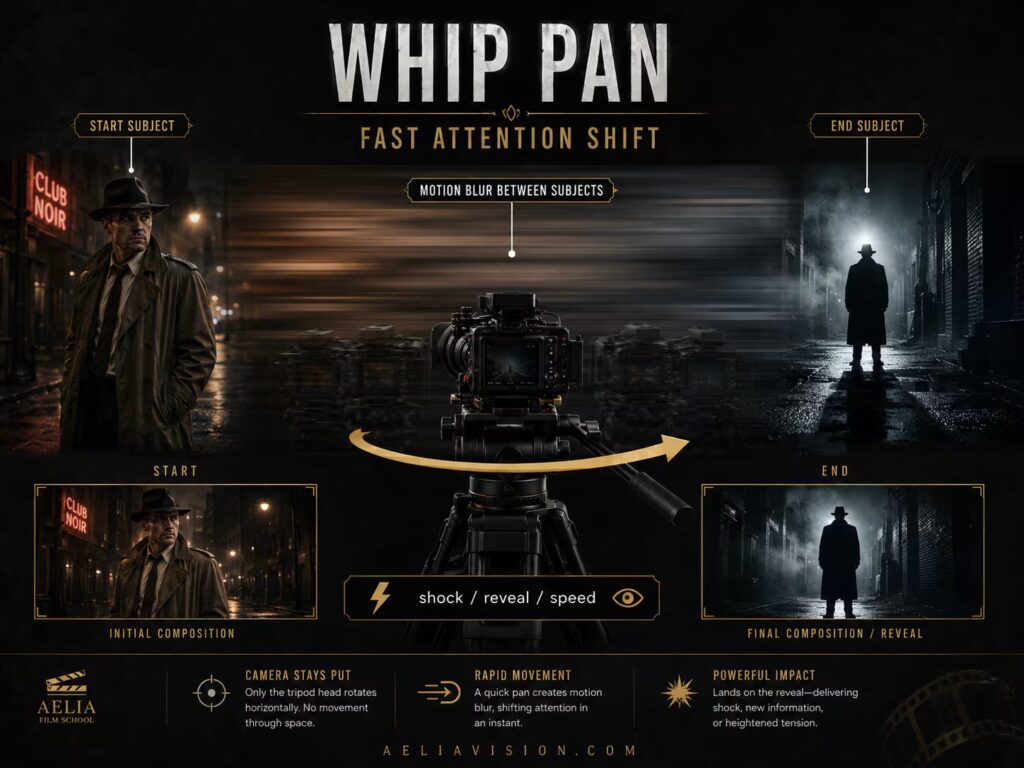
What is a whip pan?
A whip pan is a very fast pan, usually horizontal, that creates motion blur between two points. It can be used as a reveal, transition, reaction, or burst of energy. The audience does not study the middle of the move. They feel the speed and land on the new subject.
Whip pans are often used for sudden attention shifts. They can feel comedic, aggressive, shocking, or stylish depending on the scene.
Emotional meaning
Whip pans communicate surprise, urgency, shock, comedic timing, or sudden attention shift. They can feel like the camera is reacting quickly to something unexpected.
In comedy, a whip pan can reveal a joke. In action, it can shift from one threat to another. In horror, it can make the viewer feel startled by a sudden presence. In montage, it can connect two shots with energy.
When to use a whip pan
Use whip pans when the scene requires a fast change of attention. They work well for reveals, transitions, jokes, sudden danger, character reactions, and high-energy montage.
The key is the landing frame. A whip pan should arrive on something meaningful: a person, threat, joke, clue, or new location.
Common mistakes
A whip pan should be fast enough to feel intentional but not so messy that the landing frame is unreadable. The end frame matters. The move should land on a meaningful subject.
In AI video, whip pans are difficult because models can smear, morph, or lose continuity. Use short durations and strong constraints.
AI video prompt example
Prompt:
0.5-second whip pan to the right from a detective’s shocked face to a shadowy figure standing in the doorway, 24mm lens, fast horizontal motion blur, thriller reveal, camera lands sharply on the figure for one second after the pan.
Negative prompt:
No slow pan, no spinning camera, no morphing subject, no unreadable landing frame, no fade transition, no focus hunting.
Rack focus
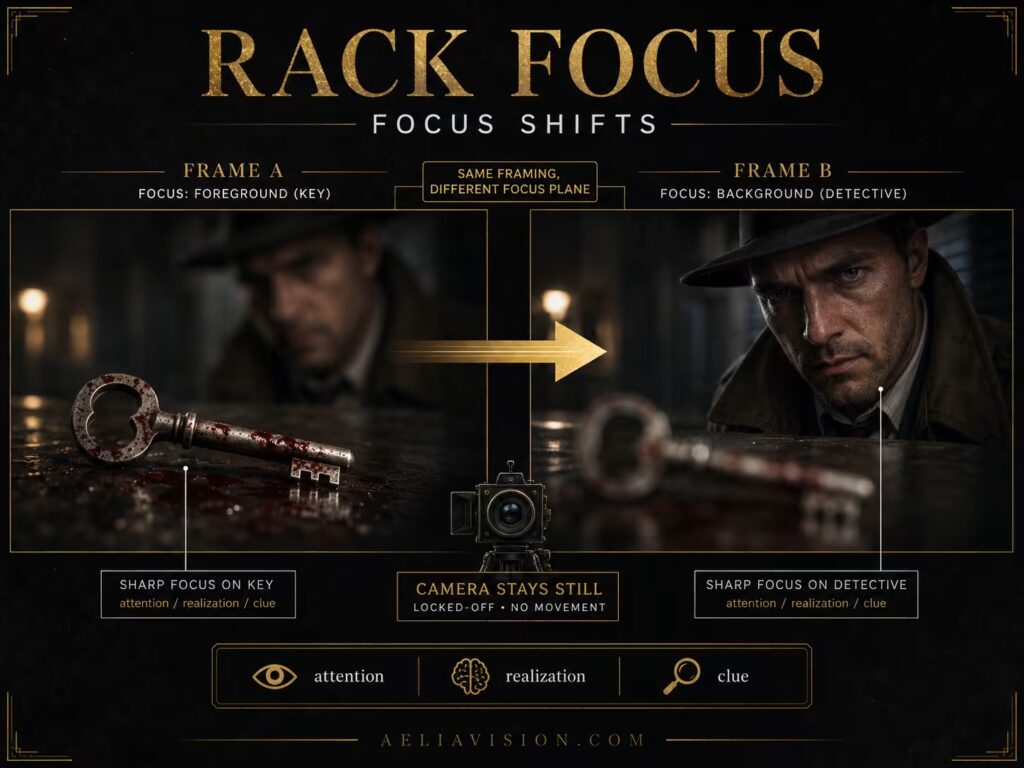
What is rack focus?
Rack focus is not a camera movement in the physical sense, but it functions like movement because it shifts the viewer’s attention inside the frame. The camera may remain still while focus moves from one subject or plane to another.
For example, the shot may begin focused on a gun in the foreground, then shift focus to the character’s eyes in the background. The camera does not move, but the audience’s attention moves.
Emotional meaning
Rack focus communicates realization, discovery, connection, suspicion, or a shift in importance. It lets the audience experience attention changing in real time.
It is especially useful when one object changes the meaning of another. A letter becomes important because we see the character’s reaction. A hidden person becomes threatening because focus moves from safety to danger. A product detail becomes premium because focus shifts from the surface texture to the full object.
When to use rack focus
Use rack focus when two visual elements are connected across depth. It works well for clues, weapons, faces, reactions, hidden threats, symbolic objects, and dialogue shifts.
A rack focus is strongest when both focus points matter. The viewer should understand the starting subject and the ending subject.
Common mistakes
Rack focus fails when the focus shift is too fast, too slow, or unclear. It also requires enough depth separation to be visible. If the foreground and background are too close together, the focus pull may not register emotionally.
In AI video, focus pulls often become unstable. Specify “smooth focus pull” and name the start and end focus points clearly.
AI video prompt example
Prompt:
5-second static shot on an 85mm lens, shallow depth of field, focus starts on a blood-stained key in the foreground, then smoothly racks focus to the detective’s eyes in the background as realization hits, no camera movement, only focus changes.
Negative prompt:
No focus jumping, no camera push-in, no object warping, no soft final focus, no extra keys, no face distortion.
Dolly zoom / Vertigo effect
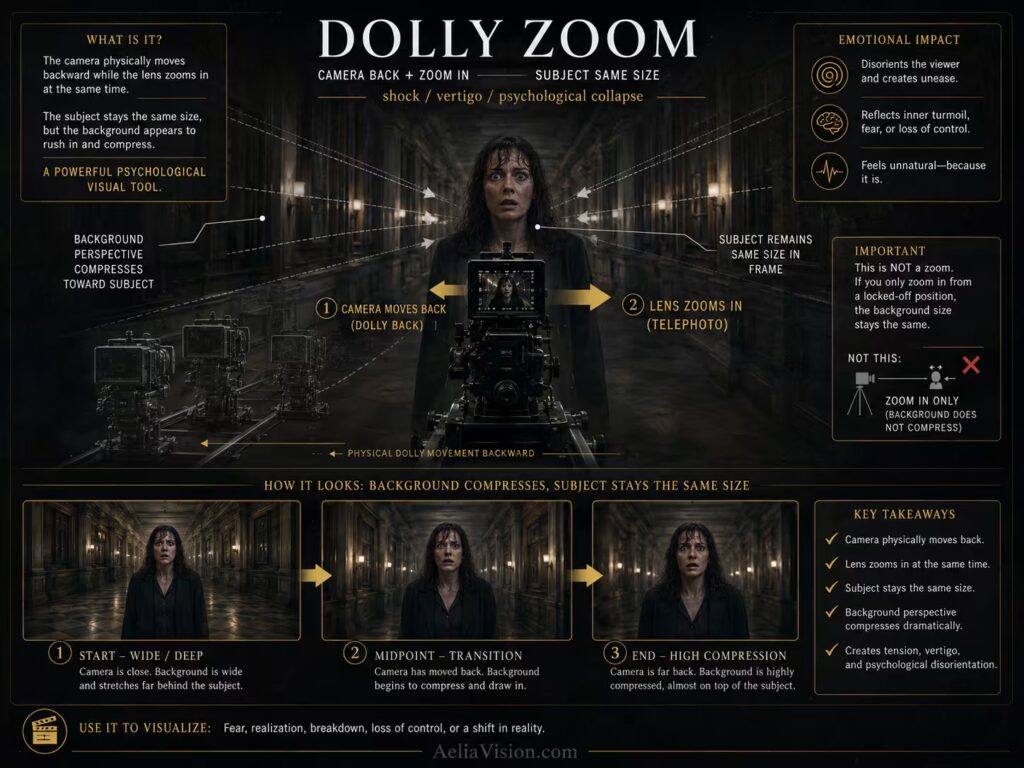
What is a dolly zoom?
A dolly zoom, also called the Vertigo effect, combines a dolly move with an opposite zoom. The subject stays roughly the same size in the frame while the background expands or compresses dramatically.
This creates an unnatural perspective shift. The world appears to move around the subject while the subject remains visually trapped in place.
Emotional meaning
The dolly zoom communicates shock, vertigo, dread, psychological collapse, or reality distortion. It makes the world appear to change around the subject while the subject remains trapped in the center of the experience.
This is why it is often used for traumatic realization, fear, or sudden awareness. It is one of the most noticeable camera effects, so it should be reserved for moments that deserve that level of visual intensity.
When to use a dolly zoom
Use dolly zoom sparingly. It is a very noticeable effect and should be reserved for major emotional or psychological moments. If used too often, it becomes a gimmick.
It works well when the character’s world metaphorically collapses, expands, rushes toward them, or becomes psychologically unstable.
Common mistakes
The dolly and zoom must be synchronized. If the subject changes size too much, the effect breaks. If the movement lasts too long, it may become distracting rather than powerful.
In AI video, this effect can easily create warped backgrounds, so the prompt must be very specific. State that the subject remains the same size while the background compresses or expands.
AI video prompt example
Prompt:
3-second dolly zoom on a terrified man standing on a beach, 70mm lens, camera dollies backward while zooming in so the subject remains the same size, background ocean and crowd compress toward him, psychological shock, realistic perspective shift.
Negative prompt:
No simple zoom, no shaky camera, no subject size change, no warped face, no broken horizon, no surreal melting unless intentional.
Locked-off shot
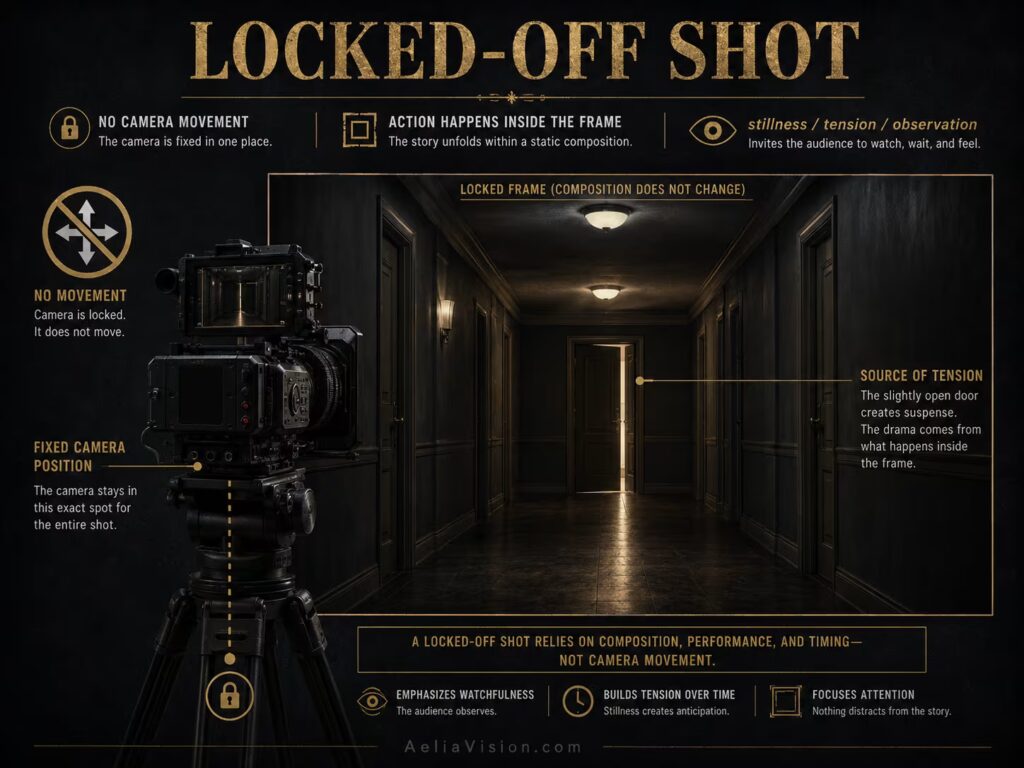
What is a locked-off shot?
A locked-off shot keeps the camera completely still. There is no pan, tilt, push, pull, shake, or drift. The camera is fixed on a tripod, dolly, or stable support.
A locked-off shot may seem simple, but it is one of the most powerful cinematic choices because it forces the viewer to sit with the frame. Instead of moving the camera to tell the audience what to feel, the shot lets blocking, performance, light, sound, and time create the emotion.
Emotional meaning
Locked-off shots communicate stillness, objectivity, tension, patience, formality, helplessness, or emotional distance. In some scenes, the lack of movement creates more pressure than movement would.
A static frame can make the viewer feel like a witness. In horror, it can make the audience scan the image for danger. In drama, it can make a painful moment feel unavoidable. In comedy, it can allow behavior and timing to play clearly.
When to use locked-off shots
Use locked-off shots when the scene should feel controlled, observational, tense, or honest. They work well for dialogue, formal compositions, slow dread, loneliness, surveillance, courtroom scenes, interviews, and moments where the actors’ movement inside the frame should carry the scene.
A locked-off frame can also be powerful when the audience wants the camera to move but it refuses. That refusal can create helplessness, dread, or emotional discipline.
Common mistakes
Static does not mean lazy. A locked-off frame needs strong composition, lighting, blocking, and timing. If nothing changes inside the frame, the shot may become dull. The movement can come from actors, light, weather, reflections, or sound rather than the camera.
In AI video, you must explicitly say “no camera movement,” because models often add slow drift or zoom even when a static shot is requested.
AI video prompt example
Prompt:
10-second locked-off static shot of a dark apartment hallway, 35mm lens, no camera movement, one flickering light at the far end, a door slowly opens in the background, horror tension, frame remains perfectly still.
Negative prompt:
No slow zoom, no camera drift, no handheld shake, no random pan, no focus hunting, no extra figures appearing.
Long take and choreographed movement
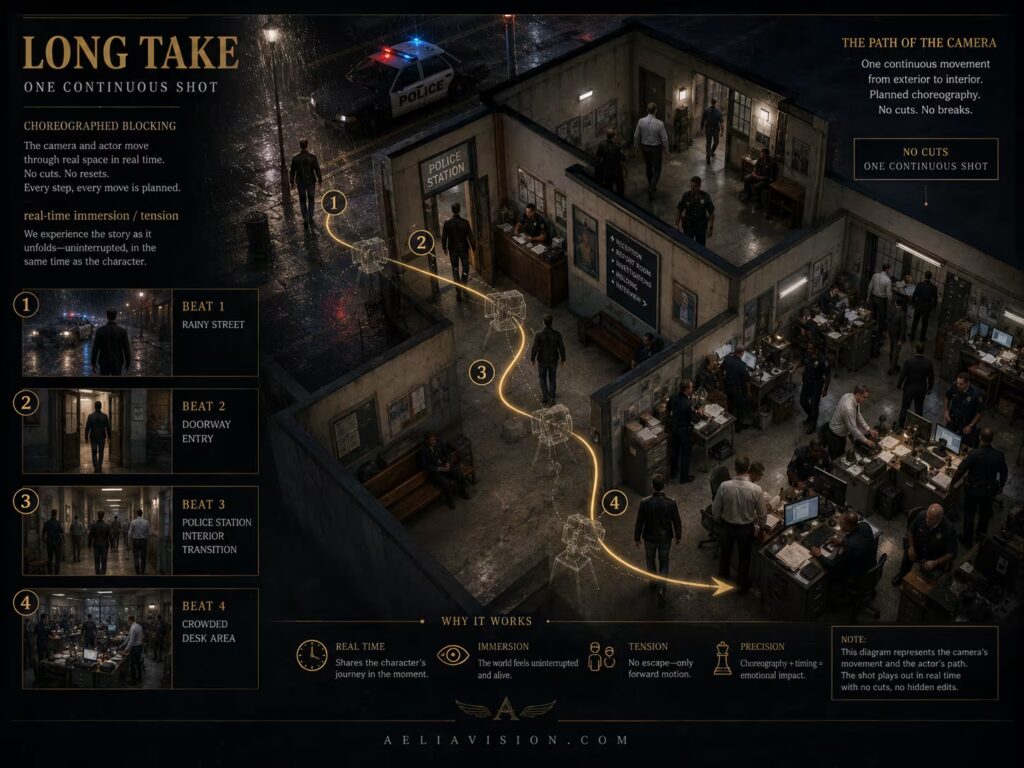
What is a long take?
A long take is an extended shot that continues without cutting. It may be static or moving, simple or carefully choreographed. When combined with camera movement, a long take can follow characters through multiple spaces, emotional beats, and power shifts.
A long take can feel invisible and natural, or it can be deliberately stylized. What matters is that the shot has internal progression. It should not simply last longer. It should evolve.
Emotional meaning
Long takes create immersion, realism, tension, and continuity. They make the audience feel that events are unfolding in real time. Because there are no cuts, the viewer cannot escape the moment.
A long take can feel elegant, stressful, documentary-like, theatrical, or technically impressive depending on how it is staged. In drama, it can preserve emotional continuity. In action, it can make danger feel immediate. In process scenes, it can make the viewer understand geography and behavior.
When to use a long take
Use a long take when the continuity of time and space matters. It works well for action scenes, walk-throughs, emotional confrontations, process scenes, investigations, ceremonies, and moments where the audience should feel trapped inside the duration.
The best long takes have rhythm. The frame changes because characters move, foreground objects pass, lighting changes, focus shifts, or the camera’s relationship to the subject evolves.
Common mistakes
A long take should not exist only to show technical skill. It needs internal rhythm. The blocking, performance, camera distance, foreground movement, background action, lighting cues, and focus changes must all create progression.
For AI video, true long takes are difficult. Break complex movement into shorter motivated segments if needed.
AI video prompt example
Prompt:
15-second continuous Steadicam long take following a detective from a rainy street into a crowded police station, 28mm lens, camera moves behind him through the doorway, then shifts beside him as officers cross foreground, movement motivated by entering a chaotic investigation, stable subject identity, realistic lighting transition from street to interior.
Negative prompt:
No cuts, no time jump, no face morphing, no background melting, no impossible camera path, no random orbit, no exposure flicker.
Zoom vs dolly
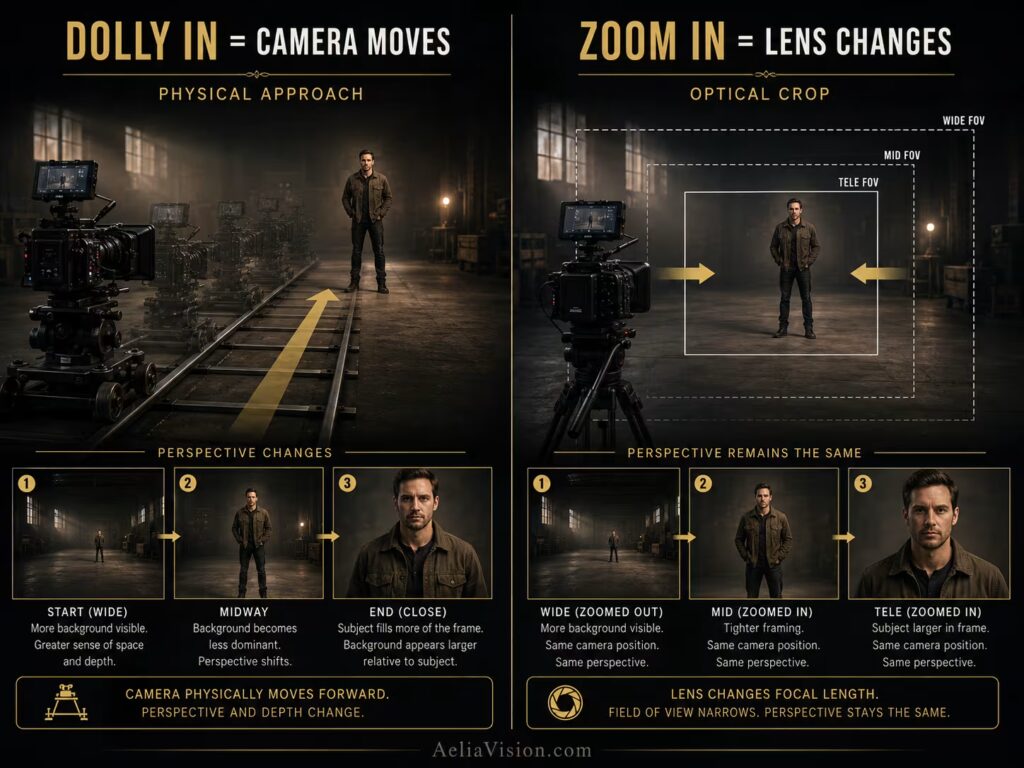
Zoom and dolly are often confused, but they create different feelings.
A zoom changes focal length while the camera stays in place. A dolly changes the camera’s physical position in space. A zoom feels more optical, observational, or stylized. A dolly feels more physical and spatial.
A slow zoom can feel documentary-like, voyeuristic, artificial, or intentionally stylized. A dolly-in feels like the viewer is physically moving closer. A zoom compresses or expands framing from a fixed viewpoint, while a dolly changes perspective because the camera is actually moving through the scene.
| Technique | Camera Position | Emotional Feeling |
|---|---|---|
| Zoom In | Camera stays still, lens narrows | Observational focus, surveillance, stylized attention |
| Dolly In | Camera physically moves closer | Intimacy, pressure, physical approach |
| Zoom Out | Camera stays still, lens widens | Revealing frame, optical distance |
| Dolly Out | Camera physically retreats | Isolation, release, spatial reveal |
For AI prompts, avoid using “zoom” when you mean “dolly.” Say “camera physically dollies forward” if you want spatial movement. Say “optical zoom-in from a fixed camera position” if you want a lens-based effect.
Choosing the right camera movement
Choosing camera movement begins with the emotional beat. Do not choose the move first. Choose the reason first.
| Story Need | Best Movement Choice |
|---|---|
| A character realizes something | Slow push-in or rack focus |
| A character feels abandoned | Pull-out or locked-off wide shot |
| The environment must be revealed | Crane, drone, pull-out, or tilt |
| The subject is being followed | Tracking, Steadicam, gimbal, or handheld |
| The scene needs panic | Handheld, whip pan, unstable tracking |
| The scene needs elegance | Steadicam, slow dolly, orbit, parallax |
| The world feels psychologically wrong | Dolly zoom, Dutch-tilted movement, unstable handheld |
| The audience must observe helplessly | Locked-off shot |
| A detail becomes important | Rack focus or push-in |
| A subject becomes iconic | Low-angle push-in, orbit, or crane reveal |
A useful decision formula is:
Emotion → Story Motivation → Subject Movement → Camera Movement → Lens → Speed → Stability → End Frame
The end frame is especially important. A camera move should land somewhere meaningful. If the final composition does not say anything new, the movement may not be needed.
AI camera movement prompt formula
For AI video, camera movement must be written with more precision than a still-image prompt. The model needs to know the movement type, duration, speed, direction, subject behavior, framing, lens, and stability rules.
| Prompt Element | Purpose |
|---|---|
| Duration | Defines the length of the shot |
| Movement Type | Push-in, pull-out, tracking, crane, handheld, orbit, etc. |
| Direction | Forward, backward, left, right, up, down, around |
| Speed | Slow, subtle, fast, sudden, gradual |
| Subject Behavior | What the character does or does not do |
| Lens | Wide, normal, telephoto, full-frame equivalent |
| Framing Change | Wide to close-up, close-up to wide, side tracking, etc. |
| Motivation | Why the camera moves emotionally |
| Continuity Rules | Preserve face, clothing, lighting, background, scale |
| Negative Constraints | No random orbit, no zoom, no warping, no drift |
AI prompt template
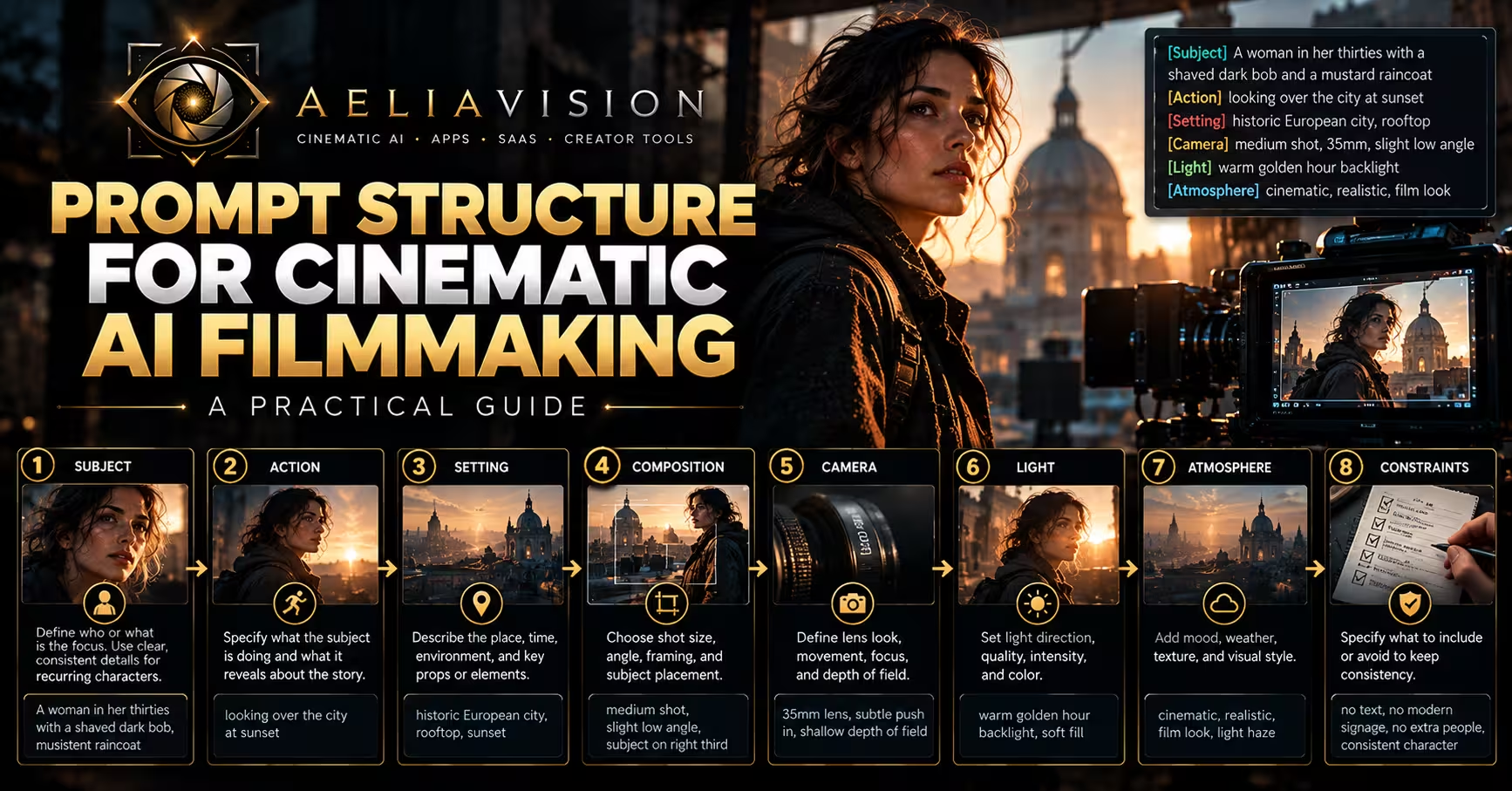
[Duration] [movement type] [direction] on [subject] during [story beat], [lens], [shot size/framing change], movement motivated by [emotion or story reason], [lighting and atmosphere], preserve [identity/costume/background/eyeline], no [common AI movement failures].
Example
6-second slow dolly-in toward a woman sitting alone in a dim room as she realizes someone is behind the door, 50mm full-frame lens, medium shot gradually tightening to close-up, movement motivated by rising fear, warm practical lamp on camera-left, preserve face identity, clothing, lighting direction, and room geometry, no random orbit, no digital zoom, no face warping, no background melting.
Common camera movement mistakes
Moving without motivation
The most common mistake is moving the camera because movement looks cinematic. If the movement does not reveal, emphasize, follow, isolate, transform, or intensify something, it probably should not be there.
Using the wrong movement texture
Smooth movement and rough movement create different emotions. A panic scene may feel weak if it is too polished. A luxury product scene may feel cheap if it is too shaky. Match the texture of movement to the emotional tone.
Confusing zoom with dolly
A zoom changes the lens. A dolly changes the camera position. In AI video, this distinction matters because “zoom” often produces flat digital movement, while “dolly” suggests physical movement through space.
Overusing orbit shots
Orbit shots can feel powerful, but they are also one of the most overused AI video movements. Use orbit only when circular motion expresses transformation, power, romance, or environmental reveal.
Not controlling the end frame
A camera move should land on a meaningful composition. If the final frame is random, the move feels unfinished.
Ignoring blocking
Camera movement must work with actor movement. If the character moves one way and the camera moves without relationship, the shot feels disconnected.
Forgetting continuity constraints in AI video
AI video can change faces, clothing, lighting, architecture, object positions, and camera direction during motion. Always specify what must remain stable.
Practice exercise: same scene, different camera movement
Use this base scene:
A detective enters an abandoned cinema and notices a projector turning on by itself.
Generate the scene with different camera movements:
| Movement | Emotional Result |
|---|---|
| Locked-off wide shot | The viewer watches helplessly from a distance |
| Slow push-in | The projector becomes more important and threatening |
| Handheld follow | The detective’s fear feels immediate and physical |
| Steadicam walk-through | The discovery feels controlled, eerie, and immersive |
| Crane down | The cinema feels large, haunted, and theatrical |
| Orbit around detective | The world feels unstable or transformative |
| Rack focus | Attention shifts from detective to projector |
| Whip pan | Sudden shock reveal from detective to projector |
| Pull-out | The detective feels small inside the abandoned cinema |
This exercise teaches the central lesson of camera movement: the story beat can stay the same, but the emotional meaning changes when the camera moves differently.
Final lesson
Camera movement is not motion for motion’s sake. It is emotional direction.
A push-in can make the audience lean into a realization. A pull-out can abandon a character inside space. A tracking shot can turn movement into journey. A crane or drone can reveal scale. Handheld can create panic or realism. Steadicam can make motion graceful and immersive. Orbit can turn a subject into the center of a world. Parallax can make space feel layered and expensive. A locked-off shot can create tension by refusing to move.
For filmmakers, camera movement shapes how the audience experiences time, space, power, and emotion. For AI cinematic creators, camera movement gives the model a director’s instruction: how the shot should breathe, where the viewer should feel placed, and why the image should move.
Do not move the camera randomly.
Move it because the story changes.
Move it because the character changes.
Move it because the audience needs to feel something new.
That is motivated camera movement.
Continue reading
Further insights from the Journal
Have a story in mind?
Bring your next project into focus.
Tell us what you are creating and what you want the audience to feel.