The story in brief
A practical guide to diagnosing bad camera motion in AI video, from drifting horizons and rubbery orbits to impossible paths, subject drift, timing errors, and repair strategies.
Inside this story
Bad camera motion is one of the fastest ways to make an AI film feel generated. A still frame can look convincing for a moment. Then the camera begins to move and the room stretches, the horizon tilts for no reason, a face slides across a head, or the shot accelerates as if it has forgotten its own instructions. The image may still contain attractive light and production design, but the viewer stops watching the scene and starts watching the mistake.
The fix is rarely a magic phrase such as “more cinematic” or “professional camera movement.” Camera motion is a piece of spatial direction. It needs a starting position, a route, a pace, a subject relationship, and a reason to end where it ends. When one of those is missing, the model fills the gap with a guess. Sometimes the guess is useful. More often, it creates a move that has no physical or dramatic logic.
This guide is for filmmakers working with text-to-video, image-to-video, storyboard animation, virtual production tools, and generated inserts. It explains what bad camera motion looks like, why it happens, how to separate camera problems from subject and environment problems, and how to rewrite a shot so the next generation has a narrower job. The examples use general language rather than instructions for one model. Different systems interpret prompts differently, but the underlying visual problems appear across platforms.
The aim is not to make every generated shot static. A controlled camera can be fast, aggressive, strange, or physically impossible when the style calls for it. The important question is whether the move belongs to the world of the film and whether the audience can read its purpose.
What bad camera motion looks like
Camera failure is easier to fix when you name the symptom accurately. “It feels weird” is a valid first reaction, but it is not yet a diagnosis. Watch the clip more than once and look for the specific break in the image.
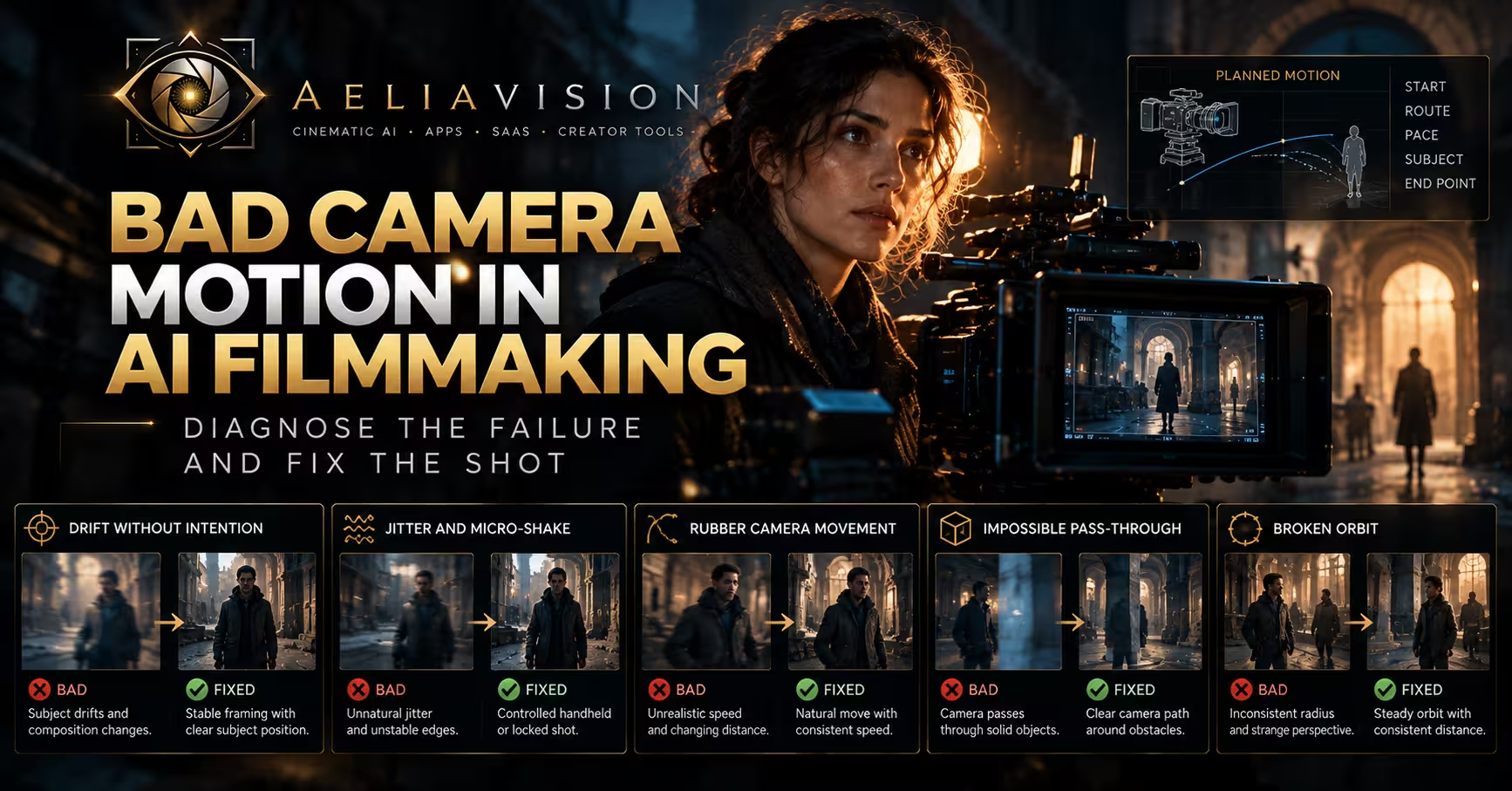
Drift without intention
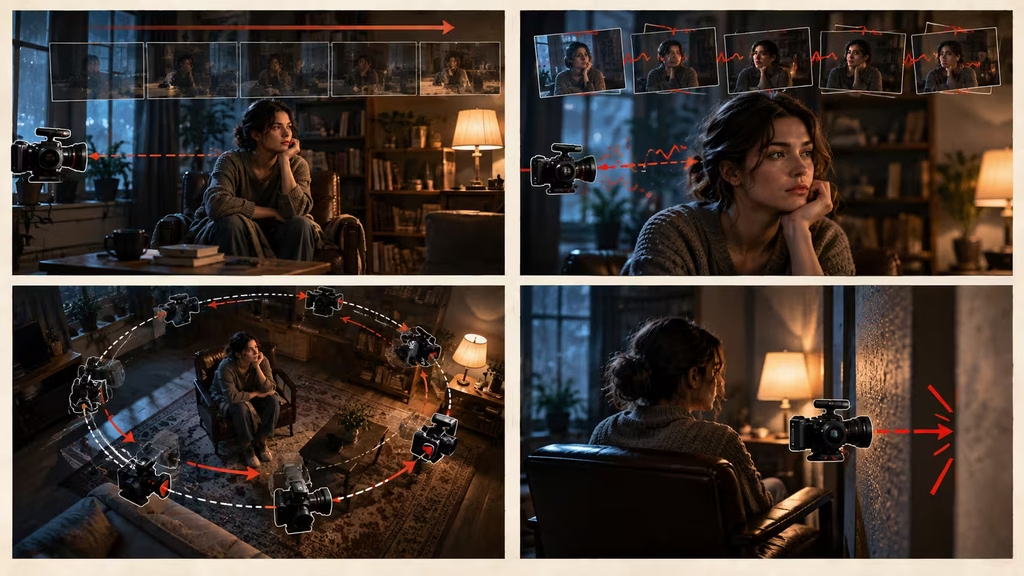
Drift is a slow, unwanted change in framing. The subject begins centered, then slides toward an edge. The horizon creeps upward. A locked-off shot develops a soft sideways movement even though nothing in the scene motivates it. Drift can be subtle enough to survive a quick review, then become obvious when several clips are cut together.
A little movement in a supposedly locked shot is not always a problem. Real cameras can breathe on a support, and documentary footage may include small operator corrections. The problem is unmotivated drift that changes the composition without changing the story. If the subject’s eyes were carefully placed on an upper third at the start, losing that placement halfway through makes the image feel careless.
Jitter and micro-shake
Jitter is a rapid, irregular shake that does not resemble a human operator, a vehicle, or a designed vibration. It may appear as tiny frame jumps, unstable edges, or a pulsing horizon. The model is often trying to reconcile motion between frames and failing to keep a stable camera transform.
Handheld footage has a pattern. It contains weight, small corrections, and a relationship to footsteps or breathing. Random pixel-level vibration is different. It makes the shot look like an unstable render rather than a camera carried by a person.
Rubber camera movement
A rubber move changes direction or speed without the camera appearing to have mass. The camera starts a push, pauses, slides sideways, rises, and then settles into a new angle with no visible reason. An orbit can tighten and widen as though the lens is attached to elastic. The subject’s size may remain strangely constant while the background perspective changes around them.
This is common when a prompt asks for too many movements at once. “Push in, orbit, crane up, whip pan, and reveal the city” is not one move. It is a sequence of moves, each with different spatial demands. The model blends them into a continuous transformation that may contain pieces of each instruction but no readable route.
The impossible pass-through
The camera travels through a person, wall, table, window, or other solid object. Sometimes the obstacle melts away. Sometimes the lens appears to pass through it while the object remains in frame. A close pass behind a shoulder can be convincing when there is a real lane for the camera. A pass through the shoulder itself is not a close pass. It is a continuity error.
Pass-throughs often happen when a prompt uses dramatic language without specifying clearance. “Fly through the crowd” leaves the model to decide whether the camera travels between people, above them, or through them. If the crowd is dense, the most visually direct interpretation may be the least physically coherent one.
Broken orbit and inconsistent radius
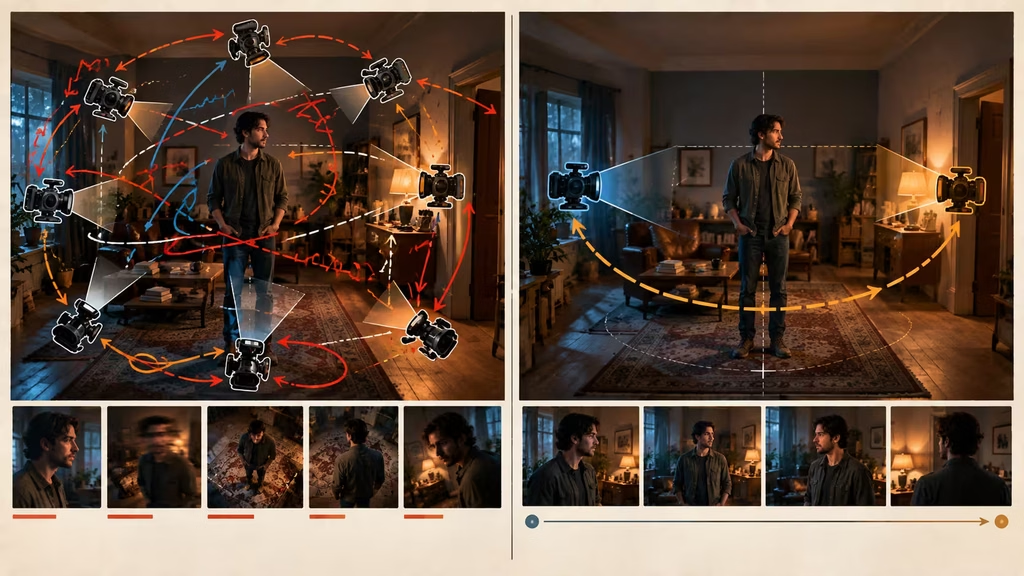
An orbit should maintain a recognizable relationship between the camera and its center. In a bad orbit, the camera rotates around a person while the distance changes unpredictably. The face grows, shrinks, and changes perspective. The background turns at a different speed from the subject. The actor’s shoulders twist to keep facing the lens, or the head rotates independently from the body.
The word “orbit” is especially dangerous because it can describe a small arc, a half circle, or a full 360-degree move. It can also cause the model to rotate the subject rather than move the camera. Name the arc, radius, height, and endpoint instead of relying on the single word.
Horizon and level errors
A pan should not automatically become a roll. A track should not make the horizon wobble. A level camera can become tilted by a few degrees, then correct itself, then tilt again. The error is more noticeable in architecture, landscape, and dialogue scenes because vertical lines give the viewer a reference.
A Dutch angle can be intentional, but it should be established and controlled. If the shot begins level and develops a random slant, the viewer reads it as a technical mistake rather than a point of view.
Subject outrunning the camera
Tracking means the camera and subject maintain a planned relationship. In a bad tracking shot, the camera loses the actor’s face, falls behind, jumps ahead, or keeps the same framing while the environment moves at an inconsistent rate. The person may walk normally while the background races by, or the camera may appear to move with the actor even though their feet are slipping over the ground.
This failure is often blamed on the camera when the subject action is the real issue. A model may not be able to generate a clean walk, a complex turn, and a smooth lateral track in the same short clip. Simplify the walk before adding more camera direction.
The three layers that get confused
A generated shot contains several kinds of movement. Camera motion changes the viewer’s position. Subject motion changes the position or posture of the person, animal, vehicle, or object being filmed. Environmental motion changes the setting: rain, smoke, trees, traffic, water, fabric, reflections, and practical lights.
These layers can work together, but they should not all be described as equally important. When the prompt asks the camera to push in while the subject turns, a car passes, smoke rolls through the room, lights flicker, curtains blow, and reflections move independently, the model has too many relationships to maintain. The result may be active but unstable.
Choose a primary movement first. If the dramatic event is a character noticing someone, the subject’s head turn may be primary and the camera may remain still. If the scene is about entering a threatening space, the camera push may be primary while the actor only walks at a measured pace. If a car chase depends on speed, the vehicle may be primary and the camera can track it from a stable side angle.
A useful prompt structure is:
> Locked medium shot. The woman stands beside the window and turns her head slowly toward the sound. Rain remains soft in the background. The camera does not move, the room geometry stays fixed, and her face remains consistent.
Or:
> Slow lateral tracking shot from left to right, matching the walking man’s pace. Keep him in a medium profile frame at a constant distance. The hallway remains straight and stable. No orbit, roll, zoom, or sudden change in height.
The negative instructions are not decoration. They define the boundaries of the move. Use only the boundaries that matter. A long list of every possible failure can compete with the positive action, so identify the two or three errors that would ruin the shot.
Why models produce unstable moves
A still image does not contain a camera path
Image-to-video systems begin with a frame, but a frame does not tell the model exactly where the camera is located or how the scene is arranged in depth. It offers visual evidence, not a measured floor plan. A prompt that asks for a large camera move requires the system to infer hidden surfaces, object depth, lens perspective, and likely occlusions.
A close-up gives especially little information about the room behind the face. Ask the camera to travel 180 degrees around that face and the model must invent the unseen side while preserving identity and lighting. The more the viewpoint changes, the more hidden information becomes necessary.
This is why a modest push-in often succeeds where a full orbit fails. The push reveals less new geometry. It can preserve the original composition while adding a readable change in scale and attention.
The prompt describes an effect instead of a route
Words such as dynamic, sweeping, epic, immersive, energetic, and cinematic express intent but not mechanics. They may influence the model’s style, yet they do not say where the camera begins, where it travels, or how it stops. A useful shot description can include one mood word, but the route needs concrete language.
Compare:
> Epic cinematic camera movement around a warrior on a mountain.
with:
> Begin in a wide rear view at shoulder height. Make a slow 30-degree arc to the warrior’s right while keeping the mountain ridge level in the background. Stop in a three-quarter profile before the warrior raises the torch.
The second prompt gives the model fewer opportunities to invent a spectacle that is unrelated to the action.
The move is too large for the clip length
A five-second clip has limited time to establish, travel, and settle. A camera that must cross a room, rise above a roof, circle an actor, and reveal a second location may have no time to express acceleration or deceleration. The model compresses the route, which makes the move look like a teleport.
Break a large move into shots. A cut is not a failure. A wide establishing shot, a lower tracking shot, and a close reaction can feel more expensive than one impossible continuous move. If continuity matters, end the first shot with a clear composition and begin the next with a matching direction, screen position, or foreground shape.
The subject is not anchored
A camera move needs a reference. The reference may be a face, a product, a doorway, a vehicle, or a horizon. If the prompt says “circle the scene” without saying what the camera is circling, the center can wander. If it says “follow the character” without specifying the framing relationship, the model may follow the character’s body, face, shadow, or a background object.
Anchor the shot with phrases such as “keep the actor’s eyes near the upper third,” “maintain a two-meter distance,” “hold the bottle centered,” or “keep the doorway on the right third as the camera advances.” These are not rigid rules for every shot. They are ways to preserve the relationship that makes the move readable.
Semantic words overpower physical ones
A model may interpret “heroic reveal” as a crane, a push, a roll, a lens flare, and a change in posture. It hears the emotional instruction before it has a route. Emotional language works best after the physical direction: “A slow rise reveals the character’s isolation; keep the movement restrained and the horizon level.” The action comes first, the feeling comes from how the action is carried out.
Diagnose before rewriting the prompt
Do not regenerate immediately. First watch the clip at normal speed, then frame by frame if your editor allows it. Write down the first moment when the move breaks. The first failure often explains the later ones.
Ask these questions:
1. Did the camera move when it was supposed to hold? 2. Did the camera keep the intended height and level? 3. Did the subject remain the same distance from the camera? 4. Did the background maintain its shape and depth? 5. Did the move begin and end at the requested pace? 6. Did the subject action remain simple enough to track? 7. Did a secondary effect, such as smoke or flicker, create the apparent camera error?
Pause on the first bad frame. If the face changes before the framing slips, the identity or subject generation is the primary issue. If the face stays stable while the whole room bends, the camera path or depth consistency is the likely issue. If the room stays stable but the actor’s feet slide, the subject action is the issue. If everything appears stable until a bright light crosses the lens, the effect may be causing the apparent jump.
A practical review method is to make three notes: camera, subject, environment. Put each visible failure in one column. This prevents a common waste of time: changing the camera prompt to repair an actor’s hands, or adding character detail when the actual problem is a drifting horizon.
Fix the prompt by reducing the move
The most reliable repair is often smaller than the failed shot. Reduce the arc, shorten the travel, lock the height, and remove a secondary action. This is not surrendering the idea. It is finding the part of the idea that the clip can carry.
Replace vague movement with a bounded route
Weak:
> The camera moves dynamically around the woman and reveals the city.
Stronger:
> Start in a medium rear three-quarter view. Make a slow 25-degree arc to her left at eye level. Keep her shoulders in frame and stop when the skyline appears over her right shoulder. Do not rise, zoom, or pass through her body.
The stronger version has a start, arc, height, framing condition, reveal, and exclusions. It does not ask for a full circle and a large vertical reveal at the same time.
Use one primary verb
Choose one main verb: hold, push, pull, pan, tilt, track, arc, rise, descend, or follow. A small supporting adjustment is fine, but avoid stacking unrelated camera actions in one sentence.
Weak:
> The camera pushes in, cranes up, rotates around him, whips to the door, and zooms out.
Stronger:
> Make a slow push from medium shot to medium close-up as he hears the door. End on his eyes. Keep the camera level and the background fixed.
If the door reveal matters more than the reaction, make a separate shot. A cut gives the editor control over timing that a single overloaded generation cannot provide.
State what must not change
Negative motion constraints are most useful when they target a known failure. Write “no roll” when the horizon tilts, “constant camera height” when the shot floats upward, “fixed radius” when the orbit stretches, or “no change in face or wardrobe” when identity breaks during the move.
Avoid filling the negative prompt with every possible visual defect. A list such as “no warping, no morphing, no blur, no flicker, no jitter, no distortion, no artifacts, no errors” may have some value in particular tools, but it does not replace a clear positive route. The model needs to know what to do before it can reliably avoid what not to do.
Common failure types and targeted fixes
The locked shot that will not lock
Start by removing all camera verbs. Use “locked-off tripod shot” or “static camera” and describe only the subject event. If the model still drifts, reduce the duration or use a cleaner source frame with stronger vertical and horizontal references. A busy background gives the model many edges to reinterpret, so a plain wall, doorway, or broad window can help.
You can also add a deliberate static reference: “the window frame, table edge, and horizon remain fixed throughout.” This gives the system visible anchors. If the shot needs life, animate the subject or environment rather than allowing the camera to wander. A held frame with a hand entering, a curtain moving, or a small eye shift can feel intentional.
The push-in that becomes a zoom
A physical push changes perspective relationships. A zoom changes focal length while the camera position stays roughly fixed. AI systems may treat “push in” and “zoom in” as interchangeable, even though they create different images. If perspective matters, write “camera physically advances toward the subject at a constant height, no digital zoom.” Keep the move short and preserve a clear foreground element when possible. The changing relationship between foreground and background helps the push read as travel.
If the lens distortion is causing instability, use a moderate lens description rather than an extreme wide angle. A very wide source image asks the model to preserve strong perspective as the camera advances. That can magnify stretching at the frame edges.
The pan that loses the subject
A pan rotates from a fixed position. It is not a sideways walk. If the subject moves too, specify which motion leads. For a static subject, write “pan slowly from the empty doorway to the seated woman, ending with her in a medium shot.” For a walking subject, a tracking shot may be better: “move laterally with him, keeping his face in profile.” Do not ask for a pan and a track unless the transition is deliberate and the clip is long enough to show it.
Use a clear endpoint. A pan that begins on an empty room and ends on a face has a reason. A pan that simply continues until the model runs out of scene may finish on a wall or a distorted background.
The orbit that turns into a spin
Limit the arc. Start with 15 to 45 degrees rather than a full circle. Name the center, radius, height, and subject orientation. For example: “Arc 30 degrees clockwise around the seated man at a fixed two-meter radius, eye level, ending in a three-quarter front view. He remains seated and turns only his eyes toward camera.”
If the background is important, use a wide shot and slow pace. If the face is important, use a smaller arc. A close-up and a large orbit are competing demands because the model must invent a great deal of unseen facial and room geometry.
The follow shot with sliding feet
First simplify the walk. Ask for a steady, natural walk in one direction and a camera that matches the pace. Avoid adding a turn, a hand gesture, a look back, stairs, loose clothing, and a complex surface in the same clip. Keep the camera at waist or chest height and use a medium or wider frame so small gait errors are less obvious.
If the feet still slide, cut around the problem. Use a shot of the upper body for the emotional beat and a separate insert of shoes or ground contact. Generated video often handles a simple torso move better than a full-body walk with changing perspective.
The crane or rise that bends the set
A vertical move reveals new surfaces quickly. Furniture tops appear, ceilings enter, and the relationship between actor and floor changes. Keep the rise modest, especially indoors. Describe a fixed base and a clear endpoint: “slow jib rise from table height to reveal the full room, maintaining the actor near center frame.” If the shot needs to travel forward and upward over a long distance, an edit or two-stage shot may be more reliable.
Large rises work better in open spaces because the camera has room to move and the environment contains fewer close surfaces that must remain stable. A small room packed with furniture is one of the hardest places to ask for a crane move.
The handheld shot that looks broken
Handheld should have an operator’s logic. Specify a restrained handheld follow, gentle body movement, and a stable subject rather than “shaky camera.” The latter can produce random vibration. If you want panic, use a controlled increase in pace or a short reframing correction. Do not demand both a locked horizon and extreme shake unless the conflict is intentional.
A useful handheld prompt might say: “Close handheld shot beside the runner, small natural vertical movement from footsteps, face remains readable, no violent shake, no sudden roll.” The phrase “beside the runner” gives the camera a relationship to the action. The restrictions keep the instability from becoming noise.
Build camera motion from start, middle, and end
A shot has a temporal shape. Even a simple pan has a beginning, a travel phase, and a landing. Describe those phases when the endpoint matters.
The start frame establishes the information the audience already has. The middle carries the change. The end presents the new information or emotional state. A prompt such as “slowly move toward the door” lacks the last part. How close should the camera get? Should the door fill the frame? Should a character enter the edge? Should the camera stop before the handle turns?
Try this pattern:
> Start on a wide view of the empty kitchen. Hold for one second. Make a slow push toward the open refrigerator as its interior light comes on. Stop at a medium view before the camera reaches the counter. Keep the vertical lines straight and the room layout unchanged.
The hold gives the first image time to register. The push has a subject. The end is defined. The constraints protect the architecture.
Easing matters too. A camera with no acceleration appears to slide at a constant mathematical rate. A camera that changes speed abruptly appears to jump. Words such as “gentle ease-in and ease-out,” “measured start,” and “settle before the final frame” can help, but the route still matters more than the adjective.
Choose the lens and framing before the move
Camera motion does not exist separately from lens choice. A wide lens exaggerates near-far relationships and makes lateral movement feel faster at the edges. A long lens compresses space and can make a tracking shot feel flatter. A close framing exposes face and hand inconsistencies. A wider framing gives the model more room to hide small errors, but it also requires more of the body and environment to remain coherent.
When a shot fails, consider whether the frame is asking for too much. A low-angle close-up with a large orbit around the face is demanding. A medium shot with a small arc may communicate the same power relationship with fewer continuity risks. A wide shot can make a camera rise legible because the viewer sees the space the camera travels through.
Avoid changing lens language halfway through the prompt. “Anamorphic close-up, extreme wide perspective, compressed telephoto orbit” gives the model contradictory cues. Choose a starting lens character and keep it stable unless a visible lens transition is part of the concept.
The same applies to depth of field. A rack focus can be a secondary action, but it should have a target. “Focus shifts from the foreground key to the woman in the doorway as the camera pushes two feet forward” is clearer than “cinematic rack focus during dynamic movement.” If the camera and focus both change without a target, the image may pulse or blur for the entire clip.
Use blocking to make the camera’s job easier
Many camera problems begin before the camera moves. If two people cross in opposite directions, a foreground object enters, a door opens, and the camera orbits at the same time, the model has to solve blocking and camera choreography together. Simplify the blocking first.
Place the subject on a clear path. Keep hands visible only when they matter. Avoid asking an actor to turn 180 degrees while the camera moves around the same axis. Decide whether the face or the profile is the priority. Give the camera a side to pass on.
Screen direction helps continuity. If a subject travels left to right in one shot, keep that direction unless the story calls for a reversal. A camera that crosses the line while also changing height and distance can make the scene feel spatially unmoored. When a line crossing is necessary, show the transition in a controlled move or cut to a neutral front angle first.
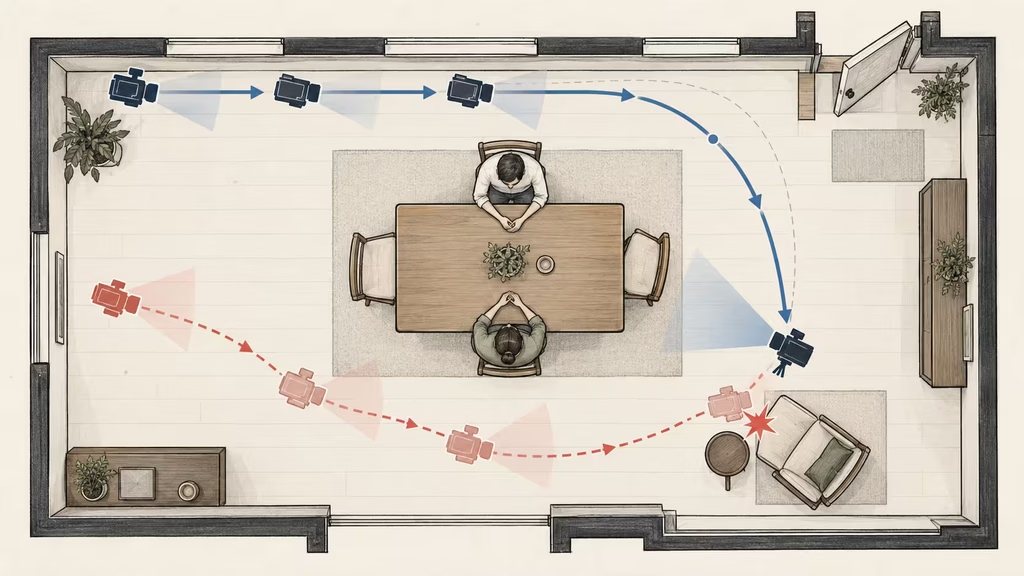
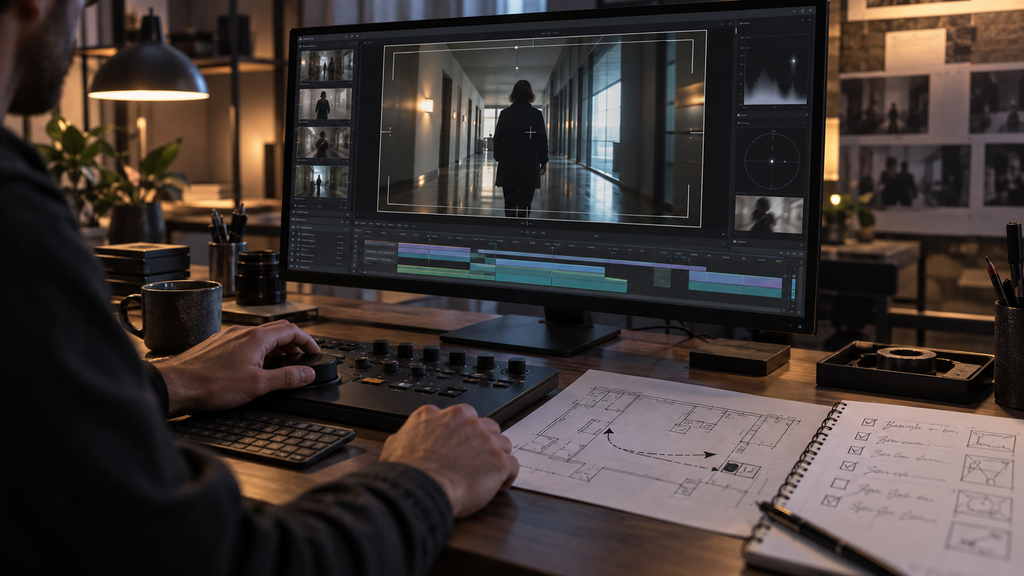
A floor plan, even a rough one, can expose impossible instructions. Mark the camera start and end points, the subject’s path, furniture, and obstacles. If the route crosses a chair or requires the camera to occupy the actor’s body, rewrite it before generating.
Repair in stages instead of changing everything
When a generation fails, change one variable at a time where possible. If you rewrite the camera path, change the subject action as little as possible. If you simplify the actor’s walk, keep the same camera move for comparison. This turns regeneration into a test rather than a lottery.
A practical repair ladder looks like this:
1. Remove decorative motion and test the camera alone. 2. Reduce the camera distance, arc, height change, or speed. 3. Lock the subject’s pose or direction. 4. Add one environmental movement. 5. Add a focus shift or reveal only if the base shot holds. 6. Split the move into separate clips if the full route still fails.
The first test can be deliberately plain: “Static medium shot, subject remains still, background fixed.” If that fails, the source image or identity problem may be more important than camera direction. Once the held shot is stable, add a short push. If the push works, try a slightly longer one. This progression tells you where the system’s limit lies.
Do not confuse a successful generation with a successful shot. Check the first and last frames against the brief. A clip can contain smooth movement and still land in the wrong composition. It can preserve the face while changing the lighting, wardrobe, or architecture. The review should ask whether the move served the shot, not merely whether it looked fluid.
When to use a cut, extension, or compositing fix
Some ideas are better solved in the edit. If the camera must travel through several spaces, use a sequence of shots with matching motion direction. A forward push can cut on a foreground dark shape, a whip, a person crossing, or a moment when the frame is briefly obscured. The audience will accept a new camera position if the transition has a visual reason.
Extensions can work when the camera is already stable and the next phase continues the same route. They are riskier when the extension asks for a new angle, a new subject action, and new geometry. Save a clean final frame and use it as a controlled handoff if the tool supports image-to-video continuation.
Compositing can repair small issues. A drifting horizon may be corrected with stabilization and a crop. A small framing error may be adjusted by reframing a higher-resolution render. A distracting background warp may be hidden with a foreground element or a cutaway. These fixes do not rescue a fundamentally broken move, but they can turn an otherwise usable take into an edit-ready shot.
Do not stabilize footage that is meant to be handheld until you have checked the subject. Stabilization can make a bad track look like a floating camera, and it can magnify warped edges at the crop. Stabilize a shot because the intended camera language needs it, not because every movement is automatically better when removed.
Prompt templates for cleaner motion
These templates are starting points, not formulas. Replace the subject and setting while preserving the physical logic.
Locked shot
> Locked-off tripod medium shot of [subject] in [location]. The camera remains completely still. [Subject action] happens slowly and clearly. Keep the horizon level, architecture fixed, face and wardrobe consistent, and background movement minimal. No pan, tilt, push, zoom, orbit, roll, or height change.
Push-in
> Begin in a [wide/medium] frame of [subject]. Make a slow physical camera push forward at constant eye level, moving from [starting framing] to [ending framing]. Keep [subject or object] anchored near [frame position]. Use a gentle ease-in and ease-out. No digital zoom, roll, orbit, or change in background geometry.
Lateral track
> Camera tracks left to right beside [subject] at a steady walking pace. Maintain a constant distance and [profile/three-quarter/front] framing. Keep the camera at [height] and the horizon level. [Subject] moves in one direction without stopping or turning. Background passes smoothly with no sliding feet or stretching walls.
Small arc
> Start at [starting angle] around [subject]. Make a slow [15/30/45]-degree arc to [ending angle] at a fixed [height] and [distance]. Keep [subject] the same size in frame and preserve the relationship to [background anchor]. Stop cleanly at the endpoint. No full orbit, rise, roll, or sudden change of radius.
Controlled reveal
> Begin behind [foreground object] with only [partial subject or location] visible. Move slowly [left/right/up/forward] through the open path to reveal [new information]. Maintain a stable camera height and level horizon. End in a [specific framing]. Do not pass through solid objects or add unrelated camera movement.
Restrained handheld
> Close handheld shot beside [subject], with small natural operator movement and gentle vertical response from footsteps. Keep the face readable and the subject centered within a protected frame. The camera follows at a constant distance. No violent shake, random jitter, roll, rubber motion, or sudden acceleration.
A template becomes weaker when every sentence is kept by habit. Delete any clause that does not describe the shot you want. The best prompt is often shorter after the route and endpoint have been made specific.
A review checklist for generated camera motion
Before approving a clip, check it at full speed and at reduced speed. Review the following:
– Does the opening frame match the planned composition? – Does the movement begin when the dramatic beat begins? – Is there one clear primary camera action? – Does the route have a believable direction and endpoint? – Does the camera maintain its height, level, and distance? – Do vertical lines, horizons, and major architecture hold? – Does the subject remain the same person, object, and scale? – Do feet, hands, hair, and clothing respond consistently to the movement? – Does the background move at a plausible relative speed? – Does the shot stop or cut before the model begins to wander? – Does the move support attention, emotion, or information? – Can the clip connect to the preceding and following shots?
If the answer to the last question is no, the problem may be editorial rather than generative. A beautiful move that cannot enter or leave the sequence is still a weak production asset.
The right amount of motion
The best camera motion is not the most elaborate motion the model can produce. It is the amount that makes the intended change easier to see. A one-foot push can turn a neutral observation into an intimate moment. A slow pan can reveal that a room is empty. A small arc can separate a face from a background and expose a second character. A locked frame can make waiting feel uncomfortable.
Generated filmmaking rewards restraint because every added degree of freedom creates another continuity problem. That does not mean the work should look cautious. It means energy should come from a clear event, a precise composition, and a move the audience can follow.
When a shot goes bad, return to the physical question: where is the camera, what is it carrying attention toward, and what must remain stable while it gets there? Give the move one route, one pace, and one landing. If the route is too much for a single clip, use two shots. If the subject is too complex, simplify the blocking. If the environment is collapsing, remove secondary motion and rebuild from a stable frame.
Good AI camera motion feels directed because it has limits. The limits are not a barrier to style. They are what let the style read.
Continue reading
Further insights from the Journal



Have a story in mind?
Bring your next project into focus.
Tell us what you are creating and what you want the audience to feel.