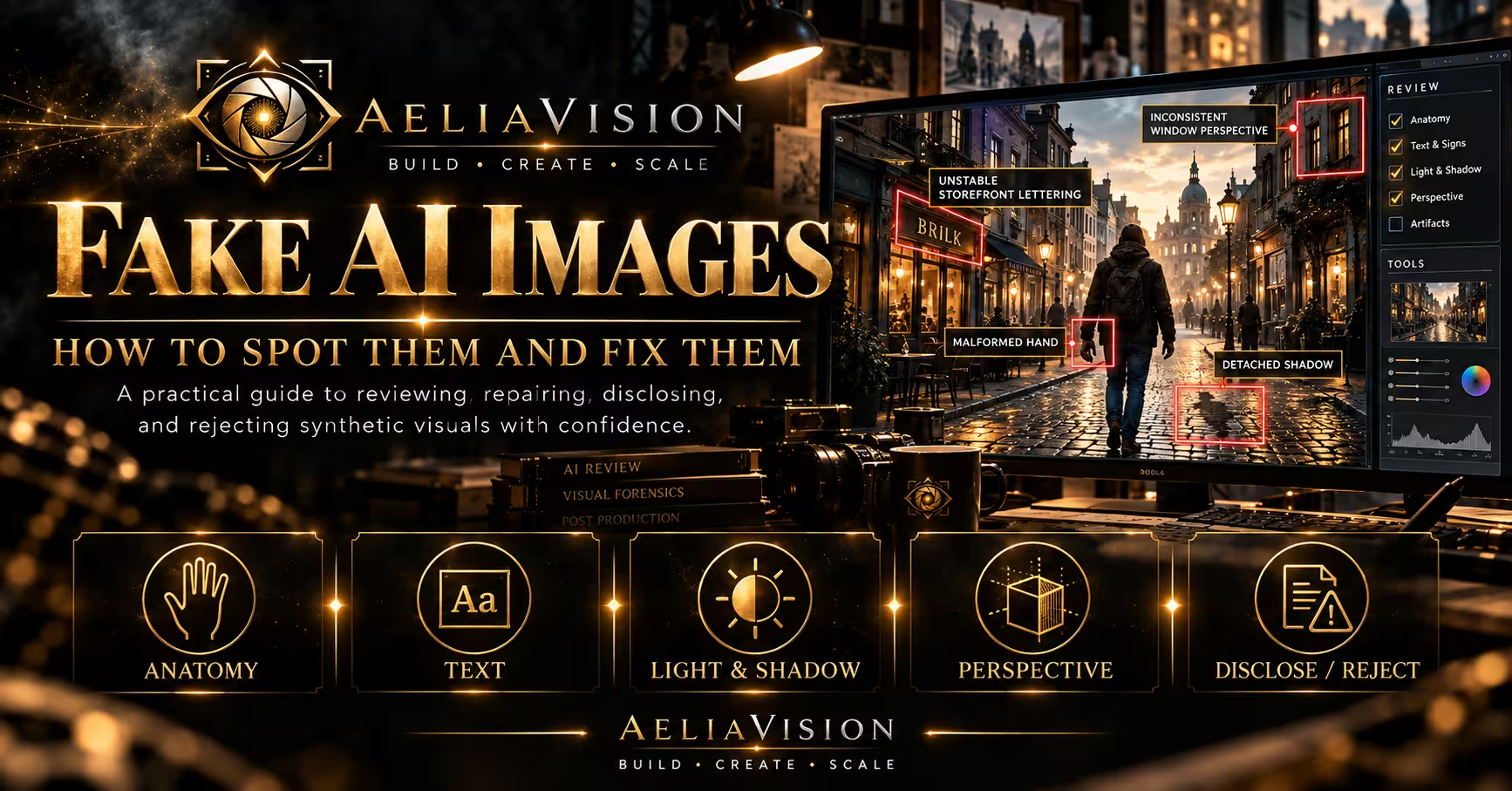
The story in brief
Learn how to spot fake AI images, understand why they look wrong, and fix anatomy, text, lighting, perspective, identity, and compositing problems in a practical review workflow.
Inside this story
Fake AI images are not always obvious failures. The worst ones often look convincing for a few seconds. The lighting is attractive. The subject is centered. The colors feel deliberate. Then you notice that the hand is gripping nothing, the sign contains almost-words, or the reflection belongs to a different person. Nothing is loudly broken, but the picture stops feeling trustworthy.
That uneasy reaction matters. Viewers may not be able to name the defect, yet they notice when an image does not obey the visual rules it appears to establish. A chair has three legs. A jacket sleeve joins the wrong arm. A building has windows that do not align with its floors. A child holds a toy whose handle changes shape from one frame to the next. The image may still work as a rough idea, but it is not ready to present as a factual photograph, a product asset, a production reference, or a finished piece of visual communication.
The phrase fake AI images covers several different problems. Sometimes it means a synthetic image presented as a real photograph. Sometimes it describes a generated image with visible anatomy or perspective errors. It can also refer to an image that uses a real person’s likeness without consent, invents an event, carries a false logo, or quietly combines real and generated material without disclosure. The fix depends on which kind of falsehood is present.
This guide gives you a practical way to review and repair fake AI images. It covers the visual clues that deserve attention, the reasons generators produce them, the fixes that work better than endless prompting, and the points where you should discard the image or disclose its synthetic origin. The examples apply to editorial graphics, advertising concepts, social posts, film references, product images, portraits, and image to video workflows.
What makes an AI image feel fake
A generated image usually feels fake when its local details do not agree with its larger claim. The picture says, “This is a real room,” but the window light comes from two directions. It says, “This person is holding a phone,” but the fingers do not touch the device. It says, “This is a street photograph,” but every person in the crowd has the same polished expression and nobody appears to be reacting to the same environment.
You can review an image at three levels.
At the global level, inspect the overall scene. Does the composition make sense? Is the camera height plausible? Do the subjects occupy space naturally? Does the image have a coherent reason for its light, weather, depth, and perspective? Global errors are often corrected by rebuilding the composition, not by retouching individual pixels.
At the relational level, inspect how objects affect each other. Does a hand actually hold the cup? Does the shadow touch the feet? Does the bicycle tire meet the road? Does a chair support the person sitting in it? Do the wheels contact the ground? These relationships are where many fake AI images reveal themselves.
At the local level, inspect anatomy, text, edges, textures, repeated patterns, and small objects. A local defect may be harmless in a background area. It becomes important when the eye is meant to read it, when it carries story information, or when it creates a safety or legal problem.
Do not zoom in immediately. First view the image as a thumbnail, then at normal presentation size, then at high magnification. Thumbnail review tells you whether the idea works. Normal size reveals the details an audience will actually see. High magnification helps diagnose the cause. If you begin at 400 percent, you may spend an hour fixing a flaw that disappears in the intended crop.
The fastest review method
Before changing an image, make a copy and write down what feels wrong. Use plain descriptions instead of vague judgments. “The image looks AI generated” is a starting reaction, not a repair brief. “The left hand has no visible contact with the suitcase handle” gives you a target. “The text on the storefront changes in three places” tells you that prompting may be the wrong fix.
A quick review pass can follow this order:
1. Confirm the image’s intended use. 2. Check the main subject and the viewer’s first read. 3. Trace every important contact point. 4. Inspect faces, hands, feet, and body joins. 5. Check text, logos, numbers, and screens. 6. Follow perspective lines and repeated structures. 7. Check light, shadows, reflections, and transparent materials. 8. Compare the image with approved references. 9. Decide whether to edit, regenerate, composite, disclose, or reject it.
The intended use changes the threshold. A strange button on a distant jacket may be acceptable in a moodboard. The same button cannot be ignored in a costume reference intended for a wardrobe department. A fuzzy storefront sign may be fine in a background plate, but not in an image claiming to document a real business.
Write a status beside the file. Useful labels include exploratory, synthetic concept, needs correction, composite, approved with disclosure, and rejected. This prevents a rough image from traveling through a project without context. A polished fake AI image can easily become an accidental promise when somebody pastes it into a deck or social post without its source note.
Fake hands, arms, and body joins
Hands remain one of the easiest places to find a synthetic image. Viewers have strong expectations about fingers because hands perform precise actions all day. We know how a thumb braces a mug, how a palm wraps around a rail, and how knuckles compress when a fist closes. A generated hand can look acceptable in isolation and fail as soon as you ask what it is doing.
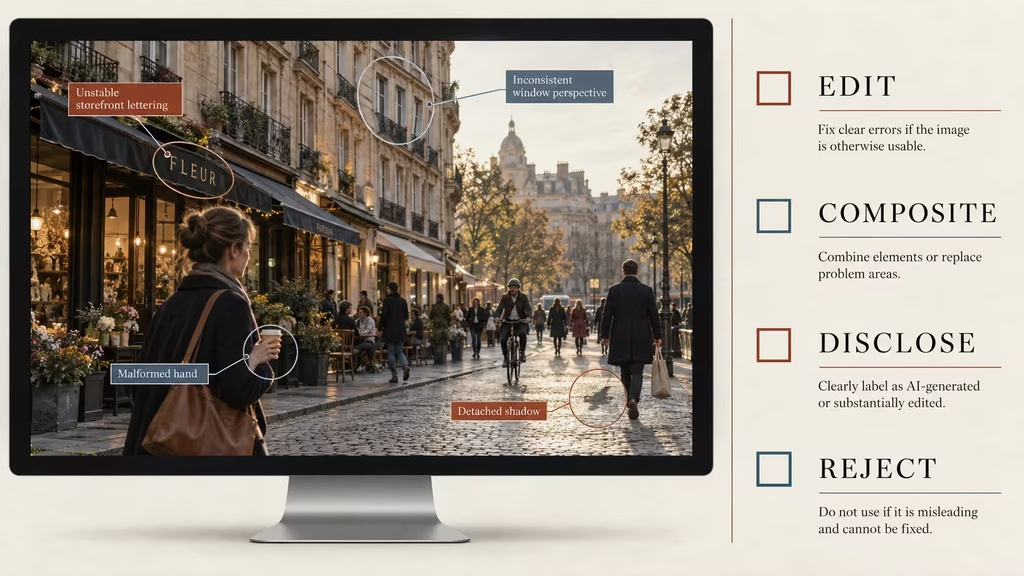
Look for extra or missing fingers, fingers that merge, nails appearing on the wrong side, a wrist that bends without a forearm, and a thumb placed where the palm should be. Check whether the hand has a believable relationship with the object. A person may appear to hold a bag, but the handle may pass behind the palm without tension. A hand may rest on a table without casting a contact shadow. Two people may touch while their fingers occupy the same space.
Arms create a second set of problems. Trace each arm from shoulder to wrist. Do not assume that a sleeve edge identifies the correct limb. In crowded poses, a model can attach an arm to the wrong shoulder or create a sleeve that seems to belong to nobody. Check elbows, underarm shapes, and the way fabric folds around a joint.
The first fix is to simplify. Crop to the action that matters. If the story only needs a hand turning a key, isolate the hand and lock. If the entire body is important, use a wider pose with less demanding contact. A clenched fist against a plain background is easier to repair than five interlocked hands at a busy dinner table.
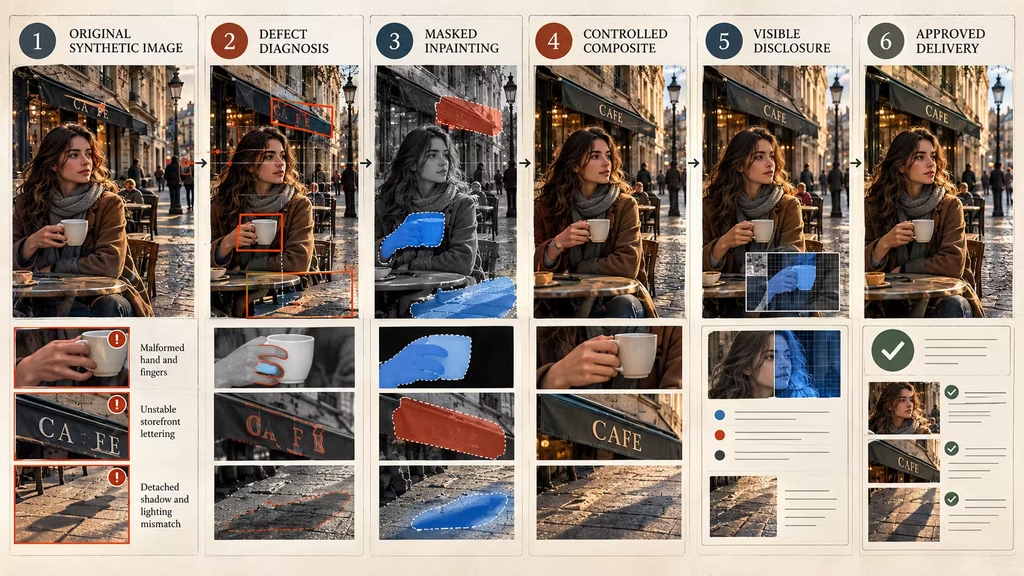
The second fix is targeted regeneration. Mask the defective area and describe the physical relationship, not just the desired appearance. Say that the right hand wraps around the handle, four fingers visible on the front, thumb pressing from the opposite side, wrist aligned with the forearm, natural contact shadow. Keep the surrounding image protected if the editor supports that option.
The third fix is compositing. Photograph or render a replacement hand, use a controlled stock element, or create a separate insert. Match perspective, light direction, grain, depth of field, and color. A clean composite that obeys the scene is better than a ninth generation that introduces a new thumb.
Do not hide a hand problem with blur when the hand carries the action. Blur can be a legitimate depth choice, but it should be motivated by the camera, not used to disguise a broken gesture. If the viewer must understand the gesture, make the gesture readable.
Faces, eyes, teeth, and identity drift
Faces attract attention even when the subject is not the story. A face can look realistic at first glance while changing identity through small details. The eyes may sit at different heights. The distance between nose and mouth may shift. A mole may move. The hairline may recede and return. The expression may show a smile without the cheeks or eyes responding.
Check symmetry, but do not demand perfect symmetry. Real faces have asymmetry. The problem is not that one eyebrow is higher. The problem is that the asymmetry changes without a reason, or that one side of the face follows a different lighting and perspective rule from the other.
Eyes deserve a close inspection. Look for mismatched iris size, reflections that point toward different light sources, pupils that are not aligned with the subject’s gaze, and catchlights that appear in one eye but not the other. A portrait can survive a slightly soft eye. It struggles to survive two eyes looking at different targets.
Teeth are another warning area. Generated smiles may contain repeated shapes, fused teeth, gums that do not meet the lips, or a mouth whose interior has no depth. If the person does not need to smile, request a closed mouth or a restrained expression. If a smile matters, use a dedicated portrait workflow, inpainting, or a real performance reference with permission.
Identity drift becomes serious when a character or real person must remain recognizable. Build a reference pack with a neutral portrait, three quarter view, profile, hairline, distinguishing marks, body silhouette, and wardrobe. Separate fixed traits from changeable traits. Lighting, expression, and clothing may change. Eye spacing, scar placement, and face shape should not change unless the story requires it.
When working with a real person’s likeness, consent and scope matter more than technical quality. Do not repair an unauthorized likeness into a more convincing unauthorized likeness. Remove the resemblance, replace the subject with a fictional person, or stop the project. If the image is meant to depict a public event or real individual, disclose synthetic alteration clearly and check the relevant editorial or commercial standards.
A face that is attractive is not necessarily a face that is useful. Overly smooth skin, identical facial expressions, and aggressive beauty lighting can turn a character into a generic stock portrait. Describe age, fatigue, posture, attention, and circumstance. A person who has been awake all night should show it through behavior and light response, not only through the word tired.
Fake text, logos, and numbers
Text is one of the clearest reasons a believable image becomes unusable. Models can create text-like marks with convincing spacing and visual rhythm, but exact spelling, repeated lettering, and long sentences remain unreliable in many image workflows. A label can be almost correct, which is more dangerous than obvious nonsense because people may stop checking.
Inspect every visible sign, screen, label, menu, book spine, license plate, jersey number, medical display, legal document, and product package. If the text matters, treat generated lettering as a placeholder until it has been checked character by character. Do not approve a product image because the brand name looks right at a glance.
The dependable fix is to create the text separately. Generate a clean sign, package, screen, or label with space for the graphic. Add the approved design in Photoshop, Figma, After Effects, an editing application, or the tool used by the relevant department. Track the graphic as its own asset so a late copy change does not require rebuilding the entire image.
For fictional text, you still need consistency. Design a small type system, logo, or alphabet outside the generator. Then composite it onto signs and objects. If the image will appear briefly and the words are not meant to be read, remove the pseudo-text rather than allowing viewers to mistake it for a real message.
Logos create rights issues as well as rendering issues. A generator may invent a mark that resembles an existing brand. It may place a real logo into an unrelated scene. Crop it out, replace it with a cleared fictional mark, or obtain the required permission. Do not rely on the claim that the model made the logo by accident.
Numbers can fail even when letters look acceptable. Dates, prices, scores, street numbers, serial codes, and measurements often change between versions. If continuity depends on a number, make it a designed overlay or use a controlled 3D or compositing workflow.
Broken perspective and impossible architecture
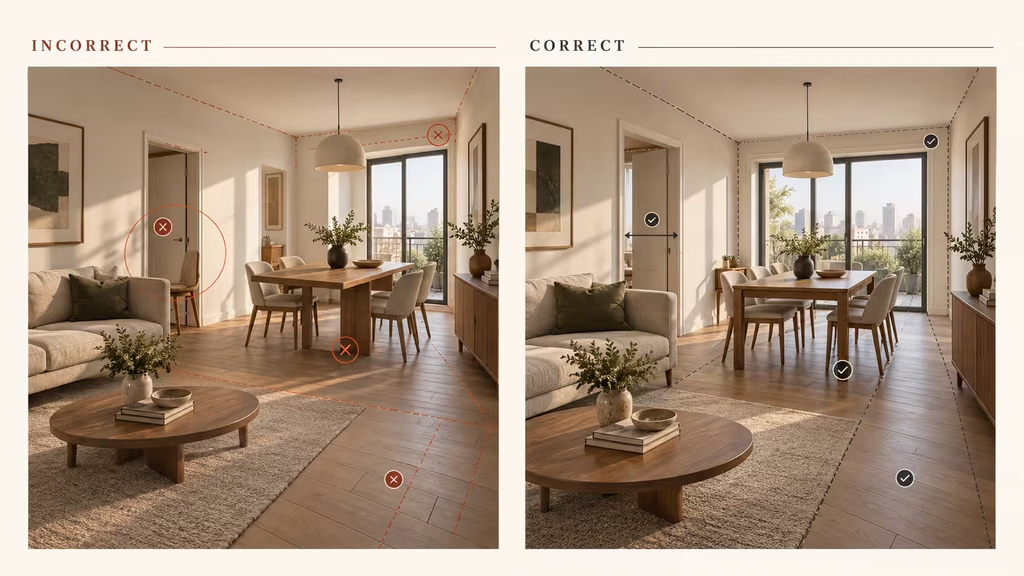
Perspective errors often make an image feel fake before a viewer finds the exact cause. Floor lines may converge toward different vanishing points. A table may be viewed from one camera height while the chairs are viewed from another. A staircase can widen in the wrong direction. Doorways may be too narrow for the people standing in them.
Start with the horizon and major lines. In an interior, inspect walls, ceiling joins, floorboards, shelves, windows, and table edges. In an exterior, inspect roads, curbs, building floors, roof lines, poles, and vehicles. Lines do not need to be perfectly straight in a real photograph, but their distortion should be consistent with the lens and camera position.
Architecture also has to support movement. Ask how a person enters the room, where they stand, and where the camera can be placed. A generated room can look spacious while having no route between its furniture. A house can show windows on the interior wall that do not appear on the exterior. A city street can put a distant tower behind a nearby building without any believable gap.
The best fix for major geometry is rebuilding. Use a 3D blockout, a photograph, a matte painting, a layout sketch, or a simpler generation with fewer architectural claims. Perspective correction tools can help with modest errors. They cannot make a fundamentally impossible room navigable.
If the image is a concept rather than a plan, label it accordingly. A mood image can use impossible architecture if the visual language is intentional. The problem occurs when viewers are told, or allowed to assume, that the picture documents a real place or a buildable design.
Lighting, shadows, and reflections
Lighting can make a synthetic image look expensive while also exposing its construction. Identify the dominant source before judging the mood. Is the sun entering from the window? Is the lamp on? Is the streetlight outside the frame? Once you identify the source, follow its consequences across the scene.
Shadows should attach to objects and respond to distance. A person standing on the ground should have a contact shadow, even in soft light. A chair leg should not cast a sharp shadow while the rest of the room is diffused unless another source explains it. A building shadow should fall across the road in a direction that agrees with the faces of nearby objects.
Highlights can reveal invented surfaces. Chrome should reflect its environment. Matte fabric should not carry the same hard highlight as polished metal. Skin, glass, water, and painted wood respond differently to light. A generator may apply a cinematic sheen to every material, creating a uniform surface that has no physical reason.
Reflections deserve their own inspection. A mirror must show the scene from the mirror’s position. A window reflection should respond to the angle between camera, glass, and subject. A car door should reflect nearby shapes without inventing an unrelated person. If the reflection is important to the story, use a controlled plate or composite. General generation often treats reflections as decorative texture rather than a second view of the world.
Transparent objects are similarly fragile. Check glasses, bottles, visors, lenses, ice, plastic, and water. Look for edges that disappear without refraction, liquid levels that ignore the container, and objects visible through glass from impossible angles. The fix may be a separate clean plate, a 3D render, or a deliberate crop.
Color grading can unify small differences, but it cannot repair source logic. A grade may hide a mild white balance shift. It cannot make two suns become one, attach a floating shadow, or correct a reflection with the wrong person. Diagnose first, grade second.
Fake depth, texture, and repeated objects
Generated images often use texture to create an impression of detail. Brick, foliage, hair, crowds, books, roof tiles, and fabric patterns can look rich at a distance and collapse when inspected. Repeated objects may change size, direction, or number without any reason. The result resembles a collage that was smoothed by a cinematic filter.
Check rows and repetition. Do the windows on a building follow a structural grid? Do books sit on the shelf or merge into one textured band? Do fence posts have a consistent spacing? Does a crowd contain people with distinct positions and scale? Does foliage emerge from actual branches or form a decorative wall?
Depth errors show up when foreground, middle ground, and background do not share atmospheric perspective. Distant objects may be sharper than nearby objects. A small person can have the same level of detail as a close face. Fog may cover one side of a road but stop at an arbitrary vertical edge.
The fix is often subtraction. Remove unnecessary detail and give important objects room. A clean background makes a repaired hand or product easier to believe. If a crowd is not part of the story, reduce it to soft shapes. If a shelf is not being read, avoid generating hundreds of book spines that later need checking.
For a final asset, replace repeated details with controlled sources. Use a texture library, 3D instancing, photography, matte painting, or procedural tools when regularity matters. Use masks to place selected details manually. A generated texture can be a starting point, but it should not be mistaken for a reliable map of repeated objects.
Fake products and manufactured objects
Product images require a stricter review than general concept art. Viewers expect symmetry, function, labeling, material behavior, and consistent dimensions. A generated chair may have attractive upholstery and no stable way to support a person. A bottle may have a beautiful silhouette but a cap that cannot open. A vehicle may show two different wheel designs on opposite sides.
Inspect the object from the outside in. First check silhouette and proportions. Then check joints, seams, closures, fasteners, controls, handles, and contact surfaces. Ask whether the object can be held, opened, worn, assembled, cleaned, or repaired. If the answer is unclear, it is not ready to serve as a product specification.
For commercial work, do not present a generated object as an existing product unless the image has been verified and the rights are clear. A synthetic image can accidentally show a competitor’s shape, an invented safety feature, or a logo that resembles a protected mark. Use approved product photography, a 3D model, controlled retouching, or a fictional design that has been reviewed.
A practical repair workflow is to generate the composition and atmosphere, then replace the product with a real photograph or clean render. Match the lens, perspective, depth of field, reflections, and shadow. If the generated image supplies a useful background but the object is wrong, keep the background and rebuild the hero product separately.
Do not use extra prompting to force exact mechanical detail when the generator has already shown that it cannot maintain it. The more important the product, the more direct control you should use.
Fake documentary and news images
A synthetic image becomes ethically serious when it is presented as evidence of a real event. A dramatic disaster scene, protest crowd, battlefield photograph, celebrity encounter, or political rally can spread quickly even when it never happened. Realistic lighting and camera noise do not make an invented event true.
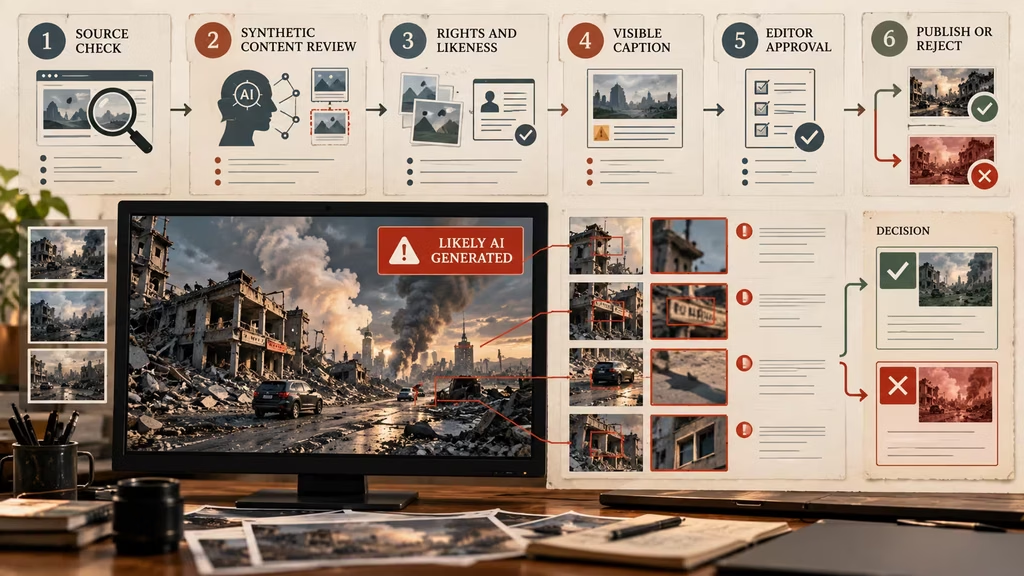
If an image is synthetic, label it where viewers will see the label. Do not hide the disclosure in a caption link or metadata field that most people never open. If a real photograph has been materially altered with generated content, describe what was changed. If the image is an illustration of an event, call it an illustration.
Before publishing an image about a real person or current event, verify the source and context. Reverse image search can help identify recycled photographs, but it does not prove that a new image is authentic. Check dates, location clues, weather, shadows, uniforms, architecture, and statements from reliable sources. A plausible image is not evidence by itself.
The repair for a misleading documentary image is not merely visual. Add a clear caption, remove false contextual cues, replace it with a verified photograph, or do not publish it. Do not edit a fake image until it looks more like proof.
When prompting helps, and when it does not
Prompting is useful when the problem is missing direction. If the image has the wrong camera height, vague action, generic wardrobe, or an unmotivated environment, a clearer brief can produce a better result. State what matters, what must remain stable, what can vary, and what the viewer should understand.
Prompting is less useful when the problem is exact lettering, complex hand contact, long continuity, a precise likeness, mechanical function, or a legally sensitive resemblance. You may get a different failure each time. More adjectives can make the image more decorative without making it more correct.
Use a stop rule. After several targeted attempts, compare the time spent with the value of the image. If the same category of error returns, change the method. Mask and inpaint the area. Use a separate generation. Composite a photographed element. Build the object in 3D. Draw over the image. Ask a designer or retoucher to solve it. Replace the image.
Keep versions so you can compare changes. Save the original, the prompt, the reference set, the settings, and each meaningful revision. A common mistake is overwriting a good composition while chasing one defective detail, then discovering that the new version has a worse face, crop, or lighting setup.
Review one variable at a time. If the hand is wrong, protect the face, camera, wardrobe, and background while changing the hand. If the text is wrong, replace the text outside the model. If the perspective is wrong, simplify or rebuild the geometry rather than changing the subject’s identity at the same time.
A practical repair workflow
Start by defining the final claim. Is the image a fictional concept, a visual reference, a product illustration, a composite, a photograph, or evidence of an event? The claim determines what must be corrected and what must be disclosed.
Next, preserve the original. Duplicate the file and record its source. If somebody later questions the edit, you need to show what was generated and what was changed. Add a working note that lists the visible defects and their severity.
Separate structural errors from cosmetic errors. Structural errors affect composition, perspective, identity, contact, or story information. Cosmetic errors include small texture irregularities, minor noise, or a background object that will be cropped. Fix structural issues first. There is little value in perfecting skin texture on a face that does not match the approved person.
Choose the least complicated method that can solve the problem:
– Regenerate when the overall brief is wrong. – Inpaint when one bounded region is defective. – Composite when exact text, identity, product shape, or physical contact matters. – Use a 3D or photographic source when perspective and materials must be reliable. – Retouch when the defect is small and the surrounding image is sound. – Crop when the irrelevant area creates risk and the story still reads. – Disclose when the image is synthetic or materially altered. – Reject when the image makes a false claim or cannot be repaired without rebuilding it.
After the repair, inspect the seams. Composites can fail through mismatched grain, sharpness, color temperature, perspective, edge softness, or shadow direction. A replacement object may be accurate but look pasted in. Match the image’s optical behavior, not only its color.
Run a second review with someone who did not make the edit. The person who spent an hour fixing a hand is likely to see the intended hand rather than the actual hand. A fresh reviewer can answer a simpler question: does the action now look physically believable at normal size?
Keep the disclosure attached to the final version when required. Do not remove the source note just because the image has been retouched. A repaired synthetic image is still synthetic. A composite is still a composite.
Build an authenticity checklist
Before you publish or deliver an AI image, ask:
– What does this image claim to be? – Is the synthetic or composited nature clear to the intended audience? – Does the main subject have believable anatomy and contact with nearby objects? – Are eyes, teeth, hairline, hands, feet, and body joins stable? – Is every important word, number, logo, and screen verified? – Do perspective lines, scale, and architecture agree? – Do highlights, shadows, reflections, and transparent materials have a source? – Does the image match approved character, product, location, and wardrobe references? – Could the image be mistaken for evidence of a real event or person? – Does it contain an unauthorized likeness, protected mark, or private source image? – Can the receiving team tell which parts are generated, edited, photographed, or final? – Have you stopped trying to prompt a problem that needs a different method?
Mark each category pass, revise, disclose, or reject. This is more useful than a single overall feeling about whether the image looks real. An image can pass anatomy and fail authenticity because it is mislabeled. It can pass disclosure and fail commercial use because the product is an unapproved trademark. Review the claims separately.
How to avoid making fake images in the first place
The best repair is a production process that limits false confidence. Begin with a clear purpose. If you need a moodboard, ask for mood. If you need a product visual, use product references and a controlled object source. If you need a factual image, begin with verified photography and disclose any generated change.
Use references with roles. One reference can guide the building shape. Another can guide fabric behavior. Another can guide light. Do not throw unrelated images into a prompt and expect the tool to understand which facts are binding.
Generate with contact points and cause and effect in mind. A person should not merely stand beside a bicycle. They should lean on it, hold its handlebar, sit on the seat, or walk past it with a believable gap. Rain should hit surfaces. Steam should rise from a source. A shadow should belong to an object. These details give the image a physical argument.
Leave exact graphics for post. Leave precise mechanical design to a 3D or product workflow. Leave sustained emotional performance and real testimony to people. Use synthetic images where exploration and communication benefit from speed, while keeping claims, rights, and factual context under human control.
Create a review gate before an image travels. The gate can be simple: source recorded, intended use stated, visible defects checked, rights considered, disclosure chosen, owner approved. A five minute check can prevent a fake image from becoming the reference for an entire project.
The standard is not photorealism alone
Photorealism is a surface quality. Authenticity is a relationship between the image, its claim, its source, and its context. A stylized illustration can be honest. A technically impressive synthetic photograph can mislead. The question is not simply whether the pixels look real. It is whether the viewer is being given the right understanding of what those pixels represent.
For creative work, fake AI image defects are usually a craft problem first. Repair the hand, correct the perspective, replace the text, rebuild the product, or cut away before the error distracts from the idea. For editorial, documentary, political, medical, financial, or legal work, the same defects sit inside a larger trust problem. Verify the image, disclose the alteration, and do not let visual plausibility stand in for evidence.
A reliable workflow makes the image’s limits visible. Keep the original. Record the prompt and references. Review at the intended size. Test contact, perspective, lighting, text, identity, and rights. Use a different tool when the task demands exact control. Ask another person to inspect the final version. Mark the image honestly.
The goal is not to make every synthetic image indistinguishable from a photograph. The goal is to make images that communicate what they are, do what the project needs, and do not ask the viewer to trust details the workflow never verified. That is how you fix fake AI images without turning the repair into another kind of fake.
Continue reading
Further insights from the Journal
 Common Mistakes and FixesBad camera motion in AI filmmaking: diagnose the failure and fix the shot
 Common Mistakes and FixesArtificial lighting in AI filmmaking: a practical guide to believable light
 Common Mistakes and FixesCheap Color Grading: How to Fix the Look and Make Your Images Feel Intentional
Have a story in mind?
Bring your next project into focus.
Tell us what you are creating and what you want the audience to feel.