The story in brief
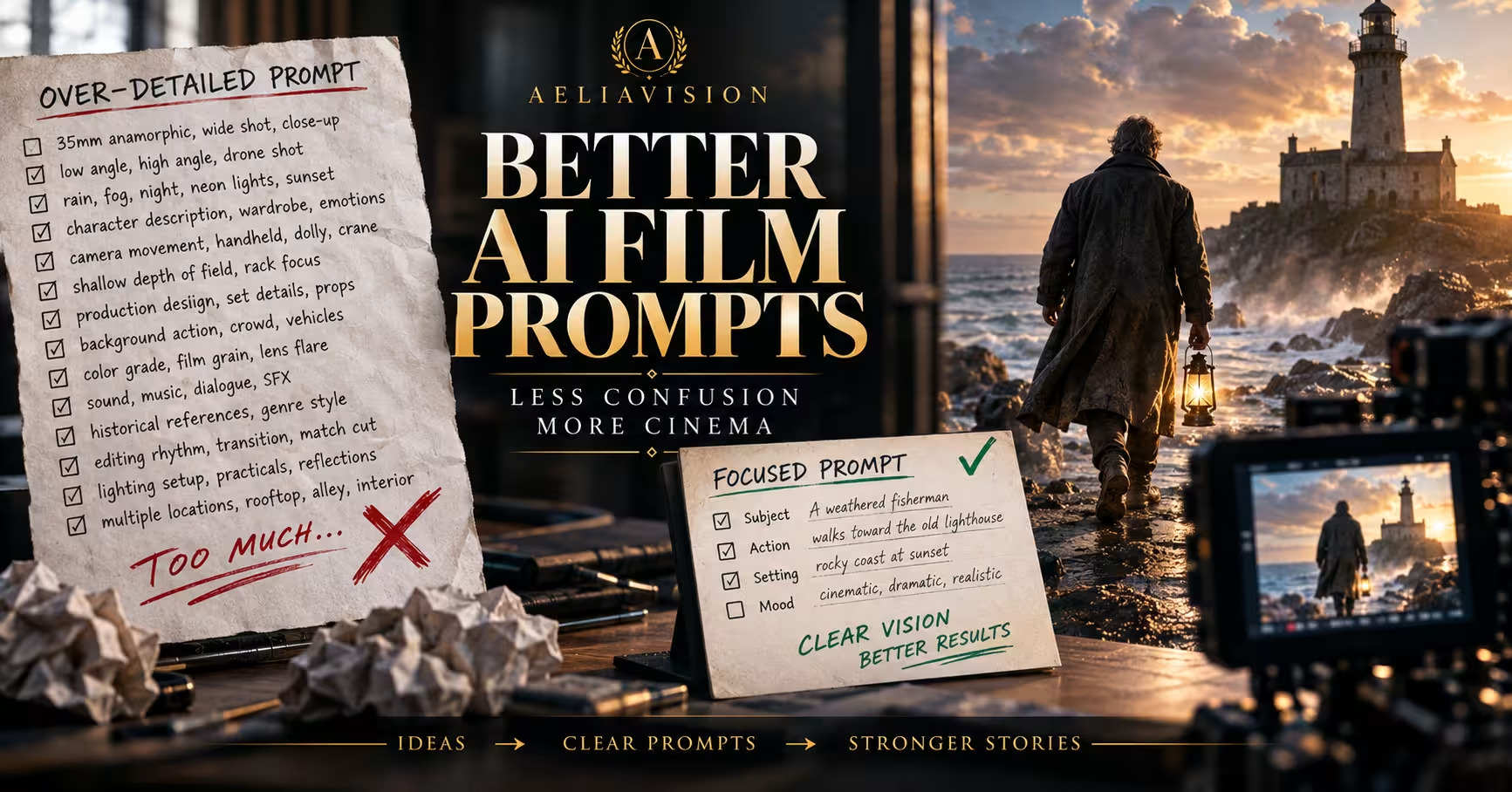
Over-detailed prompts can give an AI video model too many competing instructions. Learn how to simplify overloaded film prompts without losing the shot, mood, or story.
Inside this story
An AI film prompt can fail because it says too little. It can also fail because it says almost everything.
Many creators respond to an unpredictable generation by adding more instructions. They specify the lens, camera movement, lighting rig, wardrobe, weather, facial expression, production design, color grade, sound, editing rhythm, background action, historical references, and emotional subtext. The intention is sensible. More detail should mean more control.
In practice, an overloaded prompt often gives the model a pile of competing priorities rather than a clear shot description. The result may contain impressive fragments of the request, but the scene feels confused. The camera moves in the wrong direction. The subject changes clothes halfway through. The background steals attention. The mood becomes generic. A carefully written prompt produces a video that looks less intentional than a short one.
This guide explains how to recognize over-detailed prompts, why they break down, and how to reduce them without flattening your creative idea. The goal is not to write vague prompts. The goal is to give the model a small number of strong decisions it can execute together.
What an over-detailed prompt actually is
An over-detailed prompt is not simply a long prompt. Length is a weak measurement. Some long prompts work well because they describe one coherent visual system. Some short prompts fail because they contain contradictory instructions.
A prompt becomes overloaded when it asks the model to solve too many major problems at once. It may describe a wide establishing shot, a close emotional performance, a complicated action beat, a specific transition, several characters, multiple locations, and a complete visual style in one generation. Each request might be reasonable on its own. Together, they compete for attention and screen time.
The central problem is priority. If every instruction is presented as equally important, the model has to guess which details matter most. Different video tools handle this differently, but most are better at following a clear hierarchy than a flat inventory of adjectives.
> A rain-soaked detective in a charcoal trench coat walks through a neon market at midnight, filmed on a 35mm anamorphic lens with a slow handheld push-in, shallow depth of field, cyan and magenta lighting, warm practical bulbs, wet pavement reflections, drifting steam, distant umbrellas, a red motorcycle crossing frame, a street vendor shouting, a police drone overhead, a subtle rack focus to a newspaper, a low angle at first, then a high angle, then a close-up, with noir contrast, cyberpunk production design, 1970s thriller grain, modern music video pacing, restrained acting, visible breath, and a sudden match cut to a rooftop.
The idea is cinematic, but the prompt describes several shots and several kinds of attention. A more usable version might be:
> Medium tracking shot of a detective in a charcoal trench coat walking through a rain-soaked neon market at midnight. Cyan and magenta signs reflect on the pavement while steam drifts through the crowd. Moody urban noir, restrained performance, shallow depth of field.
The second prompt protects the subject, action, setting, and mood. It leaves the model room to render the scene instead of forcing it to interpret a miniature production bible.
Why creators overload film prompts
Over-detailed prompts usually come from a reasonable fear: if a creator does not mention something, the model may invent it. That fear is often correct. AI video systems can change a character’s clothing, lose an important prop, ignore a location detail, or drift away from the requested period.
The usual response is to list every desired feature. Creators also borrow language from cinematography forums, image generation prompts, film treatments, and camera manuals. Technical vocabulary can help, but it can also create the illusion of control. Naming five lenses does not give the model five times the cinematic understanding. It may simply make the camera instruction less clear.
Another cause is trying to direct the entire sequence in one prompt. A human director can plan an opening shot, cut to a close-up, stage a background event, and coordinate sound and performance because those decisions happen across a workflow. A single generation may not have a reliable way to represent all of them. The prompt is carrying the work of a shot list, storyboard, edit plan, art direction brief, and performance note at the same time.
There is also a psychological trap. When a generation is disappointing, adding detail feels more productive than removing it. The prompt grows, but the creative problem remains. Simplifying can feel like giving up even when it is the fastest path to control.
The main signs of an overloaded prompt
You can often diagnose the problem before generating anything. Look for these warning signs.
It contains multiple camera setups
A single prompt may request a wide shot, a low angle, a close-up, an overhead view, a rack focus, a whip pan, and a crane move. These are not small variations. They are different shot designs.
Choose one primary camera idea. If the shot needs to change perspective, split the sequence into separate generations or use a storyboard workflow.
It tells the model to show several story beats
A character enters a room, notices a letter, reads it, remembers a childhood event, runs outside, and sees a car explode. That is a scene outline, not one shot. A model may compress the beats, omit the middle, or produce unstable transitions.
Keep one prompt focused on one visible action. A shot can contain a beginning, middle, and end, but they should be variations of the same action, such as a character turning toward a sound or a vehicle approaching a gate.
It uses several style labels that do not naturally belong together
“Photorealistic documentary, expressionist German cinema, glossy commercial, 1980s VHS, anime-inspired motion, and prestige television lighting” gives the model a difficult style-matching problem. Hybrid aesthetics can work, but the combination needs a clear anchor.
Name the dominant visual language first. Add one supporting influence only when it changes a specific visual property. For example, “grounded crime drama with muted 1970s film grain” is more usable than a string of six genre labels.
It includes many adjectives for the same idea
A lonely, melancholy, sorrowful, isolated, devastated, emotionally exhausted character may not become more lonely because the prompt repeats the feeling. The repetition uses attention without adding a visual instruction.
Translate emotion into behavior and image. Instead of listing five words for sadness, write “she keeps her eyes on the empty chair and answers after a long pause.” Visible behavior gives the model something to depict.
It describes details that will not be visible
A prompt may specify the exact material of a character’s socks, the brand of a watch hidden beneath a sleeve, or a detailed history for a background building. If the detail cannot affect the image, it probably does not belong in the shot prompt.
Keep invisible information in your project notes, character sheet, or continuity document. Put visible, relevant information into the generation prompt.
It contains negative instructions that fight the positive description
The prompt asks for a crowded city but says “no background people, no visual clutter, no movement, no distractions.” It asks for a natural performance but says “do not blink, do not move the head, do not gesture, do not look away.” Negative prompts can prevent common errors, but a long list of prohibitions can make the scene internally inconsistent.
Use a few targeted negatives for known failure modes. Do not use them as a second full prompt.
It reads like a paragraph of production notes
A useful prompt can include production language. The warning sign is not technical vocabulary by itself. The warning sign is a paragraph where every phrase introduces a new department: camera, lighting, costume, props, casting, sound, editing, visual effects, and distribution format.
A generation prompt should usually describe the shot. It should not need to carry the entire production meeting.
The four layers of a strong AI film prompt
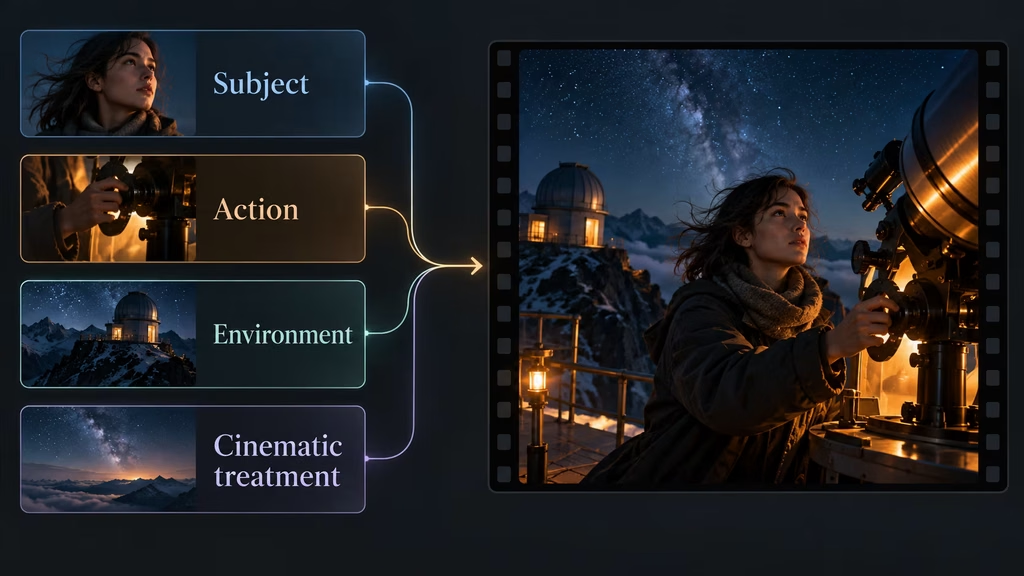
A practical prompt can be organized into four layers. This structure keeps the important information visible and makes editing easier.
1. Subject
Who or what does the viewer need to notice? State the main subject early. Include only identity details that affect the image, such as age range, clothing silhouette, physical action, or a distinctive prop.
Example:
> A young astronomer in a dark wool coat stands beside a portable telescope.
This is enough to establish the visual subject. You can add “short dark hair” or “red scarf” if continuity matters. You do not need a full biography.
2. Action
What is happening now? Use one clear verb whenever possible. “Walks,” “opens,” “turns,” “waits,” “runs,” and “looks up” are easier to stage than a sequence of abstract intentions.
Example:
> She adjusts the telescope, then looks toward a sudden light over the hills.
This includes a simple progression, but both actions belong to the same moment. If the model struggles, split them into two shots.
3. Environment
Where does the action occur, and which environmental features support the story? Choose the details that affect composition, lighting, movement, or mood.
Example:
> The scene takes place on a windswept mountain observatory under a clear night sky, with distant city lights below.
The observatory, wind, sky, and city lights all have a visible role. A list of every instrument and wall poster would add less value.
4. Cinematic treatment
How should the viewer experience the shot? Add one camera choice, one lighting direction, and one broad mood or texture.
Example:
> Slow medium push-in, cool moonlight with a warm lamp on her face, quiet suspense.
This gives the generation a coherent treatment. You can specify a lens or frame rate when it is important, but do not stack technical choices that do not change the intended result.
A compact prompt using the four layers could read:
> A young astronomer in a dark wool coat adjusts a portable telescope on a windswept mountain observatory. She looks toward a sudden light over the hills, with distant city lights below. Slow medium push-in, cool moonlight and one warm lamp on her face, quiet suspense.
The prompt is specific without trying to choreograph an entire short film.
Rank information instead of adding more information
When a prompt contains an important detail, make its priority obvious through order and wording. Put the subject and main action first. Place supporting details later. If a detail is essential for continuity, state it plainly and repeat it only when necessary across shots.
Consider this overloaded description:
> A woman with a distinctive green umbrella, wearing a cream blouse and navy trousers, walks slowly through a busy station while looking anxious, distracted, hopeful, nostalgic, and determined, as the camera circles her 360 degrees on a 50mm lens, starting in a wide shot and moving into a close-up, with golden-hour sunlight, fluorescent overhead lighting, fog, rain, steam, commuters, pigeons, a departing train, a forgotten suitcase, a red sign, shallow focus, deep focus, soft grain, high contrast, and a muted teal-orange grade.
The green umbrella may be important. The station may be important. The emotional state may be important. Everything else is competing.
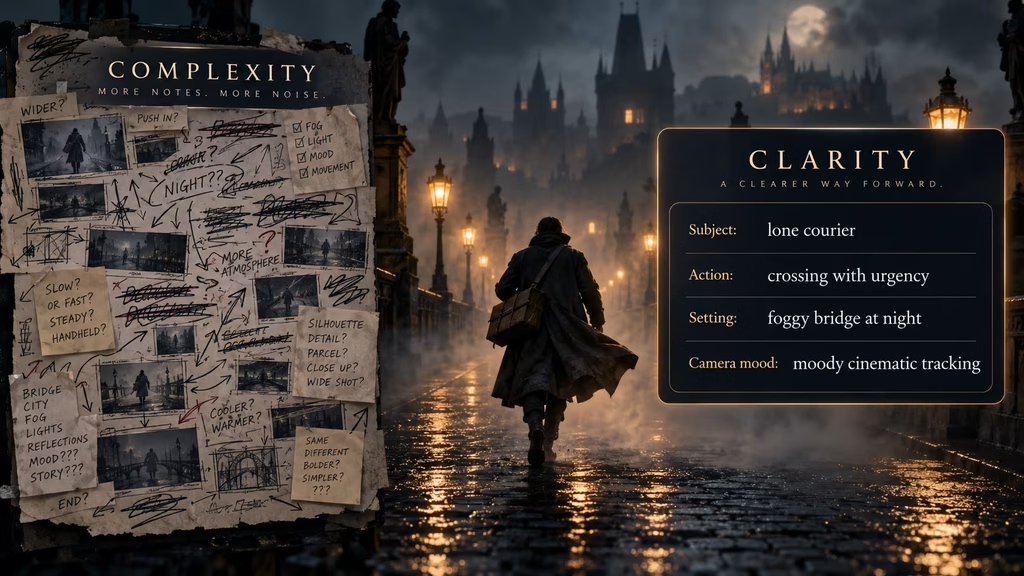
A ranked version might be:
> A woman carrying a distinctive green umbrella walks through a crowded train station and notices an abandoned suitcase. Medium tracking shot, anxious but controlled performance, mixed cool station light and warm daylight from the platform.
The prompt now has a visual anchor, a clear action, and a reason for the emotion. If the suitcase is the story’s key object, it deserves a separate insert shot rather than another sentence of adjectives.
A useful editing question is: if the model follows only the first three instructions, will the shot still communicate the scene? If the answer is no, the prompt may be missing a clear subject or action. If the answer is yes, the remaining details can be treated as optional support.
Specificity versus clutter
Specificity helps when it narrows the visual interpretation. Clutter appears when details do not narrow anything, repeat an existing instruction, or introduce a separate decision.
Specificity:
> A red emergency beacon rotates on the ceiling, washing the hallway in intermittent light.
Clutter:
> A visually striking, highly atmospheric, dramatic, cinematic, intense, mysterious hallway with emotionally rich lighting and many compelling details.
The first example gives the model an object and a lighting behavior. The second announces a desired feeling without defining what should appear on screen.
Another useful test is substitution. Replace a detail with a simpler phrase and ask whether the image would materially change. If replacing “brushed silver Art Deco wall sconce with a frosted globe and aged brass mount” with “a vintage wall lamp” produces the same shot, keep the simpler phrase unless the exact sconce matters to the story.
This does not mean detail is bad. Production design often depends on detail. The point is to spend detail where the camera can see it and where the story benefits from it.
How to simplify an overloaded prompt
The following process works for most text-to-video and image-to-video prompts.
Step 1: Write the full idea without judging it
Start with the messy version if that is how the idea arrives. Include the references, mood, action, setting, and technical instincts. This is your creative dump, not necessarily the final prompt.
Do not try to make the first draft short. Trying to edit while inventing can remove the very image you are trying to find.
Step 2: Circle the non-negotiables
Identify the details that must survive the simplification. Usually there are three to five:
– The main subject – The main action – The location or time – The emotional or visual tone – A continuity-critical object, costume, or physical trait
Everything else becomes optional. Optional details are not deleted forever. They can move into a second pass, a separate shot, or an art direction note.
Step 3: Remove duplicate meaning
Look for clusters of words that describe the same concept. Replace “dark, bleak, grim, oppressive, ominous” with one mood and one visible cause, such as “oppressive mood created by low overhead light and narrow walls.”
Do the same with camera language. “Slow, gentle, gradual push-in” is one movement. “Wide establishing shot that moves into a medium shot and ends in an intimate close-up” is a sequence, not one movement.
Step 4: Convert abstract feelings into visible behavior
AI video models cannot directly film “regret” or “inner conflict.” They can depict a character hesitating before touching a letter, keeping their gaze down, or leaving a room without taking a coat.
Abstract emotion is still useful as a style guide, but behavior should carry the scene. Use one emotional direction and one physical cue.
Step 5: Pick one camera priority
Choose the shot size and movement that best serve the moment. A wide shot emphasizes space. A medium shot balances performance and setting. A close-up emphasizes a face or object. A tracking shot emphasizes movement. A locked-off shot emphasizes stillness or observation.
If two choices are equally important, create two shots. A cut is not a failure of prompting. It is normal filmmaking.
Step 6: Keep one lighting logic
Lighting can be complex, but it should have a readable source or direction. For example, “cold window light from camera left with a small warm practical behind him” is clearer than “soft, hard, diffuse, cinematic, volumetric, natural, neon, and studio lighting.”
If the scene contains multiple sources, explain how they relate. One dominant source and one accent usually give the model enough to work with.
Step 7: Move technical details to the end
Lens, aspect ratio, frame rate, shutter angle, grain, and color profile may matter in a specialist workflow. They should not bury the subject and action.
Write the creative description first. Add only the technical parameters supported by the tool and relevant to the result. A model that does not use a setting cannot be made more accurate by seeing it repeated.
Step 8: Split the prompt into shots when the verb changes
This is one of the strongest rules in prompt cleanup. If the main verb changes from “walks” to “opens” to “looks” to “runs,” consider making a shot list.
For example:
1. Wide shot of a courier crossing an empty bridge in fog. 2. Medium shot as the courier stops at a locked gate. 3. Close-up of a gloved hand holding a brass key. 4. Tracking shot as the gate opens and the courier enters.
Each shot has a manageable job. You can maintain continuity by repeating the essential character description in each prompt.
A practical before and after example
Here is a prompt that tries to do too much:
> A handsome young pilot in a weathered brown leather jacket and cream scarf, with windswept black hair, walks across a desert airfield at sunrise toward a vintage red biplane while carrying a metal suitcase, glancing back at a distant burning hangar, then stops to remember his sister, raises his goggles, climbs into the cockpit, starts the engine, takes off, and flies over mountains, filmed with a sweeping drone shot, low-angle tracking shot, macro close-up, 24mm lens, 85mm lens, shallow depth of field, deep focus, anamorphic flares, golden-hour haze, smoke, dust, sparks, realistic flight physics, epic adventure tone, intimate family drama, old Hollywood color, modern blockbuster scale, period accurate props, dramatic orchestral sound, and a fast match cut to a photograph.
There is a good sequence inside this prompt, but it should not be generated as one shot. The creator can preserve the idea by turning it into a small sequence.
Shot one:
> Wide shot of a young pilot in a weathered brown leather jacket and cream scarf crossing a desert airfield at sunrise toward a vintage red biplane. A distant hangar burns behind him. Wind lifts dust across the ground. Period adventure drama, slow lateral tracking shot.
Shot two:
> Medium shot of the pilot stopping beside the red biplane. He looks toward the burning hangar, then grips a metal suitcase at his side. Warm sunrise light, smoke in the distance, restrained grief, steady camera.
Shot three:
> Close-up of the pilot opening the metal suitcase to reveal an old photograph of his sister. Dust moves across the frame as the aircraft engine begins to turn. Shallow focus, warm light on the photograph, quiet tension.
Shot four:
> Low angle as the vintage red biplane accelerates across the desert runway and lifts into the sunrise. Dust trails behind the wheels, mountains silhouetted in the distance. Broad adventurous composition, smooth camera movement.
The four prompts share the character, costume, plane, and period. Each prompt handles one visual problem. That is more controllable than asking for the entire story in one generation.
How much technical language is enough?
Technical terms work best when they communicate a visible result. “Locked-off medium shot” tells the model that the frame should remain stable while the subject performs. “Long lens compression” suggests a particular spatial relationship. “Shallow depth of field” directs attention toward a subject or object.
Technical language becomes less useful when it is stacked without a purpose. A prompt that says “24mm anamorphic 2.39:1 cinematic shallow depth of field with a 180-degree shutter and vintage spherical bokeh” contains choices that may conflict or may not be supported by the tool. It also distracts from the action.
Use a simple rule: one camera movement, one framing instruction, and one depth or texture instruction. Add more only when you have tested the model and know the extra control changes the output.
For example:
> Medium close-up, slow push-in, shallow focus on her eyes, natural handheld texture.
That is enough for a performance shot. You do not need to specify every physical property of the lens unless a particular artifact is central to the look.
Negative prompts without a second overload
Negative prompts can be helpful for recurring problems such as extra fingers, text artifacts, warped faces, unwanted logos, or visible watermarks. They are less effective when they become a long list of every possible failure.
A negative instruction should remove a specific unwanted feature. It should not describe an alternate scene.
Useful:
> No text, logos, watermarks, or extra limbs.
Potentially confusing:
> No blur, no grain, no noise, no movement, no dramatic lighting, no shadows, no reflections, no background people, no objects, no camera shake, no stylization, no distortion, no darkness, no bright areas.
The second list removes the visual language that makes the shot readable. If you need a clean product shot, say that directly in the positive prompt. If you need a quiet frame, describe the camera as locked off and the subject as still.
Do not use negative prompting to repair a concept that is overloaded at the positive level. Simplify the main description first.
Use references as anchors, not as a pile
Reference images can reduce the need for lengthy prose. A character reference can establish face, hair, costume, and silhouette. A location reference can establish architecture and color. A style reference can establish texture and contrast.
The reference does not remove the need for a clear action prompt. It simply lets you avoid describing what the image already communicates.
Instead of writing a paragraph about a character’s entire appearance, write:
> Use the attached character reference. She walks through the flooded subway tunnel and turns toward the sound of a train.
If the tool supports multiple references, assign each one a job. One image for character, one for location, and one for visual texture may be useful. Five references with overlapping styles can create the same conflict as five style labels in text.
Always check whether the tool treats references as strict identity anchors or loose inspiration. The prompt strategy changes depending on that behavior.
Prompting for character continuity
Over-detailed prompts often try to solve continuity by repeating a complete character description in every shot. Repetition can help, but a full paragraph is not necessary.
Create a compact continuity line with the traits that must remain stable:
> Same character: woman in her early thirties, cropped black hair, olive field jacket, small silver pendant.
Use that line consistently. Keep the action and camera instructions separate. If the character changes costume for story reasons, make the change explicit in the relevant shot rather than adding every possible outfit to every prompt.
Continuity also depends on the environment. Repeat distinctive props, color anchors, and time of day when they matter. You do not need to repeat generic details such as “cinematic lighting” in every shot if the sequence is already being generated within a consistent project setup.
A short continuity bible can hold information that does not belong in the generation prompt:
– Character appearance and costume rules – Prop design and scale – Location architecture – Time period and technology – Color palette – Performance boundaries – Details that must not change
The prompt should pull the relevant line from this document, not copy the entire bible every time.
Prompting for mood without purple prose
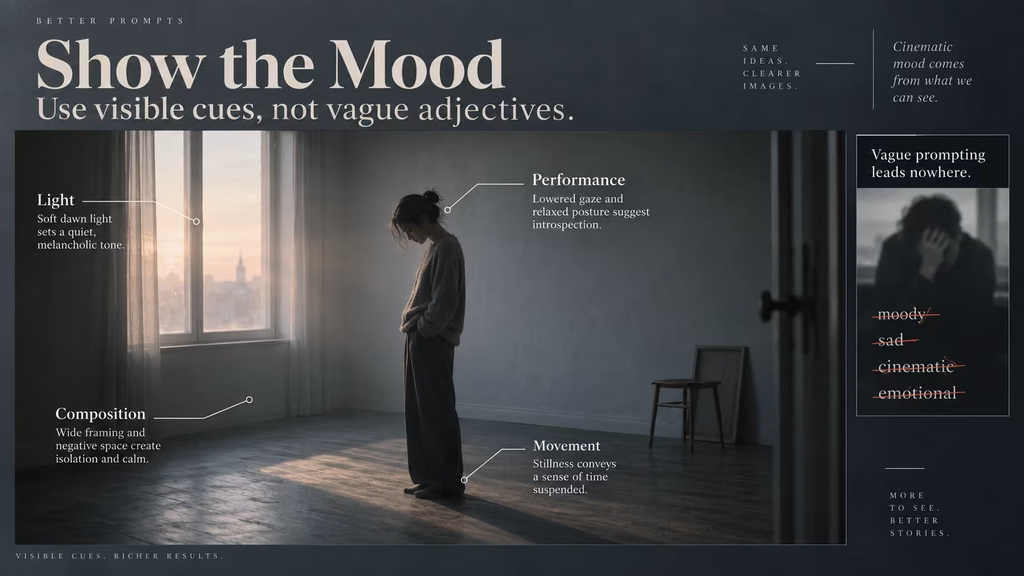
Mood is essential in film. The mistake is treating mood as a stack of decorative adjectives. A useful mood instruction tells the model how the scene should feel through light, pace, performance, and composition.
Weak:
> Haunting, ethereal, emotionally profound, deeply moving, dreamlike, mysterious, atmospheric, poetic, and unforgettable.
Stronger:
> Empty composition, slow movement, pale dawn light, and a character who avoids looking at the camera. Quiet unease.
The stronger version has fewer mood words but more cinematic evidence. It gives the model decisions it can render.
This approach also makes the prompt easier to revise. If the result feels too cheerful, change the light or performance. If it feels too busy, remove background movement. If it feels too literal, adjust the composition or pacing. Abstract adjectives alone do not tell you what to change.
When to use multiple passes
A strong AI film workflow separates invention from control. The first pass can explore composition and atmosphere. The second pass can solve character continuity, prop placement, or camera timing. The third pass can refine motion and finishing details.
Trying to get all three passes from one prompt creates unnecessary pressure. If the first generation has the right location but the wrong action, changing the entire prompt may destroy the location. If the action is right but the costume drifts, use a reference or continuity instruction instead of adding a new paragraph about the weather, lens, and color grade.
A useful sequence is:
1. Generate the core shot with subject, action, setting, and broad mood. 2. Keep the strongest composition and refine the subject or prop. 3. Adjust motion, camera movement, and timing. 4. Add finishing texture such as grain, haze, or a controlled grade.
Not every tool supports iterative editing in the same way. The principle still applies. Solve one class of problem at a time.
Diagnose the output before rewriting the prompt
Do not immediately add instructions after a weak result. First identify what failed.
If the subject is wrong, strengthen the subject description or use a reference. If the action is wrong, shorten the action and make the verb more concrete. If the camera is wrong, remove competing movements. If the style is wrong, choose one dominant visual treatment. If the scene is unstable, reduce the number of moving objects and shorten the duration.
Keep a small test log. Record the prompt, model or workflow, duration, and one sentence about the failure. For example:
> Version 3: correct character and location, but the suitcase disappears when she turns. Next change: make the suitcase part of the action and remove background extras.
This is more useful than saying the prompt needs to be “more cinematic.” A specific diagnosis leads to a specific revision.
Change one or two variables at a time. If you rewrite the subject, camera, lighting, style, and negative prompt together, you will not know which change helped.
A compact prompt template
Use this template as a starting point:
> [Shot size and camera movement] of [main subject] [single clear action] in [specific setting]. [One or two visible details that support the story]. [Dominant light or color]. [Mood or performance direction].
Example:
> Medium locked-off shot of an exhausted paramedic washing blood from her hands in a quiet hospital utility room. Fluorescent ceiling light flickers above a red emergency bag on the counter. Restrained performance, tense silence.
For a moving scene:
> Wide tracking shot of two cyclists crossing a frozen lake at dawn. Their headlights cut through low fog as the ice cracks behind them. Cold blue light, urgent but realistic motion.
For a close-up:
> Close-up of an old man folding a child’s paper boat beside a rain-streaked window. Soft gray daylight, shallow focus, quiet grief.
These prompts are not universal formulas. They are filters. If a detail does not fit one of the slots, ask whether it belongs in this shot or in another part of the workflow.
A checklist for trimming before generation
Before sending a prompt to an AI film tool, ask:
– Is the main subject named in the first sentence? – Is there one primary action? – Can I describe the shot in one frame? – Have I chosen one main camera movement? – Is the setting specific enough to affect the image? – Are the mood words supported by visible behavior, light, or composition? – Are the technical terms compatible with one another and supported by the tool? – Have I removed repeated adjectives and synonyms? – Are the negative instructions short and targeted? – Does every detail matter to what the viewer will see? – Should any story beat become a separate shot? – Can I identify the three most important instructions?
If you cannot answer the last question, the prompt probably needs another edit.
The right amount of detail depends on the shot
There is no universal word count for a good film prompt. A simple locked-off close-up may need only two sentences. A complex action shot may need more information about movement, spatial relationships, and safety boundaries.
The detail should scale with the number of visual relationships the model must preserve. A single person sitting at a desk is simple. Two vehicles approaching from opposite directions in a narrow street requires clearer spatial language. A crowd scene with a coordinated camera move requires even more structure, but it may still be better handled as several shots.
Think in terms of decisions, not words. A prompt with 80 words can contain five clear decisions. A prompt with 250 words can contain twenty-five. The second prompt is more likely to drift because it asks the model to negotiate too many decisions at once.
Detail is valuable when it protects identity, action, composition, or continuity. It is wasteful when it merely signals taste.
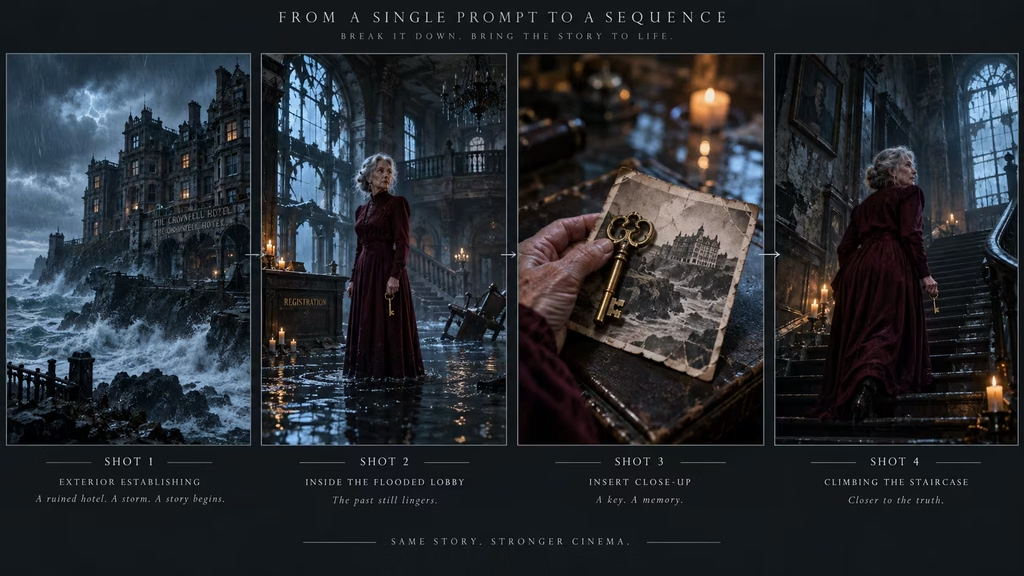
A final example: from overloaded to production-ready
Overloaded version:
> Photorealistic cinematic shot of a mysterious elderly woman with silver hair, wearing a faded burgundy velvet dress, a long black shawl, antique jewelry, old leather boots, and a blue flower pinned to her collar, standing in a ruined seaside hotel during a violent storm, hearing a ghostly child singing from upstairs, looking terrified but calm and wise, clutching a brass key and a photograph, while curtains fly, rain enters through broken windows, lightning flashes, water pours down the staircase, dust swirls, a chandelier swings, rats run, candles go out, the camera begins with a drone shot outside, crashes through the window, circles the woman, follows her upstairs, pushes into the key, racks focus to the photograph, then whip-pans into a ghostly memory, using 16mm grain, anamorphic flares, blue and orange lighting, gothic horror, psychological thriller, European art film, classic monster movie, realistic sound design, deep shadows, volumetric fog, high detail, and no modern objects.
Production-ready sequence:
Shot one:
> Exterior wide shot of a ruined seaside hotel during a violent storm. Lightning reveals broken windows and waves beyond the building. Cold blue night, restrained gothic horror, slow push toward the entrance.
Shot two:
> Medium shot of an elderly woman with silver hair wearing a faded burgundy dress and black shawl in the hotel’s flooded lobby. She holds a brass key and listens toward the staircase. Curtains whip through broken windows. Blue storm light with one dying candle, tense stillness.
Shot three:
> Close-up of the woman’s hand tightening around the brass key as a child’s singing echoes from upstairs. A worn photograph is visible in her other hand. Shallow focus, rain and candlelight reflected on the metal, psychological suspense.
Shot four:
> Low angle from the foot of the staircase as the elderly woman climbs toward the dark upper floor. Water runs down the steps and lightning flashes through the windows behind her. Slow deliberate movement, deep shadow, cold blue atmosphere.
The revised version keeps the important ideas: the woman, the hotel, the storm, the key, the photograph, the child’s voice, and the gothic mood. It removes the instruction pile and assigns each visual beat to a shot that can actually be composed.
Conclusion
The fix for an over-detailed prompt is not to remove the creative idea. It is to separate the idea into decisions the model can execute.
Start with the subject, action, setting, and cinematic treatment. Rank the details instead of presenting them as a flat list. Replace abstract emotion with visible behavior. Choose one main camera priority and one lighting logic. Keep negative prompts narrow. Put continuity information in a compact reference line or project bible. When the verb changes, consider making a new shot.
A good AI film prompt leaves less room for confusion, not less room for imagination. The model still has to render surfaces, motion, atmosphere, and small variations. Your job is to make the intended image clear enough that those variations support the shot rather than pull it apart.
The next time a generation looks chaotic, resist the urge to add another paragraph. Remove half the instructions, keep the decisions that matter, and test again. Clear prompts are not less cinematic. They are easier to direct.
Continue reading
Further insights from the Journal
Have a story in mind?
Bring your next project into focus.
Tell us what you are creating and what you want the audience to feel.