
The story in brief
A practical guide to fixing floating objects in AI filmmaking, from broken contact shadows and missing weight to sliding props, unstable surfaces, bad tracking, and postproduction repairs.
Inside this story
A coffee cup sits on a table, then drifts two centimeters to the left without anyone touching it. A suitcase follows a traveler down a station platform but never quite meets the floor. A knife rests on a cutting board while its shadow moves independently. A car tire appears to touch the road, yet the vehicle seems to hover above the asphalt.
These are floating objects. The phrase covers more than literal levitation. It also describes sliding props, weak contact, wobbling furniture, objects that pass through surfaces, and anything that appears disconnected from the world around it. The viewer may not name the problem, but they feel it immediately. The scene loses weight.
AI video generators are good at producing convincing surfaces and short bursts of motion. They are less dependable at preserving the physical relationship between separate objects over time. A model can make a table, a plate, a hand, and a shadow in the same frame, yet fail to keep those things attached to one another as the clip unfolds. The result is often attractive on first inspection and unusable once played at normal speed.
The fix is rarely one magic phrase. Better prompts help, but floating objects usually come from a combination of weak spatial references, ambiguous motion, camera movement, missing contact cues, and a shot that asks the model to solve too much at once. You need to diagnose which relationship failed before changing the wording.
This guide explains how to spot floating objects, why AI filmmaking produces them, how to prevent them during generation, and how to repair or hide them in postproduction. The examples apply to image to video, text to video, video to video, AI compositing, product shots, environments, creatures, vehicles, and synthetic camera moves.
What counts as a floating object?
An object feels grounded when its position, weight, contact, and movement make sense in relation to the surrounding world. That sounds obvious, but grounding is built from several visual signals. Remove one and the object may begin to float. Remove several and the illusion collapses.
– A prop slides across a table, floor, shelf, or vehicle interior without a force causing it. – A foot, wheel, chair leg, or product base does not appear to touch the supporting surface. – A contact shadow is missing, too soft, or detached from the object. – A shadow stays still while the object moves, or moves in a different direction. – An object wobbles in place even though the supporting surface is stable. – An object changes scale or perspective while the camera remains consistent. – A hand reaches toward a prop but never makes convincing contact with it. – A prop penetrates a wall, floor, table, body, or another object. – A vehicle or character moves, but the object that should be carried along stays behind. – A hanging object ignores its cable, chain, hinge, or mounting point. – A liquid container, bag, cloth, or flexible object responds as if it has no mass. – An object is stable in one frame and slightly rotated in the next, creating a visual tremor.
The broad diagnosis is useful, but production decisions require a more precise one. Is the object actually moving? Is the camera moving around a static object? Is the surface changing? Is the shadow wrong? Is the problem visible only at the point of contact? Each answer suggests a different repair.
A floating object is not always a model failure. A deliberately suspended prop can work if the shot gives it a reason to be suspended. A magician’s coin, a holographic interface, or a balloon can appear weightless when the scene provides the right cues. The mistake is usually unmotivated disconnection, not the absence of gravity in every frame.
Why floating objects happen in AI generated video
Generative video does not build a complete physics simulation and then render the result. It predicts visual changes that fit the prompt, reference material, and learned examples. Physical behavior may emerge when the shot is simple and familiar, but it is not guaranteed merely because the objects look realistic in a still frame.
The model has no firm object map
When a generator sees a reference image, it may recognize a broad arrangement: a mug near a hand, a suitcase beside a person, or a car on a road. It does not necessarily maintain a precise map of the mug’s rim, handle, base, table edge, and distance from the camera throughout the clip.
As motion begins, those parts can be reinterpreted. The cup may keep its color but lose its exact location. The handle may change shape. The table may subtly deform to accommodate a new frame. The model is trying to preserve visual plausibility locally, frame by frame, rather than enforce a production diagram.
The prompt describes appearance better than relationships
Many prompts list objects without explaining how they relate to one another. “A red suitcase in a train station, cinematic lighting, slow camera movement” identifies the ingredients but not the physical setup.
A stronger instruction states that the suitcase stands upright on four wheels, all wheels remain in contact with the polished floor, the handle stays extended, and the suitcase moves only when pulled by the traveler’s right hand. These details give the model a relationship to preserve.
Too many actions happen at once
A busy action prompt may ask a person to walk, open a door, lift a bag, turn toward camera, and drop a key while the camera arcs around them. Every new action creates more opportunities for contact to fail. The model may preserve the overall mood while losing the bag’s weight or the key’s landing point.
A short clip usually works better when it has one main physical beat. Establish the object, make one contact or movement happen, then stop. You can build a sequence from several controlled clips instead of forcing a complete scene into one generation.
Camera motion hides the source of the error
A moving camera makes floating harder to diagnose. Parallax, motion blur, changing reflections, and perspective shifts can disguise a small slide. The object may appear to drift because the camera move is inconsistent, or the object may actually drift while the camera remains stable.
For debugging, generate or inspect a locked off version first. If the object grounds in a static shot but floats during a camera move, simplify the camera path, use a stronger reference, or separate the object and background into different passes.
Contact shadows are weak or missing
Viewers use the darkest area close to a contact point to judge whether something touches a surface. A chair leg needs a small grounding shadow. A heavy case needs an occlusion band beneath it. A person standing on a floor needs a shadow that follows the feet and responds to the light source.
AI systems often produce a plausible global shadow while missing local contact. This is especially common with objects placed on reflective, foggy, brightly lit, or textured surfaces. The object can be geometrically close to the floor and still look airborne because the shadow does not confirm the contact.
The surface itself changes
Sometimes the prop is stable and the floor is not. Generative video may alter the texture, slope, reflection, or horizon of a road, table, or room. A stable object then appears to slide because the reference surface has shifted under it.
Check straight lines, tiles, wood grain, road markings, and shadow edges around the object. If they wobble too, the failure is environmental coherence rather than prop motion alone.
Occlusion breaks the model’s memory
When a hand passes in front of a cup, or a person crosses between camera and suitcase, the model has to reconstruct the hidden parts. It may bring the object back at a different position, angle, or scale. The same problem appears when smoke, rain, hair, cloth, or motion blur covers a contact point.
Occlusion is not always bad. It can hide a weak transition if timed well. But an object that disappears behind a body and returns with a different relationship to the floor needs a continuity check.

Diagnose the failure before rewriting the prompt
Do not begin by adding words such as “more realistic” or “physically accurate.” Those phrases express a wish, not a test. Play the clip several times and identify the first frame where the relationship fails.
Use a simple review pass.
Check the support point
Find the exact point that should touch the surface. For a mug, it is the base. For a chair, it is the legs. For a suitcase, it is the wheels or bottom edge. For a person, it is the feet. For a hanging lamp, it is the cable, chain, or ceiling mount.
Ask whether that point stays in the expected place relative to the surface. If the base rises and falls while the table remains stable, the object is bobbing. If the base stays close but the shadow separates, the problem may be lighting or compositing. If both object and shadow move while the tabletop texture also shifts, the scene may have global drift.
Check the first unwanted movement
Mark the first frame where the object starts to move. A slow, continuous slide suggests unstable anchoring. A sudden jump suggests a regeneration boundary, occlusion failure, or camera interpolation problem. A repeated left and right wobble suggests unstable geometry or a model trying to correct its own previous frame.
The first error matters more than the worst error. Once the object has drifted, later frames may be built on the wrong position. Repairing the end of the clip without fixing the start can leave a visible snap.
Check the camera and surface
Track a fixed detail on the supporting surface, such as a table corner, tile line, curb, or floor reflection. If that detail moves unexpectedly, the surface or camera is unstable. If the surface stays locked while the object moves, the object is the main problem.
A camera move can make a fixed object look as if it is sliding if the scene lacks reliable perspective cues. Compare the object’s movement with nearby edges, not with the frame itself.
Check the shadow and reflection
The shadow should remain attached to the object and follow the light. A reflection should remain below or beside the object according to the surface and camera angle. Reflections are particularly useful on polished floors and tables because they reveal small position changes that the object silhouette may conceal.
Do not assume a detached shadow means the object is floating. A moving light can separate a shadow from the object. The question is whether the lighting change is motivated and consistent with the rest of the shot.
Check contact with people
Hands, feet, and bodies create stronger expectations than many props. If a hand grasps a handle, the handle should deform or remain fixed in the hand as the object responds. If a foot steps onto a floor, the sole should meet the ground before the body weight shifts. If a person leans on a table, their arm should not pass through it or hover beside it.
Contact failures are often easier to hide by cutting before contact or after contact than by asking a generator to repair a complicated interaction. In a short commercial or social clip, an editorial solution may be cleaner than another generation pass.
Write prompts that define physical relationships
A grounding prompt should describe the object, its support, its contact, its movement, and the camera’s behavior. It does not need to be huge. It needs to be specific where the shot depends on physics.
A useful structure is:
1. Start state. 2. Support relationship. 3. One primary action. 4. End state. 5. Camera behavior. 6. Lighting and continuity constraints.
For example:
> Locked off medium close-up of a heavy black travel case standing upright on four small wheels on a concrete platform. All four wheels remain in contact with the ground. A hand enters from screen left, grips the extended handle, and pulls the case slowly toward screen right. The case rolls in a straight line without bouncing or sliding sideways. The platform, floor markings, and contact shadow remain stable. Stop after one meter of movement.
This prompt works better than “A cinematic traveler pulls a suitcase through a station” because it tells the system what should happen at the point of contact.
Use verbs that imply a physical cause. Pulled, pushed, carried, placed, dropped, attached, hanging, rolling, pressed, leaning, and resting all establish a relationship. Words such as floating, drifting, moving, or gliding are ambiguous unless the shot intentionally calls for them.
State what must remain fixed. If an object stays on a table, say that its base remains planted on the tabletop. If the camera moves, say that the object remains locked to the surface while the background changes through parallax. If a person carries a bag, specify which hand holds it and that the bag follows the hand rather than sliding independently.
Do not stack contradictory camera language. “Static shot with a dramatic orbit” gives the model two different instructions. Choose one. For a grounding test, begin with a fixed camera, a simple lens description, and a stable light source. Add movement only after the object passes the static version.
Use negative instructions carefully
Negative prompts can help, but they are not a substitute for a positive physical description. “No floating objects” may reduce a literal levitation effect while failing to preserve contact. Pair the negative with a clear instruction:
> Keep the mug base planted on the table. Preserve the contact shadow directly beneath the mug. No sliding, bouncing, hovering, or independent shadow movement.
Negative language is most useful for known failure modes. Do not create a long list of every possible defect. A crowded negative prompt can compete with the main action and make the result less predictable.
Keep one object relationship central
If a shot contains a person, bicycle, shopping bag, dog, phone, puddle, moving car, and falling leaves, decide which relationship the audience must read. You may want the person to remain stable on the bicycle, while the leaves can be imperfect. Or the phone handoff may be essential while background pedestrians can be soft and abstract.
Prompt and review priorities should match. If the contact between a hand and a phone matters to the story, simplify the background and camera movement until that exchange works.
Use references that show contact, not only appearance
A clean product cutout is useful for shape and color, but it does not tell the model how the product meets a surface. A reference pack for a grounded object should include the object in context.
For a small prop, collect:
– A three quarter view on the intended support surface. – A side view that shows height above the surface and contact shadow. – A top or overhead view when placement matters. – A hand interaction reference if the object is held or moved. – A lighting reference from the intended direction. – A scale reference beside a familiar object.
Keep the object identity consistent across those references. Do not mix a clean studio product image with a different version that has another handle, label, base, or color. If the generator uses multiple reference inputs, make their purpose clear and avoid giving equal weight to images that disagree.
For larger objects, include the surrounding geometry. A bicycle should be shown with wheels on the road. A chair should be shown with legs on the floor. A vehicle should be shown with tires meeting the ground and a visible cast shadow. The context gives the model more information than an isolated object floating on a white background.
Reference images do not guarantee physical accuracy. They narrow the visual problem. You still need to test the relationship in motion.
Start with an easy shot, then add complexity
A reliable workflow builds from a low-risk test. Generate a short locked off clip of the object at rest. Look for scale breathing, edge wobble, shadow separation, and surface drift. If the object cannot remain still, it is unlikely to remain grounded during a complex action.
Next, add one simple movement. A hand places a cup on a table. A suitcase rolls in a straight line. A box is pushed across a warehouse floor. A person takes one step. Keep the clip short enough that you can identify the exact moment of failure.
Only then add the camera move, secondary motion, environmental effects, and performance details. This order may feel slower at the beginning, but it prevents you from spending time polishing a shot whose basic contact never worked.
Use short clips when contact is the priority. A four second shot with one clear action is often more usable than a twelve second shot in which the object has to remain stable through several beats. You can hide a cut with a foreground pass, a whip movement, a close detail, or a sound bridge.
When generating variations, change one variable at a time. Keep the reference and camera fixed while changing the action. Or keep the action fixed while changing the prompt wording. If you change the model, reference, duration, camera, and seed together, you will not know why one take worked.
Fix floating objects in common AI filmmaking scenarios
Props on tables and shelves
Tables and shelves produce frequent sliding errors because their surfaces contain texture, reflections, and edges that can shift during generation. Describe the prop’s base and the surface directly. Mention whether the prop is heavy, upright, flat, or attached.
A useful instruction might be:
> Close-up of a glass bottle resting flat on a stone countertop. The circular base stays planted in one position while the camera makes a very slow horizontal slide. The bottle does not rotate, stretch, or move independently from the countertop. Its soft contact shadow remains directly beneath the base.
Avoid asking for a camera move that crosses the object from a weak angle in the first test. A lateral slide with a visible counter edge is easier to inspect than a full orbit around a small bottle.
In post, a subtle tracked shadow and a short freeze or hold can sometimes save a shot. If the bottle itself changes shape, do not rely on a shadow fix. Replace the object with a clean plate or regenerate the critical section.
People standing and walking
Feet are hard because they combine anatomy, balance, floor contact, and motion. A standing figure may appear to hover when the feet are hidden by a long coat, fog, or shadow. A walking figure may slide when the stride and ground movement disagree.
For a standing shot, specify a stable stance, visible soles or shoes, weight distributed through both feet, and a floor with clear texture or shadow. For a walk, describe a limited action such as “takes two slow steps forward and stops.” Avoid mixing a walk cycle with a complex turn, gesture, and camera orbit until the basic movement works.
If the face and upper body are important but the feet are unreliable, frame the shot at the waist or use foreground objects to mask the lower body. This is not cheating. Filmmakers choose framing to control attention and hide details that the audience does not need.
Vehicles and wheels
Vehicles expose floating errors through tires, suspension, road contact, reflections, and background speed. A car may move forward while its wheels remain visually static, or the body may glide sideways while the road markings stay fixed.
Ask for a clear direction of travel and a stable road relationship. Include visible tire contact, suspension response, and a consistent shadow. Avoid asking for an extreme low angle, fast turn, rain, smoke, and rapid camera chase in the first pass.
For a product or hero vehicle shot, separate the beauty move from the driving action. A slow camera move around a parked vehicle is easier to control than a moving car on a wet road. If the car must drive, use a simple side or three quarter view first, then add speed and weather in later versions.
Hanging objects
Lamps, signs, cables, curtains, and suspended props need a visible attachment point. If the top of the cable is out of frame, the viewer may still expect the object to respond to the unseen support. A hanging object that sways without its cable moving looks disconnected.
Describe the mount, cable or chain, direction of force, and amount of sway. Say whether the object is fixed, swinging from a previous disturbance, or being pulled. A slight motion with a clear cause reads better than a large decorative sway.
Objects in water, smoke, or loose materials
Water and smoke make grounding difficult because they are already fluid. A boat should displace water. A foot stepping into a puddle should create a disturbance at the moment of contact. A box in smoke should still have a stable edge and shadow where visibility allows.
Use environmental response as a grounding cue. Ask for a wake behind a moving boat, a small splash under a foot, dust displaced by a dropped object, or cloth tension around a moving body. These effects should follow the action rather than act as generic atmosphere.
Do not pile on effects before the object works in a clean version. Rain can hide a slide for a moment, but it can also make reflections and shadows harder to track.
Products and packaging
Product shots often fail when the item is expected to remain fixed while the camera moves. Describe the support, orientation, and visible brand or shape details. If packaging includes text, generate the scene without relying on the model to create exact copy. Add approved typography in post when accuracy matters.
A rotating product turntable is a common trap. The item may deform, the label may rotate independently, or the base may stay fixed while the body floats. Use a simple partial turn, keep the camera stable, or create the rotation through a controlled 3D or compositing workflow.

Repair options in postproduction
Not every floating object deserves another generation. Sometimes the cleanest solution is editorial or compositing work. Choose the least invasive repair that restores the viewer’s trust.
Cut before the error
If the object is grounded at the start and end but drifts in the middle, cut around the bad frames. A reaction shot, insert, sound effect, or change in angle can cover a short gap. This works especially well when the object movement is not the story’s main event.
Do not force a long continuous take when two shorter shots communicate the same action more clearly. AI filmmaking benefits from coverage and editorial flexibility.
Hold a stable frame
A brief freeze or hold can hide small instability in a product, prop, or background. Use it sparingly and add a natural sound continuation or camera movement elsewhere so the hold does not feel like a mistake.
A hold cannot repair a broken action. It can preserve a good contact moment while you cut to another angle.
Track and replace the shadow
If the object shape and position are acceptable but the contact shadow is wrong, create a new shadow layer. Track the base or contact point, draw a soft shape that matches the light direction, and animate its opacity and softness as the object moves.
The replacement shadow should not look like a dark sticker. It needs the right blur, density, color, and falloff for the surface. A hard shadow on a diffuse studio floor may be as distracting as no shadow at all. Add a small occlusion shadow directly under the object and a wider, weaker cast shadow where appropriate.
Stabilize the object or surface
If the object drifts by only a few pixels, a tracked stabilization pass can work. Mask the object, track its intended anchor, and counteranimate the layer. If the whole surface moves, stabilize the surface instead and check that the background still matches.
This method becomes risky when the object overlaps a hand, another prop, or a changing reflection. A small movement can cause edge tearing or reveal that the replacement is a flat patch. Inspect at full resolution before approving it.
Composite a clean object
For a hero prop, generate or photograph a clean version and composite it into the shot. This is often the right choice for packaging, phones, tools, instruments, and objects with exact geometry.
Match the clean layer to the plate with perspective, motion blur, grain, depth of field, and light. Preserve the original interaction where possible. If a hand touches the prop, the hand may need to sit above the replacement layer, with a separate shadow or occlusion pass beneath it.
Use rotoscoping and occlusion masks
When an object moves behind a person or foreground element, masks can hide a transition. Keep the foreground occluder consistent and cut during the hidden interval. If the object returns in a new position, the audience may accept it if the occlusion is long enough and the sound supports the edit.
Masks do not solve a continuity error in a clear, uninterrupted close-up. They only give you a controlled place to change the object.
Add physical sound
Sound cannot repair a visible float, but it can strengthen a grounded action. A suitcase should make appropriate wheel noise. A cup set on a table needs a small impact. A box sliding across wood should have friction. A suspended lamp should creak or knock against its mount when it moves.
Avoid adding a loud sound to force the audience to believe an action that is not visible. The sound should match the timing and material. If the object never appears to touch the table, a table impact may call attention to the mismatch.
Compositing details that sell contact
Grounding is a stack of small cues. A successful composite usually needs more than one.
Start with the base position and scale. The object must sit at the correct height relative to the surface. Then match the perspective. A slight mismatch in vanishing lines can make a perfectly tracked object appear to hover.
Next, match the light. Compare the object’s highlight direction with the surface reflection and nearby shadows. If the scene light comes from screen left, the object should not have a strong highlight from screen right unless a second source explains it.
Add occlusion where surfaces meet. This is the narrow, darker transition at a contact point. It should usually be subtle, especially on pale or reflective materials. Too much occlusion makes the object look pasted down.
Match motion blur and depth of field. A sharp inserted prop in a blurred moving shot will appear detached even when its position is correct. The same applies to grain and compression. Composite work should inherit the visual imperfections of the plate.
Reflections deserve separate attention. A glossy floor can reveal an incorrect object position more clearly than the object itself. Generate, track, or paint a matching reflection when necessary. Keep it softer, darker, and less detailed than the object unless the surface is a mirror.
When to stop repairing and regenerate
Postproduction is valuable, but it has limits. Regenerate when the object changes identity, passes through another object, loses a major part, or moves in a way that affects the story. Regenerate when the repair would require a long frame by frame paint job that costs more than a simpler take.
Keep a failed take when it contains useful material. A bad wide shot may provide a background plate. A drifting prop may be covered by a close-up. A flawed action may supply a reaction or sound timing reference. Failure is not always wasted if you label it and reuse the usable parts.
Regeneration is also the better option when the grounding error appears in the first frame. If the starting state is wrong, every later repair becomes harder. Return to the reference, simplify the shot, and establish the object at rest before asking it to move.
A practical troubleshooting checklist
Use this checklist before approving a generated clip with important physical contact.
Scene setup
– Is the supporting surface visible enough to judge contact? – Is the object’s base, wheel, foot, cable, or attachment point visible? – Does the reference show the object in context rather than only as a cutout? – Is the scale relationship with nearby objects clear? – Is the light direction stable and believable?
Motion
– What is the one primary physical action? – What causes the object to move? – Where does the movement start and stop? – Does the object respond with the expected weight or resistance? – Does the support surface remain stable during the action?
Contact cues
– Does the object meet the surface in every important frame? – Does the contact shadow remain attached? – Does the reflection follow the object? – Do hands, feet, wheels, or cables connect convincingly? – Are there any penetrations, gaps, or sudden rotations?
Camera
– Is the camera move necessary for the shot’s job? – Can you pass the same action with a locked off camera? – Do nearby lines and textures support the object’s position? – Does motion blur make a small error worse? – Would a closer or more stable angle hide irrelevant instability?
Postproduction
– Can the error be removed with a cut? – Can a tracked shadow restore contact without exposing a new mismatch? – Does a clean replacement object cost less than another generation pass? – Does the repaired layer match perspective, blur, grain, light, and reflection? – Has the shot been checked at normal playback speed and frame by frame?
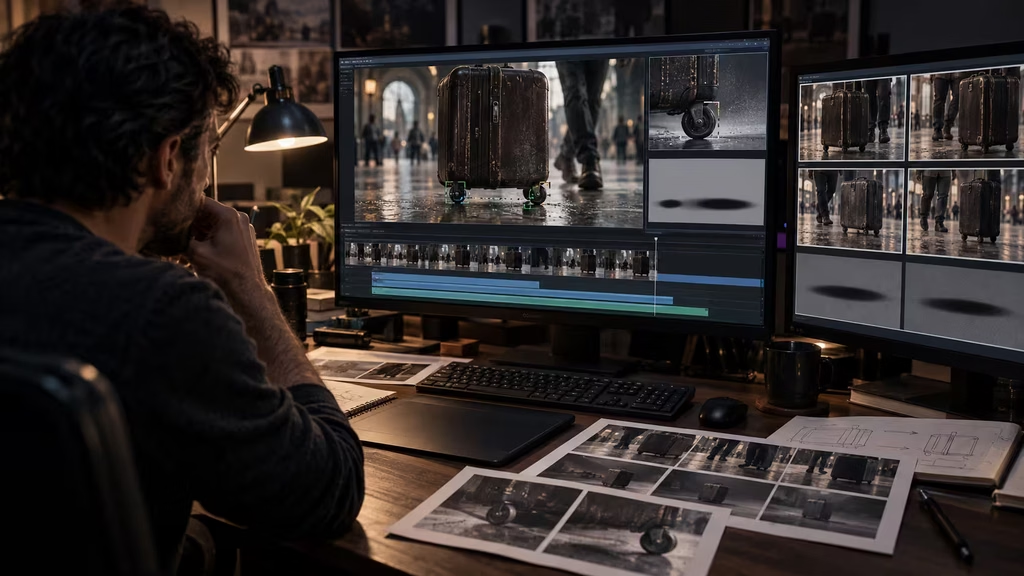
Build grounding into the shot plan
The best fix happens before generation. During shot planning, mark which objects need physical continuity and which can remain soft or abstract. A hero product, a character’s feet, a handoff, a vehicle tire, and a prop that carries story information deserve more control than background debris.
Add contact notes to the shot list. Instead of writing “medium shot, woman enters room,” write “medium shot, woman enters from screen left, plants both feet on the wood floor, crosses to the table, and places the envelope flat on the tabletop.” The note gives the generator and the editor a concrete pass condition.
Choose coverage that gives you options. A wide shot can establish geography. A detail shot can show the hand and prop. A reaction shot can cover a cut. A static insert can replace a drifting object. Even in an entirely generated workflow, thinking like a live action crew helps because each shot has a manageable job.
Keep version notes. Record the model, reference images, prompt, duration, camera instruction, seed if available, and known defect. If one version keeps a suitcase grounded but changes the person’s coat, save it as a prop reference. If another preserves the character but breaks the wheels, do not assume a small wording tweak will solve both problems at once.
A compact prompt template for grounded motion
Use this template as a starting point, then remove anything the shot does not need:
> [Shot size and camera position] of [specific object] at rest on [specific supporting surface]. The object’s [base, feet, wheels, cable, or attachment point] remains in continuous contact with [surface or mount]. [Person or force] causes one clear action: [action]. The object moves [direction and distance] with believable weight and stops at [end position]. The support surface, perspective, contact shadow, and reflection remain stable. [Camera movement]. No sliding without a cause, hovering, wobbling, shape change, penetration, or independent shadow movement.
For example:
> Static close-up of a blue ceramic bowl resting flat on a pale wooden kitchen table. The circular base remains in continuous contact with the tabletop. A right hand enters from screen right and pushes the bowl slowly twelve centimeters toward screen left, then stops. The bowl stays upright and keeps its shape. The table grain, perspective, contact shadow, and soft window reflection remain stable. No sideways drift beyond the hand’s push, no hovering, rotation, wobbling, or detached shadow.
The template is not a guarantee. It gives you a clear structure for testing. If the result still floats, you can tell whether to change the reference, action, camera, duration, or tool.
The standard for a usable result
A grounded shot does not need perfect simulated physics. It needs enough consistent evidence that the viewer accepts the object as part of the scene. Slightly stylized motion can work. A soft shadow can work. A surface that is not physically measured can work. The failure appears when cues disagree.
If a suitcase rolls, its wheels, body, shadow, and hand should agree about the direction. If a cup rests on a table, its base, shadow, and reflection should agree about the location. If a person walks, their feet, body weight, and background movement should agree about forward motion.
Review the shot at the speed and size where it will be watched. A defect that disappears in a thumbnail may be obvious on a cinema screen. A problem visible only at 400 percent may not deserve a full rebuild. Check the intended delivery, then inspect suspicious frames at full resolution.
Floating objects are a control problem, not a sign that AI filmmaking cannot produce believable physical scenes. Give the model fewer relationships to solve, show those relationships in the references, test the object at rest, keep the action simple, and use editorial or compositing repairs when they are cheaper and cleaner. The goal is not to make every generated frame obey a perfect physics engine. The goal is to keep the viewer from noticing that the world was assembled one prediction at a time.

Continue reading
Further insights from the Journal


Have a story in mind?
Bring your next project into focus.
Tell us what you are creating and what you want the audience to feel.