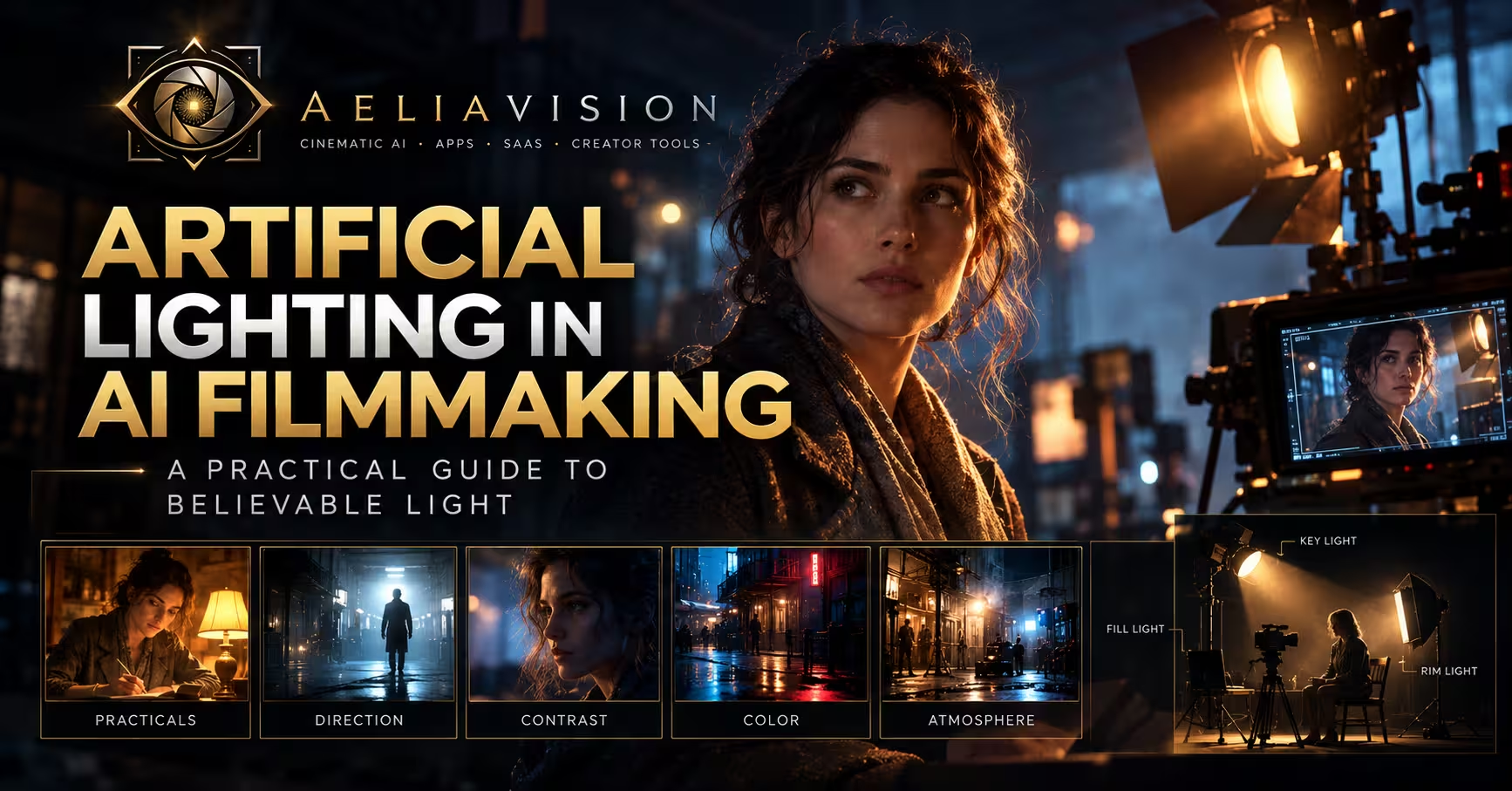
The story in brief
Learn how to design, prompt, and fix artificial lighting in AI filmmaking so generated scenes feel motivated, cinematic, and consistent instead of flat, plastic, or randomly overlit.
Inside this story
Artificial lighting is one of the fastest ways to make an AI-generated film look intentional or or to expose that it was generated at all. A model can produce a detailed set, an attractive actor, and a convincing camera move, yet the scene still feels wrong when the light has no clear source, changes direction between shots, or illuminates every surface with the same strength. Viewers may not describe the problem as “bad lighting.” They simply feel that the image is synthetic.
The solution is not to ask for “more cinematic lighting” and hope the generator interprets the phrase correctly. Cinematic is an effect, not a lighting plan. A usable plan identifies the source, its direction, its size, its color, its distance, its relationship to the subject, and the reason it exists in the story. A warehouse can be lit by sodium fixtures, a phone screen, and a cold security lamp. A bedroom can be lit by a practical table lamp and a blue spill from a street outside. A science-fiction corridor can use strips in the ceiling, warning panels, and a hard beam through a hatch. Each choice gives the image rules.
In AI filmmaking, those rules do more than create mood. They stabilize generations. When a prompt or reference establishes a coherent lighting system, the model has fewer contradictory possibilities to resolve. The image becomes easier to match across angles, shots, and iterations. Artificial lighting therefore belongs in both the creative department and the troubleshooting department. It shapes the emotional experience while also helping control common generation failures.
This guide explains how artificial light works on screen, how to describe it for image and video models, which mistakes make generated scenes look flat or physically impossible, and how to repair those problems without covering them with decorative effects.
What artificial lighting means in a film image
The word artificial does not mean unnatural. A real practical lamp in a room is artificial light, but it may be the most natural-looking element in the image because the audience understands where it comes from. Conversely, a supposedly natural scene can feel artificial if the shadows and highlights do not agree with the sun, window, or sky.
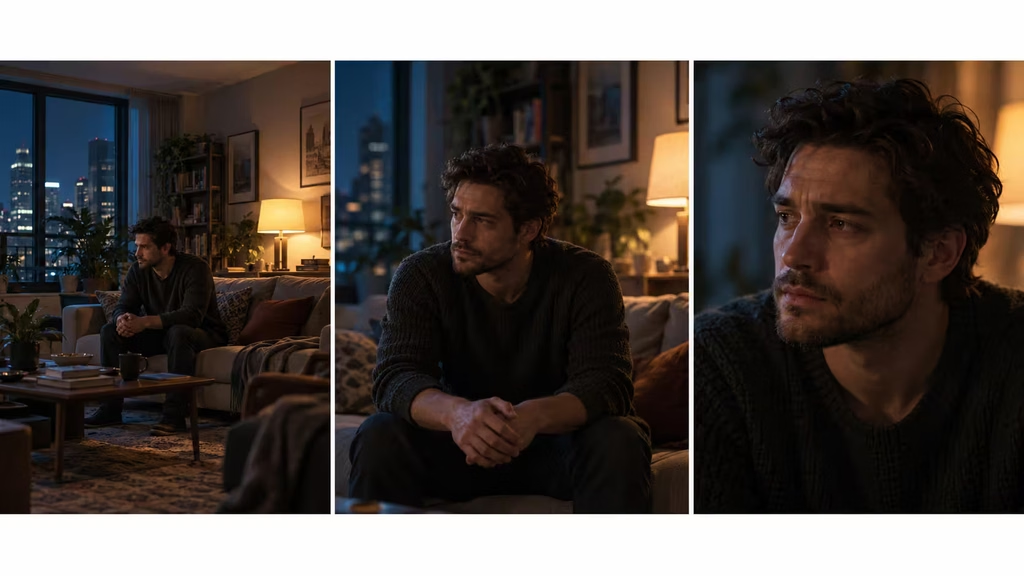
AI systems often understand the visual language of a practical source but fail to preserve the causal relationship. They may render a glowing lamp without casting light, put a bright window behind a subject while leaving the subject’s front fully exposed, or place multiple shadows in incompatible directions. To prevent this, describe both the source and its consequence: “a warm table lamp on camera left creates a soft amber pool across the woman’s hands and cheek, while the rest of the room falls into cool blue shadow.”
That sentence gives the model a hierarchy. It says what is bright, what is warm, where the source is, which parts of the subject respond, and what remains dark.
The basic lighting decisions every AI shot needs
Before writing a prompt, decide five things: **direction, quality, intensity, color, and contrast**. You do not need technical jargon, but you do need a consistent visual idea.
Direction
Direction describes where the light travels from in relation to the subject and camera. A source can come from camera left, camera right, above, below, behind, or nearly frontal. Side light reveals texture and creates a stronger divide between light and shadow. Front light is forgiving but can flatten the face. Backlight creates separation and atmosphere, especially through haze, but can turn the subject into a silhouette if there is no fill.
The phrase “lit dramatically” is weak because it does not identify direction. “Hard backlight from a doorway behind the actor, with a narrow rim along the shoulders” is much more useful. If the subject is turning, specify whether the light remains fixed in the room or follows the subject. A lamp mounted in the environment should not magically move to stay on the face from every angle.
Quality
Quality means how sharply or softly the light transitions from highlight to shadow. A large source close to the subject produces soft light. A small or distant source produces hard light. A bare bulb, spotlight, projector, or direct sun creates distinct edges. A lampshade, frosted panel, curtain, cloud, or bounced wall creates softer transitions.
AI prompts often use “soft cinematic light” as a general beauty filter. That can remove useful shape. If the scene is a tense interrogation, soft light everywhere may reduce the pressure. If it is an intimate conversation, a hard top light may create unwanted severity. Describe the quality in relation to the scene: “a large diffused window source with gentle shadow edges,” or “a bare overhead fluorescent tube producing hard downward shadows under the eyes.”
Intensity
Intensity is the relative brightness of one area compared with another. A believable shot usually has a hierarchy. The face may be the brightest important element, while the background is one or two stops darker. A practical may be bright in the frame but contribute only a modest warm glow. A neon sign can dominate the color without making every object equally bright.
Avoid instructing a model to make every feature “bright, highly visible, and detailed.” Visibility is not the same as exposure. Darkness is information too. It lets the viewer feel depth, directs attention, and gives bright elements meaning.
Color
Color temperature gives artificial lighting an emotional and spatial identity. Warm tungsten or amber light can suggest domestic comfort, age, memory, or danger depending on context. Cool blue light can suggest moonlight, screens, isolation, or institutional space. Greenish fluorescent light can feel sickly, bureaucratic, or industrial. Magenta and cyan can create a stylized club or science-fiction palette, but they require restraint to avoid turning the image into a color demonstration.
The most convincing colored scenes often contain a contrast between two sources rather than one uniform tint. A warm practical against a cool exterior spill gives the viewer a readable interior. A red emergency light against neutral gray walls feels more specific than a completely red image. State which surfaces receive each color and where the colors mix.
Contrast
Contrast is the distance between bright and dark areas. High contrast can create suspense, mystery, and graphic composition. Low contrast can make a scene gentle, nostalgic, or documentary-like. Contrast also affects how much detail survives in generated faces and costumes. Excessive contrast may produce crushed shadows, black eye sockets, or clipped highlights. Too little contrast makes the scene look like a showroom.
A good prompt can set contrast without numbers: “controlled low-key lighting, readable shadow detail, deep but not crushed blacks.” If you do use photographic terms, pair them with a visible result. “High-key commercial lighting” should mean broad, even illumination and minimal shadow, not merely a bright image.
Key, fill, and separation: the simplest reliable structure
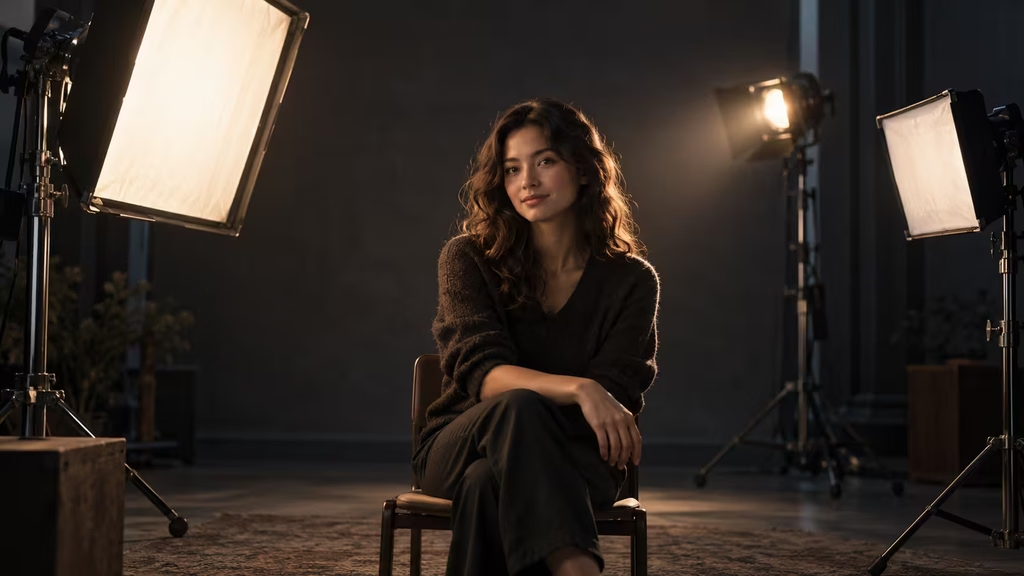
The classic three-point arrangement remains useful for AI filmmaking because it gives the model a clear hierarchy. The **key light** is the main source shaping the subject. The **fill light** controls how dark the opposite side becomes. The **backlight**, often called a rim or hair light, separates the subject from the background.
This does not mean every shot should look like a portrait photographed against a studio backdrop. The three roles can be hidden inside a motivated environment. In a kitchen, the key may be a broad window source, the fill may be bounce from a pale counter, and the separation may come from a warm fixture in the hallway. In a night exterior, the key may be a streetlamp, the fill may be ambient blue from the sky, and the rim may be a distant vehicle headlight.
For AI prompts, think in roles rather than equipment. “A soft key from the window shapes the near side of her face; the far cheek falls into gentle shadow; cool rim light separates her hair from the dark room.” This is more robust than listing three expensive lights with no relationship to the scene.
The key should generally explain the face’s main form. If a character is supposed to be lit by a lamp on the right, the right side should carry the dominant illumination. A little fill from the room is fine. A second equally strong key from the left is not fine unless the scene intentionally contains two strong sources.
Fill is particularly important in AI-generated faces. Models may interpret deep shadow as missing facial structure, asymmetry, or a rendering defect. Moderate fill protects identity while preserving dimensionality. The fix is not to remove every shadow. Ask for “soft, low-level fill retaining facial detail without flattening the cheekbones.”
Separation is useful when the subject and background have similar values. A cool rim on a dark coat can outline the shoulders. A warm background pool can separate a face from a cool wall. But a rim light that appears on every contour can look like a cutout effect. Keep it selective and motivated by a doorway, edge light, moon, sign, or practical fixture.
Practical lights: visible sources that earn their place
A practical light is visible in the frame and belongs to the world of the story. It can be a lamp, bulb, sign, screen, refrigerator, candle, torch, or vehicle headlight. Practicals make AI scenes feel grounded because they provide visual evidence for the lighting design.
However, a visible source is not automatically believable. The bulb must have a plausible relationship to the illuminated area. A tiny lamp cannot cast a broad, intense beam across a large room unless the scene establishes an unusually powerful source. A neon sign should tint nearby surfaces more strongly than distant walls. A television should create irregular, shifting light rather than a perfectly constant studio wash.
Prompt the practical and its footprint together. “A single tungsten desk lamp with a beige shade glows at frame right, creating a small warm pool on the papers and the actor’s hands; the corners of the office remain dim.” The footprint tells the model to limit the influence. “A red vending-machine light reflects faintly on the polished floor and the underside of the character’s jaw” tells it where the color should appear.
When a practical is overexposed, do not automatically lower the entire scene’s exposure. Ask for “visible filament detail inside the bulb, controlled highlight, no blown-out white source.” If the source becomes dull, increase its apparent glow through local bloom or surrounding haze rather than clipping the emitter. In video, a clipped practical can flicker and pulse unpleasantly as the model tries to reconstruct its shape.
A common mistake is adding many practicals because the set feels empty. More sources mean more competing shadows and color relationships. Start with one dominant practical, one secondary environmental source, and a controlled amount of ambient fill. Let darkness occupy part of the frame.
Artificial light and the psychology of space
Lighting communicates where a character is emotionally and socially. A fluorescent office can make a person feel exposed. A narrow pool from a desk lamp can create concentration or entrapment. A harsh security light can make an empty parking lot feel watched. A soft strip of light under a door can turn an ordinary hallway into a question.
The most effective lighting choices are not just pretty. They create pressure on the character. If someone is hiding, the light can divide the room into safe and unsafe zones. If two people disagree, one may sit in warm practical light while the other remains in a colder spill. If a character is losing control, an unstable source can make the environment feel unreliable or but it should be a story-motivated instability, not random AI flicker.
Use light to establish attention. The brightest area is not always the face. Sometimes a glowing doorway or screen pulls the viewer’s eye first, then reveals the character in silhouette. Sometimes a bright face against a dark background makes the performance unavoidable. Decide what the audience should notice first, second, and last.
This hierarchy is especially valuable in text-to-video. Models tend to distribute detail and brightness evenly, producing a scene where every object competes. A prompt with explicit priority can counter that tendency: “the actor’s eyes are the focal point, the practical lamp is bright but controlled, background objects remain subdued and slightly out of focus.”
Common mistake: flat front lighting
Flat front lighting is one of the most frequent failures in AI-generated filmmaking. The subject is visible, but the face has little shape. The background and foreground share almost the same brightness. Shadows are weak, and the image resembles a product catalog or an ungraded webcam frame.
The cause is usually an instruction stack that rewards visibility over design: bright, clear, detailed, evenly lit, sharp, colorful. Those terms are not individually wrong, but together they erase contrast. Another cause is a default “cinematic” preset that adds mild diffusion without establishing direction.
Fix the problem by introducing an angle and a ratio. Move the key source to three-quarter camera left or right. Reduce the fill. Add a background value difference. Ask for “directional soft light with the near side of the face brighter than the far side, gentle cheek shadow, darker background separation.” If the scene is indoors, give the source a reason: window, lamp, ceiling panel, doorway, or bounced light from a wall.
Do not solve flatness by adding random colored lights. Color can make a flat image more noticeable because the surfaces remain equally illuminated. Shape first, palette second.
Common mistake: impossible shadow directions
Generated scenes often contain several shadows that point in different directions. A chair shadow may fall left, a person shadow may fall toward camera, and a wall shadow may rise upward. This happens when the model combines learned lighting patterns instead of tracing one source through the scene.
The repair begins with a single dominant source. State its position clearly: “one hard spotlight high above and camera right.” Then state the expected result: “all cast shadows fall toward camera left and slightly forward.” If there are multiple sources, rank them: “the warm lamp is dominant; a weak cool bounce lifts the shadows but does not create a second hard shadow.”
For a video sequence, lock the light direction across prompts. Repeating the same lighting sentence can be more useful than constantly inventing synonyms. Use reference frames when available, and describe the light as belonging to the set rather than the individual shot. “The window remains off camera left throughout the sequence; the key direction does not change as the camera tracks.”
If a generated shadow is only slightly wrong, crop, relight, or regenerate the affected region rather than accepting a contradiction. A small impossible shadow can draw more attention than a large but coherent stylization.
Common mistake: the glowing object that emits no light
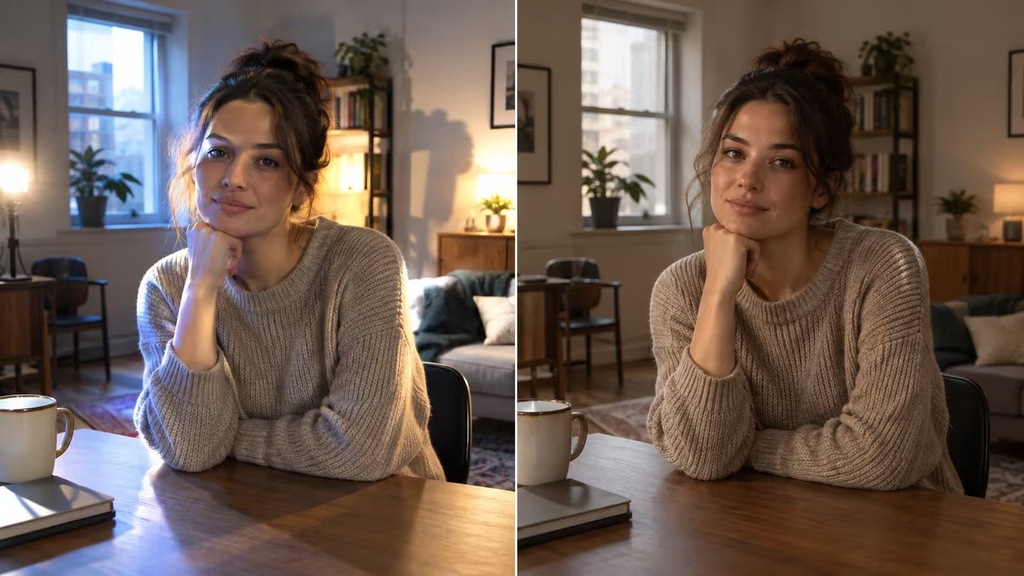
A lamp, neon sign, phone, or monitor may glow brightly while leaving nearby objects unaffected. This disconnect is a classic synthetic cue. The object appears pasted into the frame instead of participating in the scene.
Describe local illumination explicitly. A phone screen should add a cool reflection to the eyes and a small soft glow to the fingers. A candle should warm the nearest skin and cast a delicate moving shadow. A monitor should create a rectangular cool reflection on glasses or polished surfaces. A streetlight should form a pool on the pavement and pick out the top planes of parked cars.
The scale of the effect matters. A phone is a small source. It can be important in a dark close-up, but it should not brightly light an entire room unless the scene establishes a stylized exposure. A large neon sign can affect a wall, but the color should fall off with distance. Words such as “subtle spill,” “localized glow,” and “faint reflected color” help prevent a source from becoming an all-purpose paint bucket.
If the model keeps making the practical decorative rather than functional, mention what it is doing in the shot: “the character raises the glowing screen, and the cool light visibly changes across the lower half of the face.” Motion and consequence reinforce the causal link.
Common mistake: overexposure and clipped highlights
Overexposure often appears when a prompt contains glowing, radiant, brilliant, luminous, high contrast, and HDR all at once. The model interprets intensity as a white-hot image. Practical bulbs become featureless circles, windows lose all detail, and pale skin turns into a bright mask.
A cinematic image can contain bright sources without clipping them. Ask for controlled highlights, preserved texture, and a protected exposure. “The window is bright but retains a soft suggestion of exterior architecture” is more useful than “blown-out window.” If you actually want a blown-out window for a dream or flashback, reserve that effect for the source and keep the subject’s face readable.
Exposure is relative. A headlight may be clipped in a wide night shot while still producing believable falloff on the road. A bulb may be bright in a close-up but not erase the shade around it. Define the desired emphasis instead of making the whole frame brighter.
In post or iterative generation, use highlight recovery, local masking, and exposure reduction on the source. Do not darken the entire shot to rescue one lamp. That usually creates muddy skin and an underexposed background.
Common mistake: mixed color temperatures without a plan
Warm and cool lighting can be beautiful, but unplanned mixing looks like a broken color grade. A face may turn orange on one cheek, cyan on the nose, green under the eyes, and magenta in the hair. The effect feels accidental when each color has no source or spatial boundary.
Choose a dominant color and a counter-color. For example: “cool blue ambient night fills the room; a warm tungsten lamp on frame right creates the only strong warm accent.” Then define the transition: “the warm pool fades across the desk, while the far wall remains blue.” This gives the model a map.
Green is particularly dangerous because models may use it as a generic “moody” tint. If you want fluorescent green, give it a material and context: old tubes in an underground station, green spill on white tile, slightly sickly skin tones. If you do not want green contamination, include “neutral skin color, no green cast in the face.”
Color consistency across shots is a production issue. A close-up and a wide shot can have slightly different exposure, but the dominant source should remain recognizable. Build a short lighting bible for the sequence with source names, colors, directions, and relative priorities. Refer back to it instead of writing each prompt from memory.
Common mistake: lighting that ignores the camera angle
The light may be coherent in one generated frame but change when the camera moves. A source that was on camera left becomes frontal in the next shot. A backlight turns into a key without a reason. The actor’s shadow flips while the room remains fixed.
Treat the camera as a witness moving through a real space. The light belongs to the space, not to the lens. If the camera moves around the subject, the apparent screen direction of the source can change while its world position stays constant. Describe that relationship when planning a sequence: “the large window remains behind and to the actor’s left as the camera arcs slowly from frontal to profile.”
For simpler workflows, maintain screen direction intentionally. Keep the key on the same side of the face in a series of shots unless the change is narratively motivated. If the model has trouble with world-space continuity, generate a key reference still with the final lighting and use it for subsequent frames.
Avoid asking for a moving light unless the light itself is moving: a flashlight, passing car, rotating beacon, or flickering sign. “Dramatic moving light” is vague and often produces a scene where illumination slides across surfaces without a source.
Common mistake: no falloff or depth
AI-generated rooms can look as if every object is equally close to the light. A lamp on a table illuminates the back wall as strongly as the book beside it. A hallway light reaches every corner with no decay. The result is a flat, game-like space.
Light loses intensity with distance. You do not need to write a physics lecture into a prompt, but you should describe pools and falloff: “bright near the lamp, fading into shadow across the room,” “a narrow corridor with repeated pools of overhead light,” or “headlight beams weaken into mist after several meters.” Atmospheric haze can reveal beams, but it should not eliminate falloff.
Depth can also be created through layered values. Put the foreground in controlled shadow, the subject in the middle range, and a practical or light patch in the background. A small amount of haze can separate planes, especially in smoky interiors or humid exteriors. Too much haze turns every shot into a generic music video and hides continuity errors rather than fixing them.
Lighting materials, surfaces, and reflections
Artificial light becomes convincing when surfaces respond differently. Skin is soft and slightly reflective. Metal produces crisp highlights. Wood absorbs and warms light. Glass catches reflections. Matte fabric holds broad, quiet values. Wet pavement mirrors bright sources and stretches them across the ground.
Prompts that say only “dramatic lighting” leave the material response undefined. Add one or two important surface behaviors: “warm reflections in the polished floor,” “soft fluorescent streaks on the metal cabinet,” or “a controlled rectangular reflection in the window.” Avoid specifying every surface, because excessive detail can create competing highlights.
Reflections are a frequent source of AI errors. A mirror may show a light that does not exist, or a glossy table may reflect a lamp from the wrong position. Keep reflective elements subordinate unless they are part of the story. Use “consistent reflections matching the key light direction” when a surface is prominent.
For night scenes, wet ground is often used to make light look cinematic. It can help, but it is also overused. If every night scene has rain-slick pavement, the visual language becomes repetitive. A dry asphalt surface with a small pool under a streetlamp may be more specific. Artificial lighting should explain the environment, not decorate it by default.
Lighting people of different skin tones
A lighting plan must preserve human texture and color across a range of complexions. Overly bright front light can erase subtle tonal variation. Strong colored light can distort skin in ways that make the character look painted. Deep unfilled shadow can remove facial detail, especially in compressed video.
Use directional light with controlled contrast and deliberate fill. Warm sources can remain warm without turning skin orange if their saturation is restrained. Cool sources can remain blue without making the face gray. Ask for “natural skin texture under stylized light” or “accurate complexion with colored spill kept subtle on the face.”
Do not treat exposure as a substitute for representation. The goal is not to make every face equally bright; it is to preserve form, expression, and identity while allowing the scene’s contrast to exist. Reference images, consistent color management, and a locked lighting setup are more reliable than trying to correct a poorly lit generation later.
Building an artificial-lighting prompt
A strong prompt can be built in layers. Start with the scene and subject, then define the key source, secondary sources, quality, color, contrast, and continuity.
A practical template is:
**Scene + subject + dominant source + direction + quality + secondary source + color relationship + falloff + subject response + contrast + continuity constraint.**
For example:
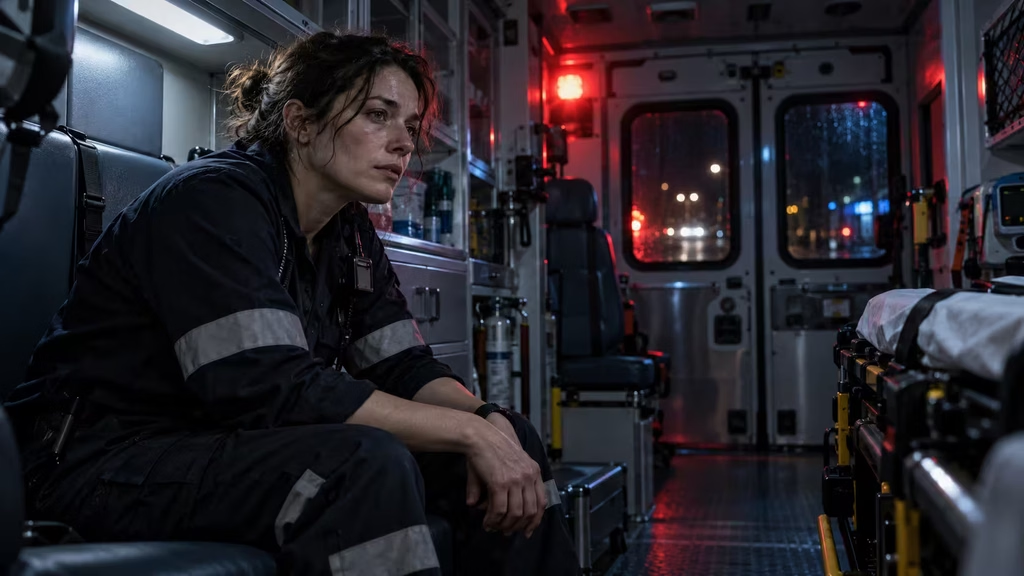
“Medium close-up of a tired paramedic inside an ambulance at night. A cool overhead LED panel is the dominant key, slightly above camera left, with soft but directional shadows under the brow. A red emergency beacon outside the rear doors creates intermittent, localized red spill along the far cheek and metal cabinets. The interior falls off into deep blue-gray shadow; reflections on the windows match the sources. Natural skin texture, controlled highlights, readable eyes, low-key cinematic contrast. The light sources remain fixed as the camera slowly pushes in.”
This is specific without prescribing every pixel. It tells the model what matters: hierarchy, location, color, material response, and continuity.
Negative prompts can protect the plan, but use them selectively. “No flat frontal light, no multiple conflicting shadows, no random colored wash, no overexposed face, no light source from below unless motivated” addresses common failures. A long list of every possible defect can dilute the important constraints.
For image-to-video, repeat the lighting anchor in the motion prompt. “Preserve the cool overhead key and red beacon spill throughout the push-in; shadows remain consistent on the face and cabinets.” Models often prioritize movement and re-invent lighting unless continuity is stated.
Fixing lighting in image-to-video generation
A still image can hide a lighting problem because the frame is judged once. Video reveals whether the light behaves over time. Common failures include brightness pulsing, shadows crawling across the set, practicals changing color, and faces alternately flattening and becoming dramatic from frame to frame.
First, distinguish intentional animation from instability. A candle, television, passing car, or rotating beacon may change. A static desk lamp should not breathe brighter every second. State what is allowed to move and what must remain locked: “the candle flame flickers gently, but the room’s overall exposure and key direction remain stable.”
Shorter shots are often easier to stabilize. Generate a controlled five-second push-in before attempting a long complex camera move through a room. Use a clean reference frame with the desired light hierarchy. If the tool supports motion strength, lower it when lighting is more important than transformation. High motion can cause the model to redraw highlights and shadows.
When a source flickers, try removing words such as “pulsing,” “dynamic,” “energetic,” or “intense” unless they are essential. When a face changes exposure, specify fixed exposure and consistent key light. When the background changes but the subject remains stable, simplify background objects and reduce reflective clutter.
If the sequence cuts between angles, do not expect a single prompt to maintain all continuity. Generate a lighting reference sheet: one wide, one medium, and one close-up with the same key direction and palette. Use those images as visual anchors. The practical source can move in screen position as the camera changes, but its effect should remain legible.
Fixing harsh, unflattering artificial light
Harsh light is not inherently bad. It becomes a problem when it creates accidental shadows under the eyes, shiny hotspots on the forehead, and a background that looks unrelated. To soften it, enlarge the apparent source or bounce it. In prompt language: “large diffused source through a fabric panel,” “soft bounced light from a pale wall,” or “gentle wraparound fill from the ceiling.”
If the scene requires a hard source, control its angle. A high frontal spotlight can make the eyes disappear. A side-motivated hard source can create a graphic edge while leaving the eyes readable. Add “subtle eye light” only if the expression needs it; a conspicuous catchlight can look artificial.
Harsh colored LEDs are another frequent issue. Reduce saturation and keep the colored source localized. “Muted amber practical with neutral fill” usually produces more usable skin than “strong orange cinematic light.”
Fixing underexposed scenes that lose the subject
Darkness can be expressive, but if the audience cannot read the action, the lighting has failed its storytelling job. Raise the subject’s exposure without flattening the set. Add a motivated bounce, a nearby practical, or a small amount of ambient lift. “Readable face in shadow, preserved dark background” is the target.
Use edge light carefully. A thin rim can recover the outline of a coat or profile, but too much creates a glowing halo. A background light patch may separate the silhouette more naturally. In a night exterior, reflected light from pavement, a wall, or a vehicle can provide a subtle lift that feels connected to the space.
If an AI generator turns all shadows black, include “retained shadow detail” and avoid contradictory phrases such as “pitch black, highly detailed, every feature visible.” Decide which details must survive: eyes, hands, an important prop, or a doorway. Prioritize those rather than demanding universal visibility.
Fixing artificial-looking volumetric beams
Visible light beams are popular because they communicate direction quickly. They work best when there is a reason for the air to reveal them: smoke, dust, mist, humidity, or a dirty shaft of sunlight. If the air is perfectly clear, a thick laser-like beam may feel pasted in.
Describe the density and falloff: “faint dust in the air reveals a narrow beam, strongest near the projector and fading before the far wall.” Keep volumetrics behind the subject if you want a readable face. A beam aimed directly into the lens can obscure the composition with bloom.
Avoid using “god rays” as a substitute for a source. Name the source first. “A security spotlight cuts through light fog” is more useful than “dramatic god rays everywhere.”
Lighting continuity checklist for a sequence
Before generating a scene or batch of shots, write down the following:
– What is the dominant source in the location? – Where is it in world space, and where will it appear relative to the camera? – Is it hard, soft, diffused, bounced, or flickering? – What is its color, and which surfaces receive that color? – What is the secondary source or ambient level? – Which side of the face is brighter? – Where do the cast shadows fall? – Which practicals are visible, and do they actually illuminate anything? – What remains dark by design? – Which lighting elements can change during the shot?
This checklist catches contradictions before they become generations. It also gives you a way to diagnose a bad result. If the shot looks wrong, ask which rule broke. Was the key no longer dominant? Did the practical stop casting spill? Did the camera move through the source? Did a negative prompt remove too much shadow detail?
A repeatable troubleshooting workflow
When a generated shot has bad artificial lighting, change one variable at a time. If you alter the source, camera, palette, pose, wardrobe, and background simultaneously, you will not know what solved the problem.
Start by simplifying. Remove secondary lights, haze, colored reflections, and decorative neon. Keep one key and one low-level fill. Generate a clean version. If the subject now has shape, add the practical or color contrast back gradually.
Next, correct direction. State the source position and shadow result. If the face is still flat, reduce fill or move the key farther to the side. If the face is too severe, enlarge the source or add bounce rather than adding a second equal key.
Then correct exposure. Protect the face, practical highlights, and important background detail separately. A single global instruction such as “make it brighter” is too blunt. Use local language: “lift the actor’s eyes slightly while keeping the corners of the room dark.”
Then correct color. Keep one dominant temperature and one accent. If the palette is muddy, neutralize the fill before adding more saturation. If the colors are disconnected, identify where the spill lands.
Finally, correct continuity. Compare neighboring frames or shots. Note the side of the face that is lit, the position of the source, the shadow direction, and the relative brightness of practicals. Reuse the same anchor language and reference image. Do not allow each shot to invent a new lighting concept.
This workflow is slower than adding “more cinematic” adjectives, but it produces results you can reproduce. Reproducibility matters in filmmaking. A successful single frame is not enough if the next angle cannot match it.
The difference between style and lighting design
Style words such as noir, cyberpunk, naturalistic, glossy, dreamy, gritty, or blockbuster are useful as broad references. They should come after the physical lighting plan, not replace it. “Noir” may imply hard side light, blinds, deep negative fill, and strong separation, but different films use the label differently. “Cyberpunk” may mean neon contrast, wet surfaces, and haze, but it does not explain whether the actor is visible.
A robust prompt combines both: “restrained neo-noir lighting, one hard streetlamp from camera right, deep negative fill on the opposite side, a faint cool sign reflection on wet pavement, readable eyes, no random colored wash.” The style sets the mood; the sources make the image coherent.
Likewise, “naturalistic” does not mean unlit. It means the added light should appear to belong to the environment. A documentary-style interior can use a large hidden soft source motivated by a window. A realistic night exterior can use controlled off-camera light motivated by a streetlamp. Artificial lighting is often what makes a naturalistic image possible.
When to break the rules
Lighting rules are tools, not laws. A horror film may deliberately use an impossible underlight. A dream sequence may let a lamp illuminate a room beyond its physical reach. A music video may use shifting colors without a visible source. The difference between a purposeful violation and a generation error is control.
If you want an impossible effect, frame it as a deliberate visual event: “surreal underlight from an unseen subterranean source, shadows rising upward, intentionally unnatural and consistent.” If you want a source to change, connect the change to the narrative: “as the door opens, a hard white corridor light replaces the warm room light.” The audience can accept impossible lighting when the film establishes that it is a rule of this moment.
Unintentional inconsistency has no dramatic purpose. It merely weakens trust. The aim is not perfect physics in every frame; it is a visual system the viewer can understand.
Final principles for artificial lighting in AI filmmaking
Artificial lighting works when it has a source, a direction, a hierarchy, and a reason. Start with one dominant key. Use fill to protect important detail without flattening the image. Let practicals illuminate nearby surfaces. Control color by assigning each temperature a location. Describe falloff, reflections, and shadow direction. In video, lock the environment’s lighting and state which effects are allowed to change.
When a shot looks synthetic, do not immediately add atmosphere, neon, bloom, or a stronger grade. Remove complexity and find the broken relationship. Is the lamp glowing without spill? Are the shadows disagreeing? Is every surface equally bright? Is the camera moving through a light that belongs to the room? Is the color palette hiding a lack of shape?
The best AI lighting prompts are not the most decorative. They are the ones that tell the generator what the audience should believe. A warm pool on a face tells us where the character is sitting. A cool edge from a doorway tells us what lies outside. A dark corner tells us that the room continues beyond attention. A consistent shadow tells us that the world has structure.
Once those relationships are stable, style becomes easier. You can make the scene intimate, threatening, luxurious, bleak, futuristic, or dreamlike without losing physical and emotional clarity. Artificial light then stops being a corrective layer added after generation. It becomes part of the story’s grammar or the system that tells us where to look, what to feel, and what kind of world the film is asking us to enter.
Continue reading
Further insights from the Journal
Have a story in mind?
Bring your next project into focus.
Tell us what you are creating and what you want the audience to feel.