The story in brief
A camera move should have a reason. That reason may be physical, such as following a person who walks through a room. It may be emotional, such as pushing closer when a character understands a painful truth. It may be informational, such…
Inside this story
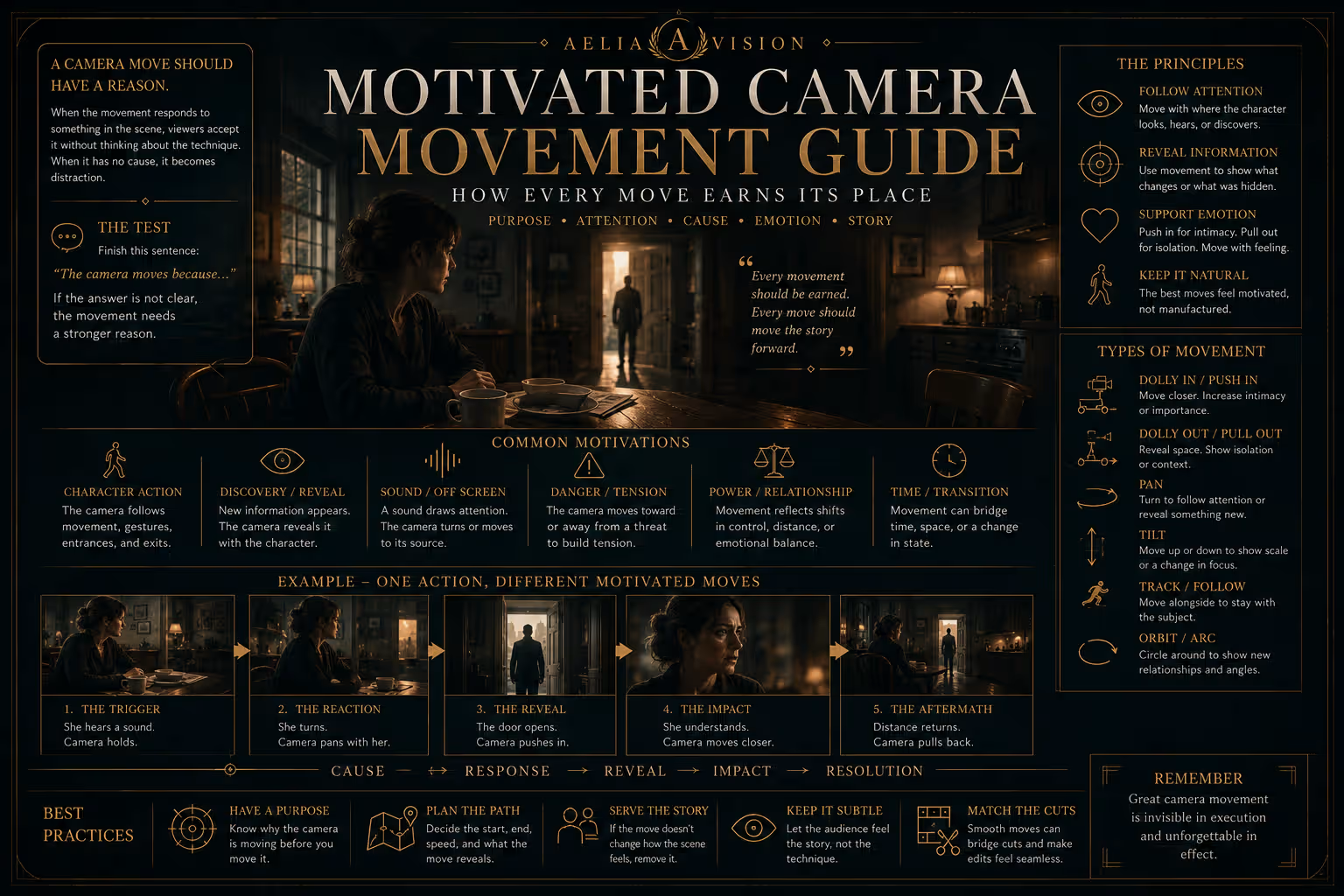
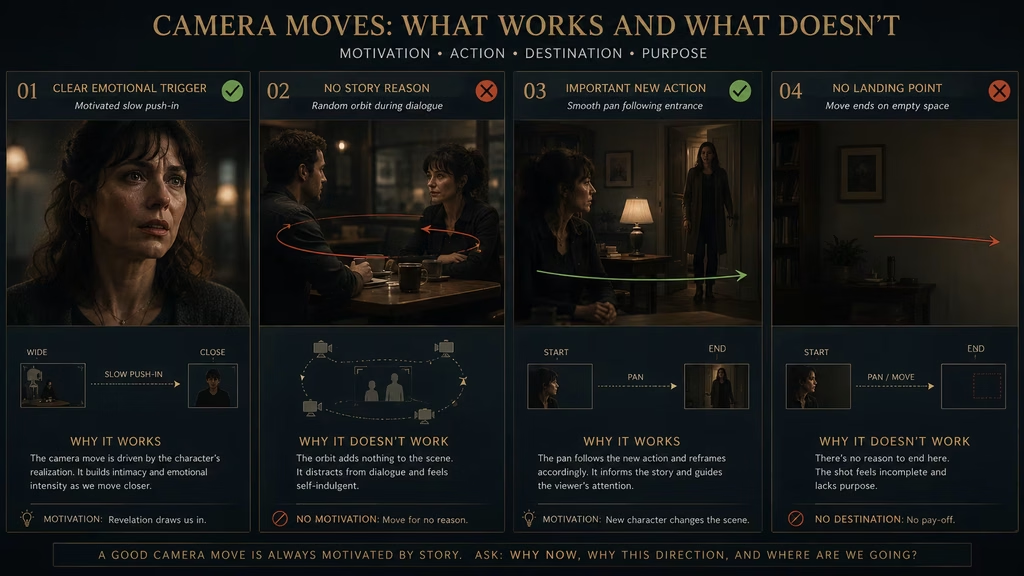
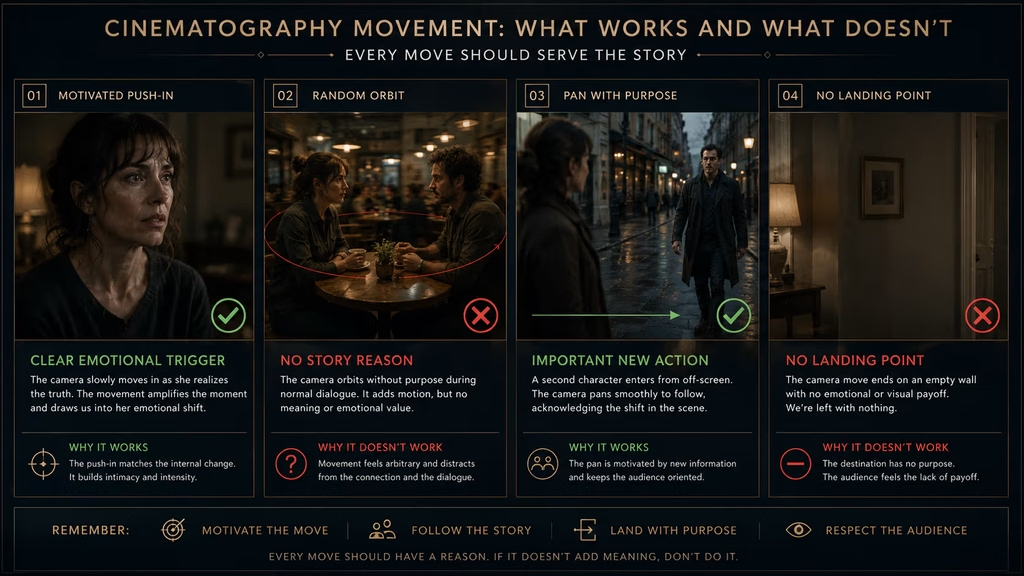
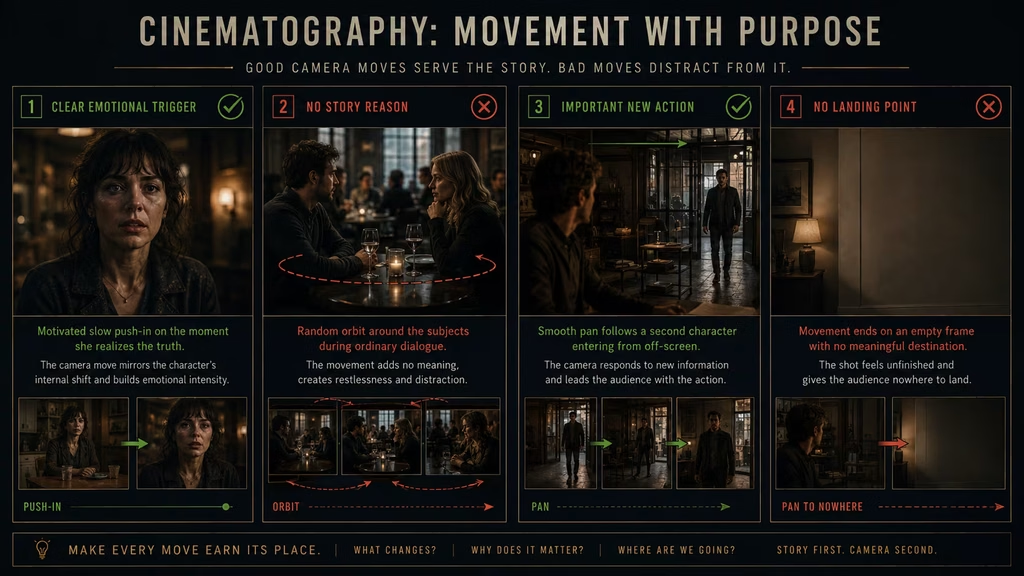
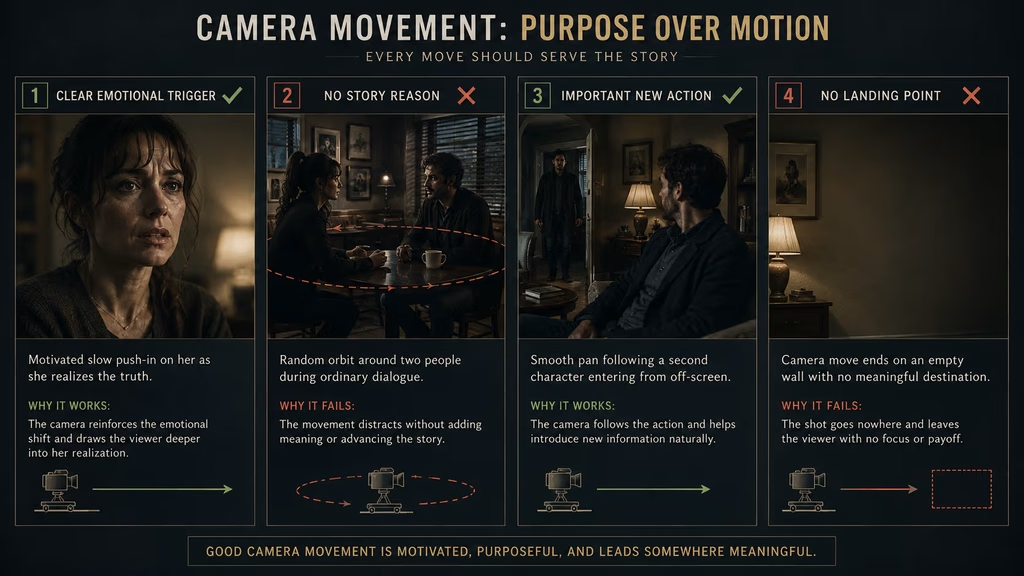
A camera move should have a reason. That reason may be physical, such as following a person who walks through a room. It may be emotional, such as pushing closer when a character understands a painful truth. It may be informational, such as panning to reveal the person standing just outside the frame.
When the move responds to something in the scene, viewers usually accept it without thinking about the technique. When the camera moves without a clear cause, the movement becomes visible as a decision. It can feel decorative, restless, or disconnected from the story.
This is the idea behind motivated camera movement. The camera does not move because movement looks cinematic. It moves because an action, discovery, sound, change in power, or shift in attention gives it a reason to move now.
The principle applies to real cinematography and AI filmmaking. On set, a director and operator coordinate the move with actors and blocking. In an AI prompt, you connect the camera movement to a visible event. “Push in as she recognizes the photograph” gives the model more direction than “dramatic cinematic push-in.”
Motivation does not mean every move must be literal. A camera can move emotionally, metaphorically, or in response to information the audience understands before the character does. The important part is that the movement has a relationship with the scene.
What motivated movement means
Motivated movement is camera movement caused by something happening in or around the frame. A character enters, so the camera pans to include them. Someone walks away, so the camera follows. A sound comes from another room, so the camera turns toward it. A realization changes the emotional temperature, so the camera moves closer to the face.
The cause does not need to be visible at the exact moment the move begins. A camera may slowly advance because the audience already knows that a threat is waiting ahead. The motivation comes from the expectation built by the scene.
The move can also respond to the rhythm of a conversation. The camera may begin in a balanced two-shot, then drift toward one speaker after the power relationship changes. The camera is not merely covering the dialogue. It is showing that the relationship has changed.
A useful test is to finish this sentence:
“The camera moves because…”
If the answer is “because the shot would look more interesting,” the movement probably needs a stronger reason. If the answer is “because the character notices the open door and the camera follows her attention,” the move has a clear dramatic connection.
Motivation also helps you decide when not to move. A still camera can be the correct response to an event. If a character leaves and the camera remains behind, the stillness may express abandonment. If the world becomes chaotic while the camera stays fixed, the contrast can create pressure.
The main sources of motivation
Character action
The most direct motivation comes from movement inside the scene. If a person walks, the camera can follow. If they sit, the camera can lower or settle with them. If they step toward another character, a push-in or tracking move can maintain the relationship.
The camera does not have to react to every movement. A person crossing the background may not deserve a pan. Motivation depends on importance. The camera follows the action that the audience needs to notice.
For example, a character may walk across a room while the camera remains still. The movement can establish the room and let the actor pass through the composition. If the character suddenly stops at a photograph, the camera might push in because the photograph has become important.
In an AI prompt, name the action and response together:
“As the woman reaches for the old photograph, the camera makes a slow push toward her hand and the image on the table.”
The action gives the model a reason to change the frame.
Discovery
A reveal can motivate a pan, tilt, dolly, or pull-out. The camera moves because new information is becoming available.
A pan may reveal a second character who was just outside the frame. A tilt may reveal the height of a building or the object above a character. A dolly may move around an obstruction to expose a person hiding behind it. A pull-out may show that the apparently safe room is surrounded by danger.
The move should control the timing of the information. If the reveal happens too early, the movement has no suspense. If it happens too late, the audience may not understand what the camera is doing.
Prompt example:
“The camera slowly dollies left from behind the concrete pillar, revealing the second figure only after the hallway has been established.”
The obstruction creates a reason for the movement and gives the reveal a shape.
Sound
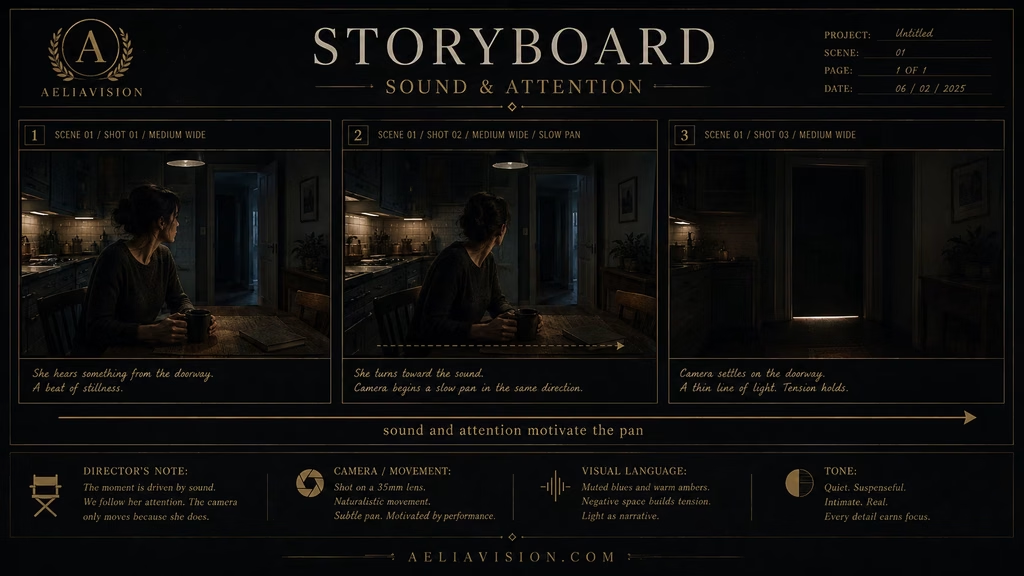
Sound can pull the camera toward something that is not yet visible. A voice calls from another room. A glass breaks behind the character. A vehicle approaches from off-screen. The camera turns because the sound has changed the audience’s attention.
Sound-motivated movement works well when the visual answer is delayed. The camera may pan toward the source and stop before revealing it. That pause gives the viewer time to imagine what might be there.
In AI video, sound often gets added in post. You can still generate the visual movement by describing the cause:
“A sharp impact comes from off-screen left. The character turns first, then the camera pans left to follow her attention, stopping on the empty corridor.”
The sound does not need to be generated by the model for it to motivate the visual. Add the sound layer later and make the movement match it.
Emotional change
A camera can respond to an internal shift even when the character barely moves. A realization, decision, fear, or moment of relief can motivate a change in distance or angle.
A slow push-in during recognition makes the emotion more personal. A pull-out after rejection can make the character feel exposed. A subtle orbit can show a person becoming trapped in their own thoughts. A camera that stops moving when a character accepts the truth can make stillness feel final.
The emotional shift needs a visible cue. The character may lower their eyes, stop breathing for a moment, turn away, or focus on an object. In an AI prompt, connect the camera to that cue:
“As she realizes the message is from her missing brother, the camera begins a slow push-in and ends on her restrained reaction.”
Avoid vague instructions such as “camera moves emotionally.” State what changes.
Change in power
Camera movement can mark a change in status between characters. The camera may move toward the person who takes control and away from the person who loses it. It may start in a shared two-shot and gradually favor one side.
A low-angle push-in can make a character feel increasingly dominant. A high-angle pull-out can make another character appear smaller and less able to act. A lateral move can shift the composition so one person occupies the center while the other moves to the edge.
Power motivation is especially useful in dialogue scenes. The move should happen at the moment the relationship changes, not simply halfway through the conversation.
“The camera begins in a balanced two-shot. When the lawyer places the signed contract on the table, it slowly pushes toward her as she takes control of the negotiation.”
The object and the action give the movement a dramatic trigger.
Environmental force
Wind, traffic, water, crowds, machinery, and weather can motivate movement. The camera may follow a person through a crowd because the crowd is pushing them. It may pull back as a storm opens the landscape. It may rise with smoke or track beside a vehicle.
Environmental motivation helps a move feel part of the world. The camera is not floating independently. It responds to the same force affecting the subject.
In AI prompts, describe the force and the camera relationship:
“Strong wind drives dust across the road as the camera tracks beside the runner, handheld but controlled, keeping her visible through the moving haze.”
The environment becomes part of the choreography.
Motivated movement versus decorative movement
Decorative movement is not automatically bad. A music video, fashion film, or abstract sequence may want the camera to move for rhythm, texture, or visual pleasure. The problem begins when a dramatic scene uses movement that has no connection to what the audience is watching.
A decorative move asks the viewer to notice the camera. A motivated move directs attention back to the story. In a commercial, a rotating product shot may be the point. In a tense conversation, an unrelated orbit can weaken the exchange.
Ask what the move adds:
- Does it reveal information?
- Does it follow important action?
- Does it change the viewer’s emotional distance?
- Does it clarify a relationship or space?
- Does it respond to sound or environment?
- Does it create a contrast with stillness?
If the answer is no, consider holding the frame. A still shot may be more confident and more useful.
The timing of motivation
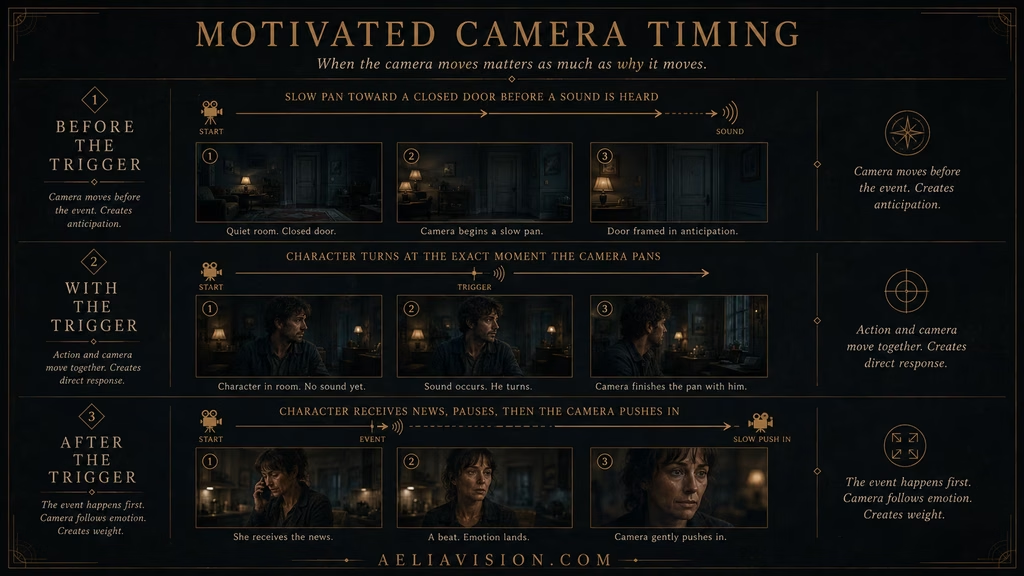
A motivated move can begin before the trigger, with the trigger, or after it.
Before the trigger
The camera may begin moving before the audience sees the cause. This creates anticipation. A slow pan toward an empty doorway can prepare the viewer for a sound or entrance. A push-in before a character speaks can tell the audience that the line will matter.
Use this timing when the audience knows or senses that something is coming.
With the trigger
The camera responds at the same moment as the action. A character turns and the camera pans with them. A door opens and the camera moves forward. This feels direct and readable.
Use it for clear physical actions and simple cause-and-effect shots.
After the trigger
The camera waits for the consequence. A character receives bad news, stays still, and only then does the camera move closer. The delay can make the movement feel like a decision rather than an automatic reaction.
Use this timing for emotional scenes and moments that need a small pause before the camera changes distance.
Movement and shot size
The same move can feel different depending on where it begins and ends. A push-in from a wide shot to a medium shot changes the viewer’s relationship with the environment. A push-in from a medium shot to a closeup removes context and concentrates attention on the face.
A pull-out from a closeup can reveal a room, another character, or a large event. The new context may change the meaning of the original expression. A tracking shot can begin as a profile and end in an over-the-shoulder view, changing the relationship between the subject and the person ahead.
Plan the starting and ending shot sizes before writing the motion prompt. The move needs a visible destination.
For AI generation:
“Begin in a wide shot of the empty station. Slowly dolly forward to a medium closeup as the woman notices the person waiting across the platform.”
The start and end states make the movement easier to control.
Movement and lens choice
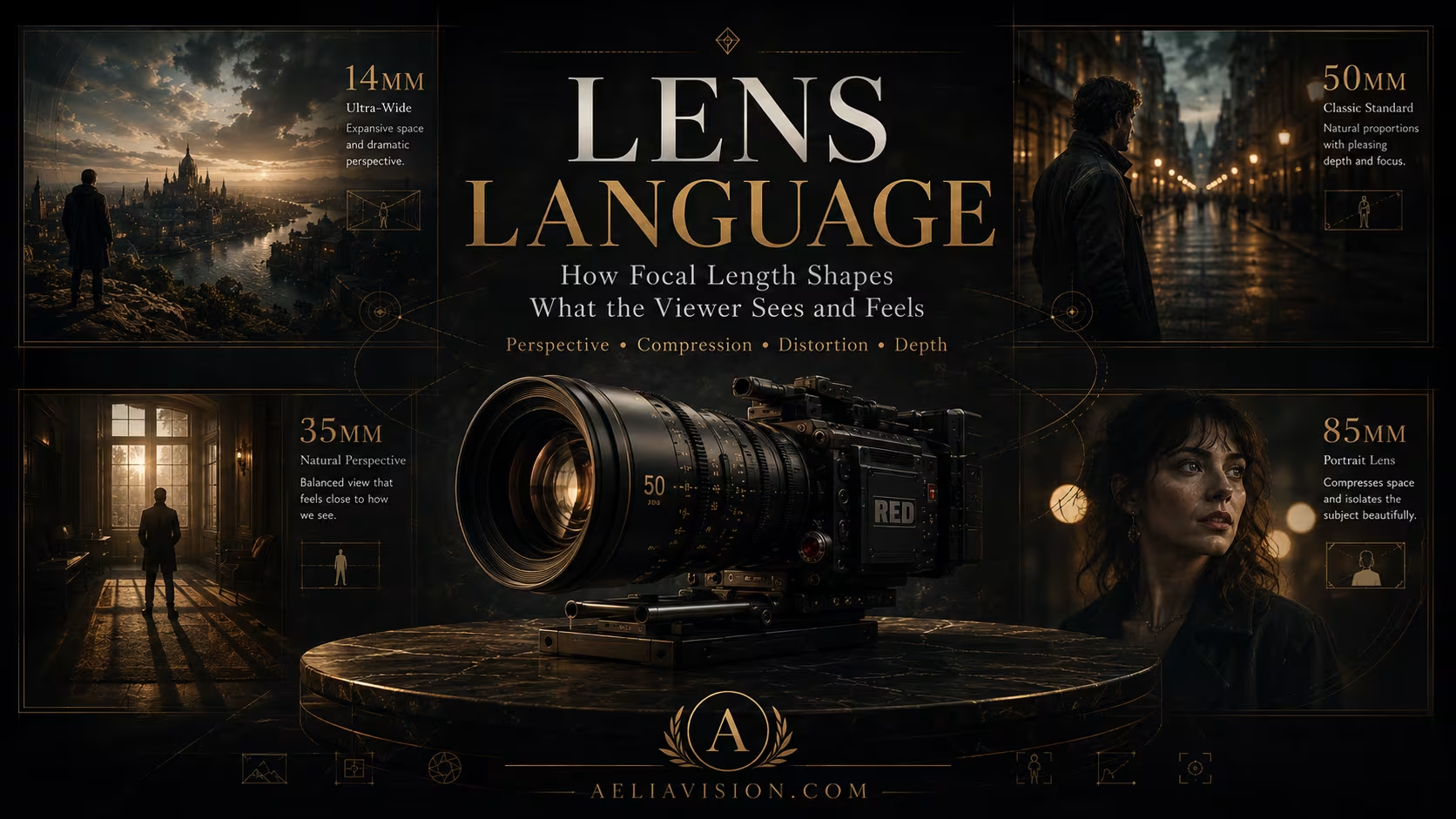
Lens choice affects how motivated movement feels.
A wide lens makes a physical move visible. A push-in creates strong parallax, and a tracking shot separates foreground from background. This works when the audience should feel the camera traveling through the space.
A normal lens keeps the movement familiar. A 35mm or 50mm push-in can feel like the viewer is choosing to get closer. The environment remains readable while attention tightens.
A long lens makes the movement more restrained. An 85mm push-in can feel like observation becoming fixation. The background stays compressed, and the subject gains weight without a large change in spatial geometry.
The lens should support the reason for the move. Do not combine a very wide lens with a request for a flattering, distortion-free closeup unless you are willing to accept conflicting instructions.
Movement and camera height
Camera height adds another layer of motivation. A move can begin at one height and end at another when status changes.
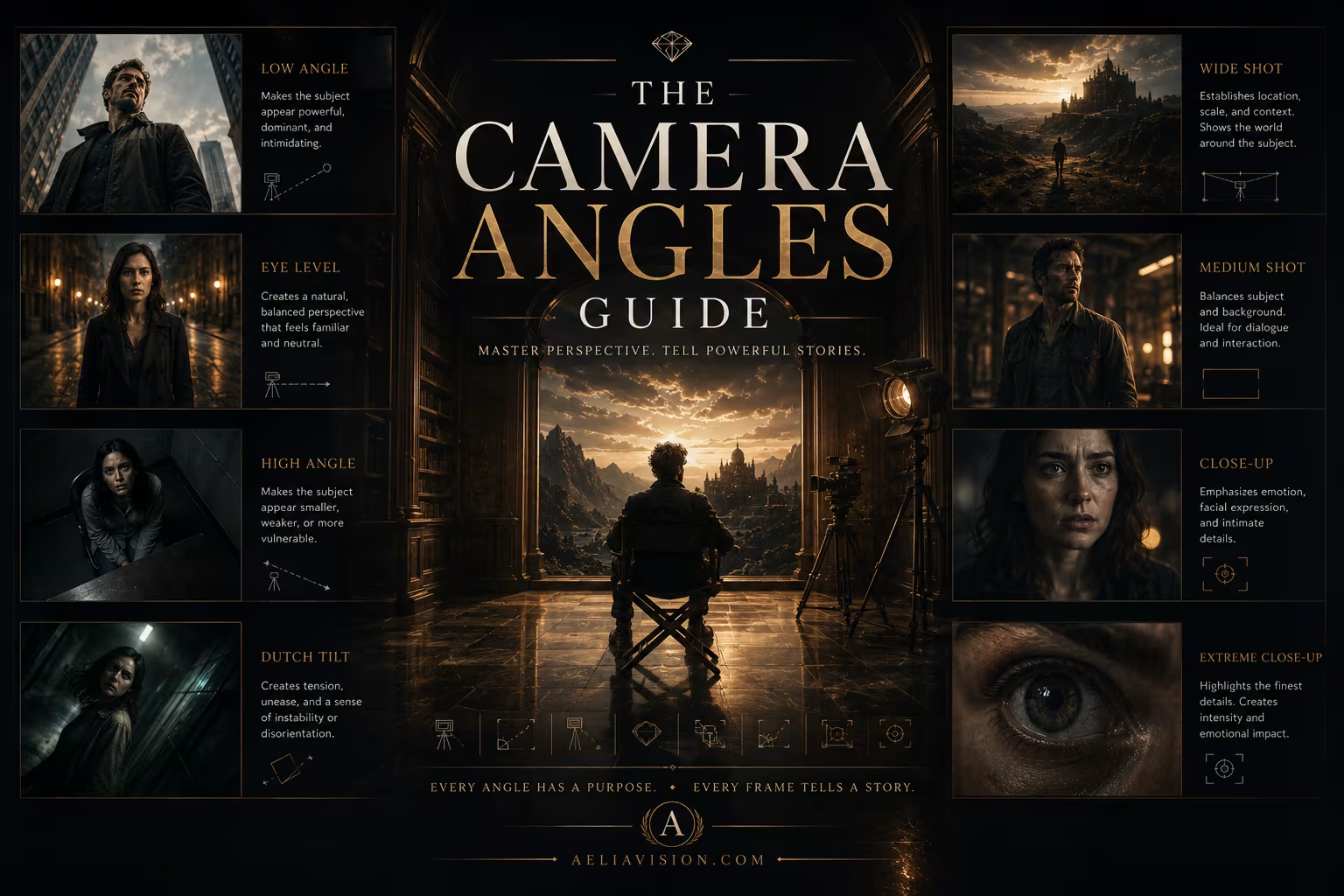
A low push-in toward a powerful figure can reinforce authority. A camera that rises to eye level as two characters reach an agreement can reduce the visual distance between them. A high-angle pull-out can make a character appear abandoned after another person leaves.
Keep the height change simple in AI video. A combined dolly, orbit, tilt, and height transformation can cause the frame to warp. Choose the main move and describe the height shift only when it matters.
Movement and editing
Motivated movement can carry a cut. A character crosses the frame, and the cut occurs during the movement to a new angle. A whip pan hides a cut because the camera’s speed motivates the blur. A dolly reaches a dark doorway, and the edit begins the next shot inside the room.
The edit should respect the movement’s direction. If the camera moves right in the first shot and the next shot suddenly reverses without a reason, the continuity breaks. Use the 180-degree rule and action matching to keep the space readable.
Sound can help the cut. A J-cut may begin the next location’s sound before the camera arrives. An L-cut may let a line continue while the camera moves away. The camera movement and sound transition can work together to make the edit feel inevitable.
Motivated movement in AI video prompts
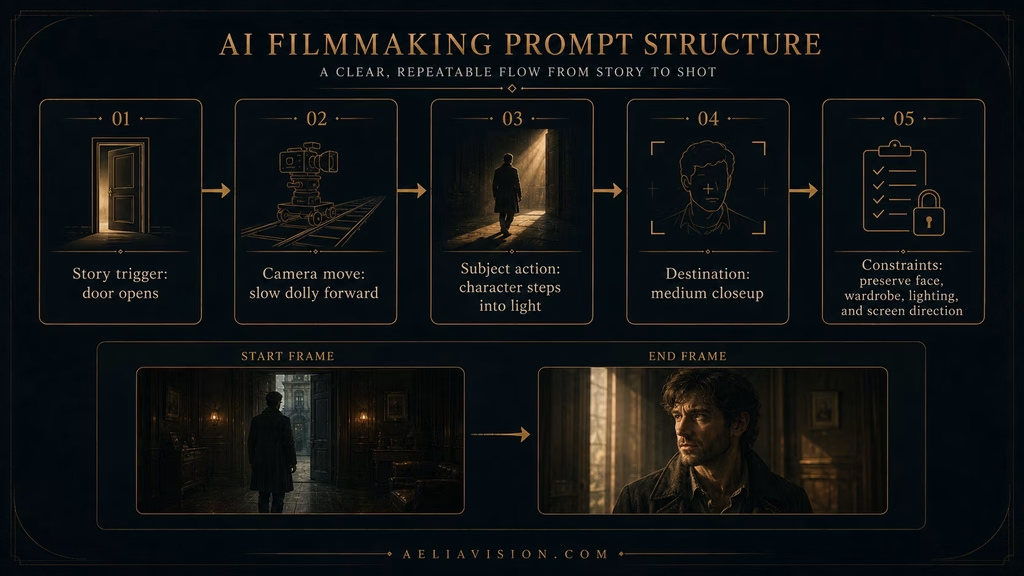
AI models respond better when the prompt describes a cause, a camera action, and a result. A useful structure is:
**Trigger + camera movement + subject action + destination + constraints**
Example:
“When the door opens, the camera makes a slow dolly forward. The woman steps into the light and looks toward the empty hallway. End on a medium closeup, 35mm perspective, smooth movement, preserve her face and wardrobe.”
The trigger is the door opening. The camera move is the dolly. The subject action is the step and look. The destination is the medium closeup. The constraints protect the visual continuity.
Avoid stacking several unconnected moves:
“Dramatic orbit, fast push-in, whip pan, crane up, handheld shake, and tilt down as the character runs.”
That prompt gives the model too many competing instructions. Choose the move that communicates the main beat. Add a second move only if it is physically and narratively connected.
Motivated movement across common shot types
Push-in
Use a push-in when attention narrows. A realization, discovery, confession, or threat can trigger the move. State what the camera approaches and where it stops.
Pull-out
Use a pull-out when context needs to return or the subject needs to feel smaller. A character may be rejected, isolated, or revealed as part of a much larger situation.
Pan
Use a pan when something enters, sounds, or deserves attention off-screen. The camera turns because the audience needs to see what has changed.
Tilt
Use a tilt when vertical information matters. The camera looks up at a structure, down at a body, or follows a character’s attention toward something above or below.
Dolly
Use a dolly when the camera should travel through space. The move can approach, retreat, reveal, or track. Add depth layers so the physical movement can be seen.
Tracking shot
Use tracking when the camera needs to share a subject’s route. The camera may follow behind, lead from in front, or move beside the character.
Orbit
Use an orbit when the relationship around a subject needs to change. The camera may circle a person after a transformation, discovery, or shift in power.
Crane or drone movement
Use a vertical rise or aerial move when scale or location changes the meaning. The camera reveals the world around a small subject or pulls away from a private moment.
Handheld
Use handheld when human presence, urgency, or instability motivates the camera’s behavior. The level of shake should match the scene.
Locked-off frame
Use no movement when the story needs patience, observation, or contrast. Stillness can be a response to action, not an absence of technique.
Motivation and blocking
Blocking is the arrangement and movement of people inside the frame. A motivated camera move often begins with a blocking decision.
A character crosses toward a window, so the camera tracks with them. Two people move apart after an argument, so the camera holds the widening space between them. A person steps into the foreground and hides another character, so the camera shifts to restore the information.
Plan the actor’s path and the camera’s path together. The camera should not chase movement that was never designed for it. In AI prompts, describe the subject’s direction and the camera’s relationship:
“The woman walks screen-right along the corridor while the camera tracks beside her, keeping her in profile.”
Or:
“The man stops at the edge of the light. The camera remains behind him and slowly pushes forward only after he turns toward the doorway.”
Blocking gives the camera something to respond to.
Motivation and stillness
A motivated movement guide must include stillness because a camera that never moves becomes just as predictable as one that always moves.
A locked-off frame can make a character’s exit feel final. The camera does not follow because the relationship has ended. A person may run through the foreground while the frame stays still, forcing the viewer to watch the whole space. A calm shot after a series of moving shots can feel like the scene has reached a decision.
Use stillness when movement would weaken the moment. If a character is waiting, let the waiting occupy the frame. If the audience should inspect a composition, do not interrupt it with a decorative camera move.
Common mistakes
Calling every move motivated
Adding a character action to a prompt does not automatically justify the camera. The action must explain why the camera moves, not merely happen at the same time.
Moving before the story is ready
A push-in that starts before the character has a reason to change can reveal the intended emotion too early. Let the camera wait when anticipation matters.
Following unimportant movement
Not every person crossing the background needs a pan. Follow the action that changes the audience’s understanding.
Using movement to hide weak blocking
A moving camera cannot fix a character who has no objective or a scene with no clear geography. Solve the blocking first.
Overloading the prompt
Several camera moves may sound impressive, but the model may blend them into unstable motion. Choose the primary move and add only supporting instructions that serve the same beat.
Ignoring the destination
A camera move that has no final composition feels unfinished. State what the viewer should see when the movement ends.
Breaking continuity
A motivated move can still create a bad cut if screen direction, eyelines, wardrobe, or lighting change accidentally. Preserve the visual rules across the sequence.
Treating motivation as a ban on style
Stylized movement can be valid. A music video may move with the beat, and an abstract film may use camera motion as texture. The point is to choose that style deliberately rather than allowing a dramatic scene to drift into it by accident.
Motivation in different genres
Drama: Emotional shifts, decisions, and changes in relationships usually motivate movement. The camera can stay close to performance and move with restraint.
Thriller: Sound, information, and hidden threats motivate pans, pushes, and reveals. The camera may know more than the character or may discover information with them.
Horror: Movement can respond to an unseen sound, a change in space, or a character’s attention. Stillness can be more frightening when the audience expects the camera to follow.
Action: Physical movement motivates tracking, dolly, handheld, and aerial shots. Keep the route and screen direction clear so speed does not become confusion.
Documentary: The camera responds to real events and the operator’s attention. Controlled imperfection can be part of the truth of the scene.
Commercial: Product interaction, hand movement, or a reveal usually motivates the camera. The movement should lead the viewer toward a feature or use case.
Music video: Rhythm and performance can motivate movement. The cause may be musical rather than narrative, but the relationship still needs to be deliberate.
A practical motivated-movement workflow
Start with the beat. Write what changes in the scene and when it changes.
Choose the camera response. Decide whether the camera should move toward, away from, around, beside, above, or past the subject. Also consider whether staying still would say more.
Choose the lens. Wide lenses show physical travel and parallax. Normal lenses keep the move familiar. Long lenses make it observational and compressed.
Plan the start and end frames. Write the opening composition and the destination composition. If both look the same, question whether the move is needed.
Plan the blocking. Give the actor a simple action that the camera can follow or respond to. Keep the route possible inside the location.
Set the timing. Decide whether the camera moves before the trigger, with it, or after the consequence.
Write the prompt in causal order. Start with the trigger, state the camera move, describe the subject action, and finish with the destination and continuity constraints.
Test the shortest version first. In AI video, generate a simple clip before adding more movement. If the primary move fails, extra instructions will not rescue it.
Review the cut. Check the shot before and after. Confirm that the movement preserves direction, eyeline, lens behavior, lighting, and character identity.
AeliaVision workflow integration
Motivated movement belongs in Camera DNA and the shot plan. Record the project’s preferred movement style, acceptable camera height, lens behavior, and rules for when the camera moves or holds.
AeliaDirector can associate movement with story beats instead of treating it as a list of visual effects. A push-in can be linked to recognition. A pull-out can be linked to isolation. A pan can be linked to an entrance or sound. A locked-off frame can be linked to patience or consequence.
For AI filmmaking, keep the motivation in the prompt package. Each shot should include the trigger, camera response, subject action, destination frame, and constraints that protect continuity. That record helps you regenerate a failed clip without losing the intent.
When you review a generated shot, ask two questions:
- Can I identify what caused the camera to move?
- Does the final position give the audience something they did not have at the start?
If both answers are no, simplify or remove the movement.
Conclusion
Motivated camera movement makes the camera part of the story without making it the subject of the story. The camera follows important action, responds to sound, reveals information, tracks emotional change, and marks shifts in power. It also knows when to stay still.
The strongest movement prompts are causal. They say what happens, how the camera responds, what the subject does, and where the shot ends. They use lens, angle, speed, and depth to support the reason for the move instead of replacing it with cinematic adjectives.
Use a push-in when attention narrows. Use a pull-out when context or distance matters. Pan toward a meaningful entrance or sound. Track a character whose route matters. Use a dolly when the camera needs to travel through space. Hold the frame when stillness carries the weight.
A move earns its place when the audience can feel the connection between the event and the camera. They may never name the technique. They simply understand where the scene wants them to look and why the image changed at that moment.
- Camera Movement Library
- Push-In Camera Movement Guide
- Pull-Out Guide
- Dolly Shot Guide
- Tracking Shot Guide
- Handheld Guide
- Locked-Off Frame Guide
- Lens Language Guide
- 35mm Lens Guide
- 50mm Lens Guide
- Start/End Frame Workflow
- Image-to-Video Guide
- Motivated Movement Shot Planner
- Camera Movement Prompt Reference
- AeliaDirector Motion Logic
- AI Video Continuity Checklist
Continue reading
Further insights from the Journal
Have a story in mind?
Bring your next project into focus.
Tell us what you are creating and what you want the audience to feel.