
The story in brief
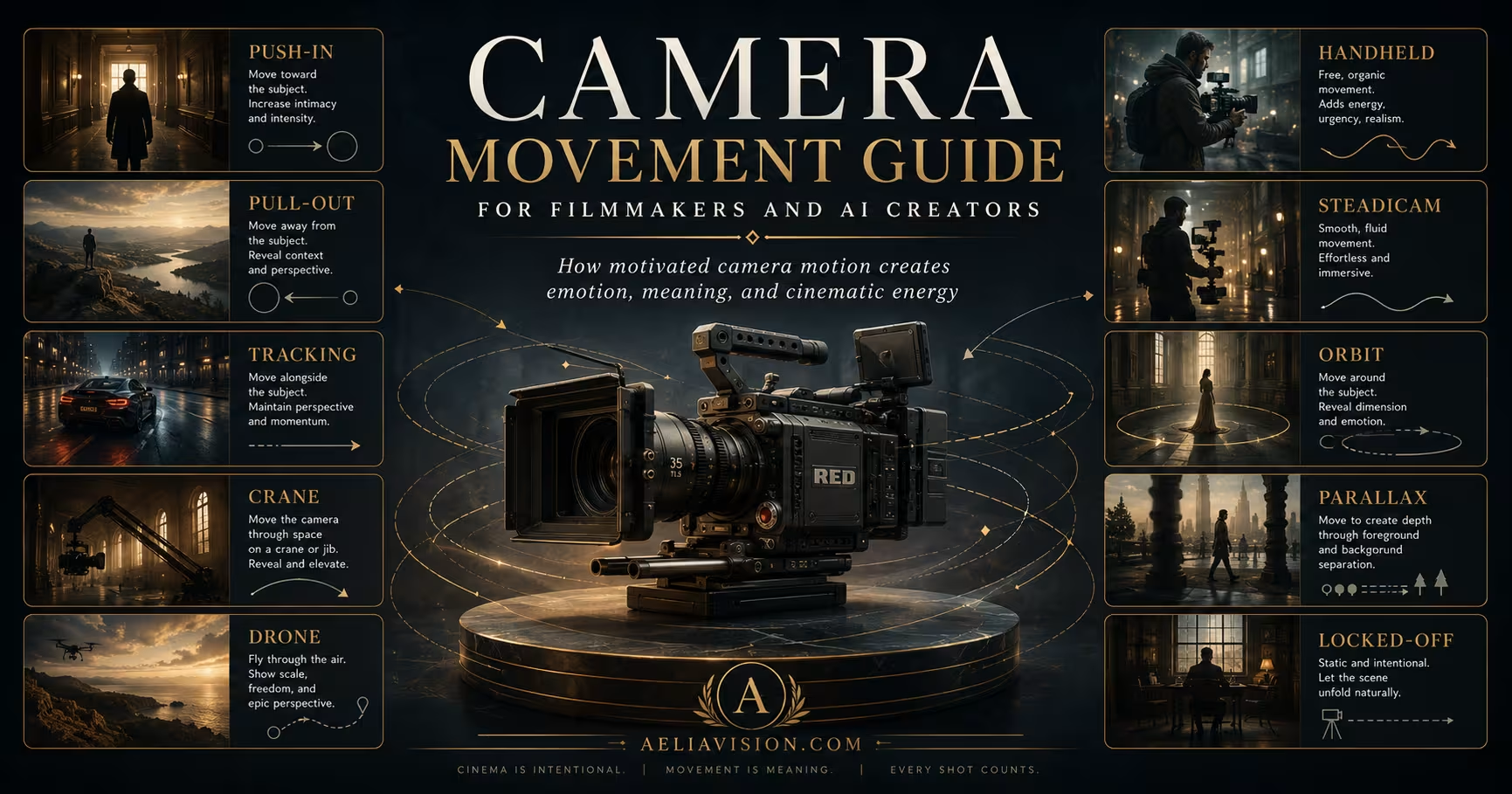
Use this camera movement cheat sheet to choose, direct, and describe cinematic moves with purpose, from pans and dollies to handheld, gimbal, crane, and orbit shots.
Inside this story
Camera movement is a storytelling decision before it is a gear decision. A camera can stay locked off and still create tension, tenderness, or unease. It can also glide through an elaborate setup and communicate nothing. The useful question on set is not “What move would look cinematic?” It is “What changes for the audience during this shot?”
A movement may reveal information, follow a character’s choice, change the power relationship between people in frame, alter the viewer’s distance from an emotion, or give a location a particular physical feeling. Sometimes the right answer is no movement at all. A still frame can make a moving subject feel trapped, observed, or suddenly important. A moving frame earns its place when it gives the scene a new beat.
This guide is designed as a working reference for directors, cinematographers, camera operators, editors, and filmmakers using AI video tools. It separates movements that people often confuse, explains the practical consequences of each choice, and gives concise wording you can use in a shot list, a call sheet note, or a generation prompt. Read the tables first when you are planning quickly. Read the notes when a shot is not landing and you need to diagnose why.
The one-page movement selector
| If the scene needs… | Start with… | What it usually communicates | Watch for | | — | — | — | — | | A character noticing something offscreen | Pan or tilt | Discovery, attention shifting | Panning too fast before the audience can read the first image | | The viewer moving emotionally closer | Push in or dolly in | Pressure, intimacy, realization | Moving without a performance beat | | The viewer pulling away from a character | Pull back or dolly out | Isolation, consequence, context | Revealing irrelevant empty space | | Following a walk across a room | Truck, gimbal, or handheld | Momentum and spatial continuity | Letting the background become visually noisy | | Showing status or scale in a location | Crane, jib, or drone | Geography, awe, exposure | Treating a wide rise as automatic production value | | Showing a subject from several angles without cutting | Orbit | Seduction, instability, scrutiny | Circling so far that the move becomes decorative | | Making the scene feel immediate or unsafe | Handheld | Presence, subjectivity, friction | Random shake that obscures action | | Giving a flowing walk-and-talk shape | Gimbal | Controlled momentum | Excessively floaty movement that removes tension | | Letting the audience feel a shift in thought | Rack focus | Attention changes inside a stable composition | Calling it camera movement when the camera does not travel |
A simple rule helps under pressure: identify the subject, identify the beat, then choose the smallest move that makes the beat legible. If the subject has not changed, the emotional temperature has not changed, and no new information arrives, reconsider the movement.
Pan and tilt
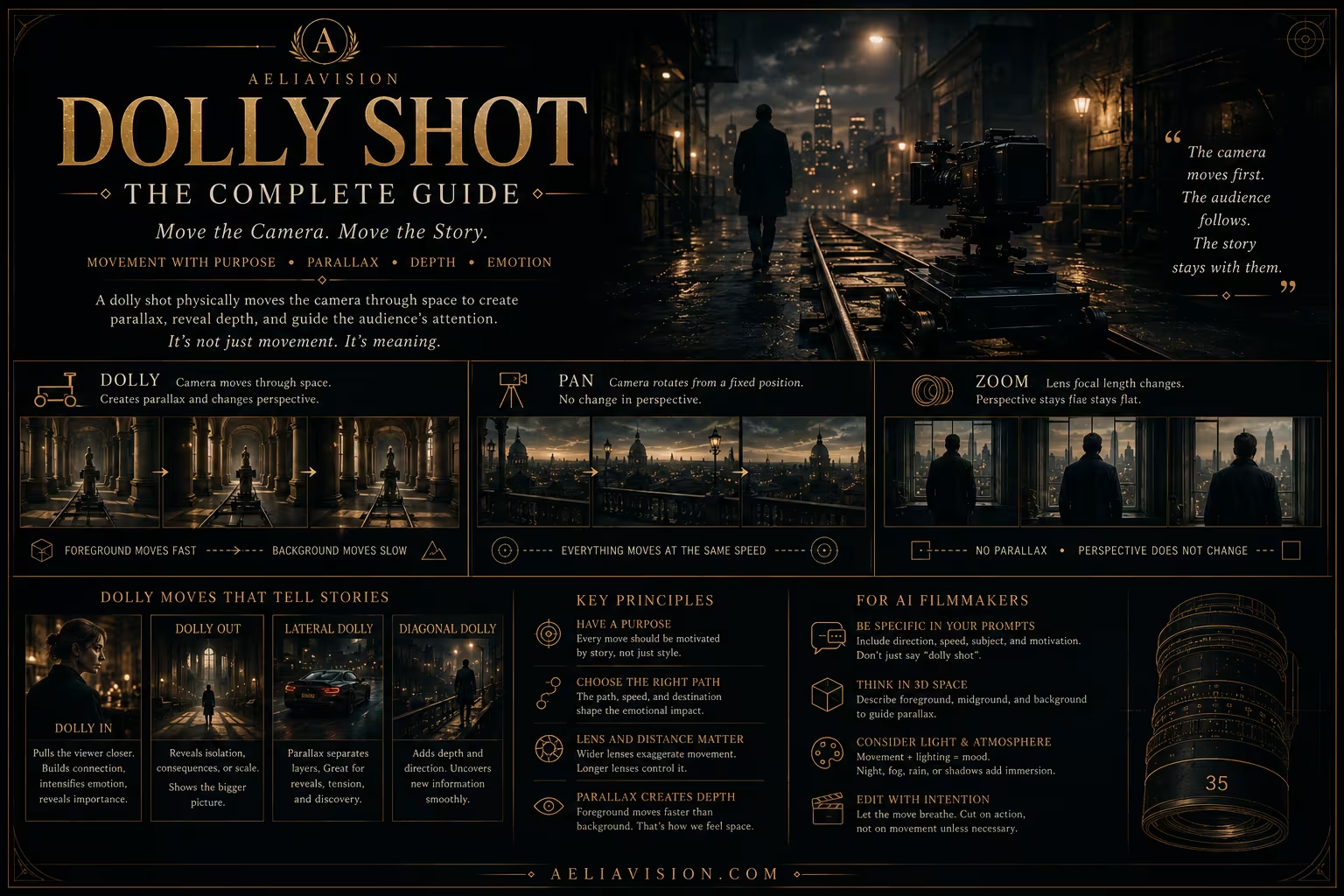
A pan rotates the camera left or right on its horizontal axis. A tilt rotates it up or down on its vertical axis. Neither move changes the camera’s physical position. The lens stays in the same place while the framing points elsewhere. This matters because a pan does not create the changing perspective or foreground separation of a dolly. A tilt does not physically rise above a subject in the way a crane does.
Use a pan when attention travels across a space. It can follow a person entering or leaving frame, discover another character at the end of a conversation, connect two objects whose relationship matters, or show the scale of a room in one uninterrupted look. A slow pan can feel observant. A fast pan can feel reactive, comic, or disorienting. The move has to begin and end on images worth seeing. Operators often call these the settle frames: the composition before the move and the composition after it. Give both enough time to register.
Use a tilt to reveal height, cause, or consequence. Tilting up a building can make a character feel small. Tilting down to a dropped object can land a realization. A tilt from hands to face can turn an action into an emotional read. Since the camera stays put, tilt is particularly useful in tight spaces where a dolly or jib has no room to work.
Pan and tilt become weak when they merely chase a moving actor. If an actor crosses a room, a static wide shot may show the movement more clearly. If you do pan with them, establish where they started, let them move through frame, and use the pan to preserve a relationship to something else in the room.
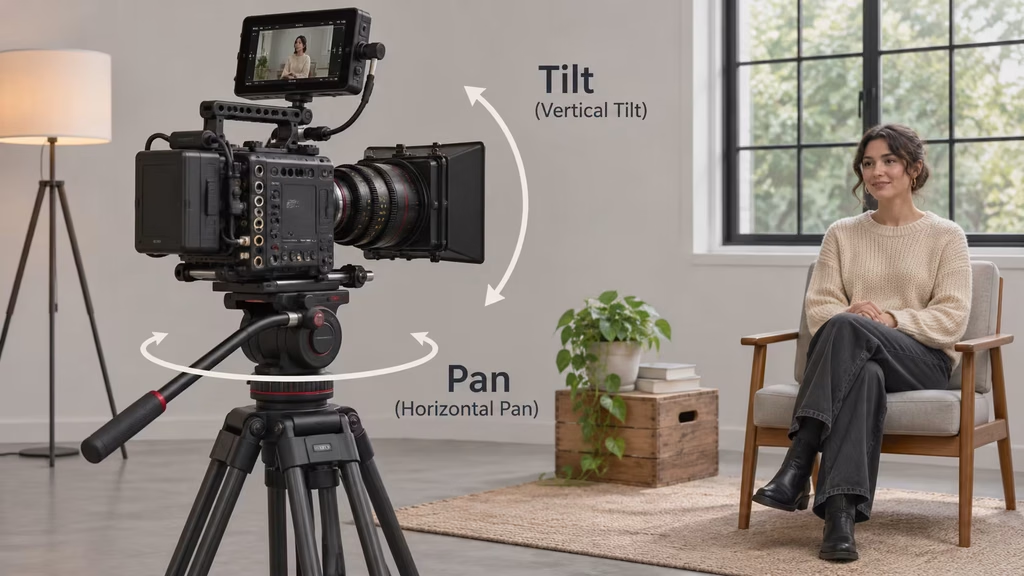
Pan and tilt field notes
– Start and finish with intentional compositions. A pan that begins late looks like the operator was caught off guard. – Pan at a speed that lets viewers understand what crosses frame. A fast move can intentionally withhold detail, but that choice should be clear. – Keep the horizon steady during a pan unless a roll is part of the design. – Tilt with a reason. Tilting up can reveal scale, but it can also make ordinary ceilings and walls look accidental. – On a long lens, small pan corrections look larger. Rehearse the actor’s marks and the end frame. – If the scene needs a reveal with depth, move the camera rather than only rotating it.
Dolly, truck, pedestal, and crane
These terms describe different ways the camera changes physical position. They are often used loosely, which makes a shot list harder to execute. Precise language saves time because it tells the crew where the camera needs to travel.
A dolly moves the camera toward or away from the subject along the lens axis. Dolly in means the camera physically moves closer. Dolly out means it physically moves away. On a real set, the camera may ride on a wheeled dolly, a slider, a vehicle mount, or a stabilized rig. The method can vary; the important part of the description is the camera’s change in distance.
A truck moves the camera sideways, parallel to the subject or scene. Some crews use “track” as a verb for the same lateral move. A truck can follow someone walking down a hallway, reveal one character from behind another, or create parallax as foreground objects slide against the background. Trucking is especially effective when the location has layers: door frames, pillars, parked cars, shelves, or people passing close to lens.
A pedestal raises or lowers the whole camera while keeping its orientation roughly consistent. A pedestal up might begin at table height and rise toward an actor’s face. A pedestal down can introduce a seated character, reveal an object, or let a standing person dominate the frame. The camera physically changes height. This is not the same as a tilt, which only angles the lens.
A crane or jib move carries the camera through a larger vertical arc, sometimes also traveling laterally. It can rise over a crowd, descend into a scene, cross above a table, or move from a close foreground object into a broad view. A crane can make a location feel open, but it can also create distance at the very moment the scene needs intimacy. A modest pedestal or dolly may tell the story better.
| Move | Camera path | Best use | Common mistake | Useful shot-list language | | — | — | — | — | — | | Dolly in | Forward toward subject | Realization, pressure, intimacy | Pushing in because the shot feels empty | “Slow dolly in from medium to close as she understands” | | Dolly out | Backward away from subject | Isolation, aftermath, context | Moving so far that the subject loses importance | “Dolly out to reveal him alone in the office” | | Truck left or right | Sideways | Following action, parallax, reveal | Matching actor speed with no compositional change | “Truck right beside her through the market” | | Pedestal up or down | Vertical rise or drop | Status shift, object-to-face reveal | Confusing it with a tilt | “Pedestal up from the letter to his reaction” | | Crane or jib | Large rising, falling, or arcing path | Geographic reveal, transition, scale | Making every exterior shot a crane shot | “Jib up over the gate to reveal the crowded yard” |
A dolly creates perspective change. That is its signature. As the camera moves closer, foreground objects expand relative to distant objects. Background lines and spacing change. A zoom makes the subject larger without moving the camera, so the perspective stays put. In some scenes that distinction is everything. A dolly in can make the audience feel that the room closes around a character. A zoom in can feel like the audience is examining them from a fixed position.
Speed determines whether a dolly feels like a thought, a threat, or a simple adjustment. Slow is not automatically serious. A slow move that starts before the actor has a beat becomes wallpaper. Time the start to a decision, a withheld answer, an object being noticed, or a shift in control. End the move early enough that the actor can finish the beat in the new frame.
Push in and pull back: intent before equipment
Push in and pull back describe audience experience more than a specific tool. A push in usually means the frame moves closer to the subject. It may be achieved with a dolly, gimbal, handheld step, slider, or virtual camera. A pull back takes the viewer farther away or reveals more of the world. The language is useful during creative planning because it emphasizes the direction of attention.
A push in can make a realization feel private. It can also make an accusation feel inescapable, especially if the subject has nowhere to move in frame. Keep the move small if the performance is subtle. A two-foot advance can be enough to take a medium close-up into a close-up. The audience notices the shift even if they do not consciously identify the mechanics.
A pull back changes the terms of a scene. It can reveal that a character is alone in a large space, show a witness listening nearby, expose the aftermath of a confrontation, or turn an apparently personal moment into one part of a larger situation. Pulling back after a close emotional beat often works because it lets the environment answer the performance.
Avoid treating these moves as punctuation marks you add in post-planning. A push in only has force when something is pulling the viewer toward the subject. A pull back only lands when the wider frame contains a useful answer. Decide what the shot reveals before deciding how smoothly the camera gets there.
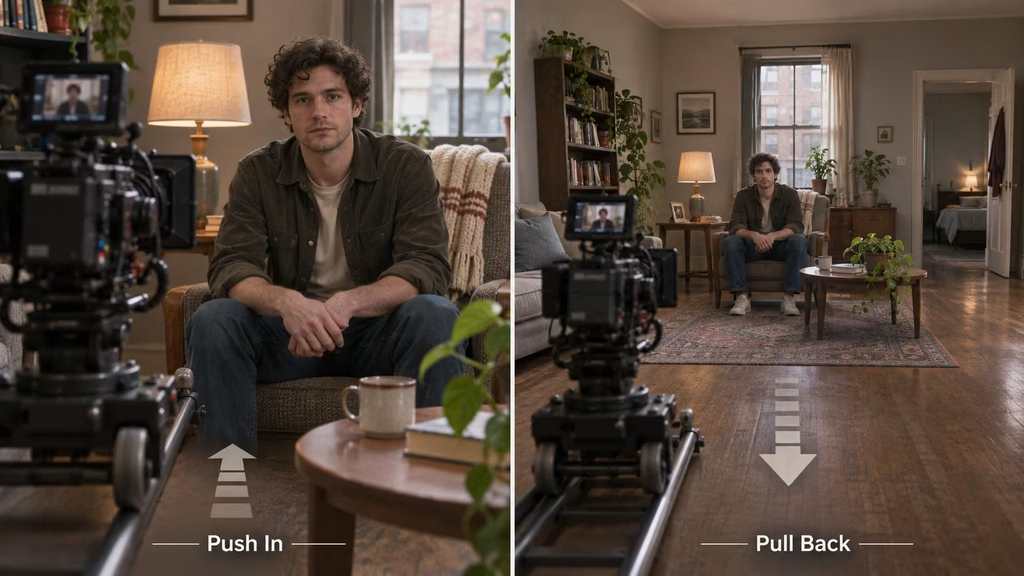
Push and pull quick choices
| Story beat | Better first option | Why | | — | — | — | | A character hears a lie and hides their reaction | Slow push in | The frame can tighten without interrupting the performance | | A character wins an argument but realizes the cost | Pull back | The wider world can complicate the apparent victory | | A weapon or letter changes the stakes | Short push toward the object, then hold | The audience needs time to read it | | A person enters an unfamiliar building | Push with the character | The movement can share their forward commitment | | A breakup ends and one person is left behind | Pull back or static wide | Distance can show the empty space without commentary |
Orbit and the value of parallax
An orbit moves the camera around a subject or group of subjects. The camera may travel in a half circle, full circle, or small arc. Unlike a pan, the orbit changes viewpoint and creates parallax. Background elements shift behind the subject, near objects pass quickly, and the audience feels the camera occupying the space.
An orbit can create intimacy when two people are locked into a conversation and the world falls away. It can create instability when a character loses control. It can make a confrontation feel ceremonial if the movement is slow and controlled. In action scenes, an orbit may reveal who surrounds a fighter or what exits are blocked.
The danger is obvious once you have seen it: the camera circles because it can. An orbit draws attention to itself. Use it when the relationship inside the frame is changing while the camera moves. Perhaps one character steps into another’s space. Perhaps a confession turns the listener from ally to threat. Perhaps the orbit passes a foreground obstacle that lets you hide a cut. If nothing develops, hold the camera or use a simpler path.
Plan the orbit with a background in mind. A blank wall makes the move feel less dimensional. A room with windows, practical lights, furniture, and depth lets the parallax read. In exterior scenes, consider the sun direction, shadows, crew reflections, and the path the operator can actually walk. A beautiful arc that forces an operator to step over cables or into uneven ground will not stay beautiful.
Handheld and gimbal: two kinds of presence
Handheld and gimbal work are not interchangeable. Both allow the camera to move through a location, but they produce different physical information.
Handheld movement carries the operator’s body into the image. Tiny shifts, breathing, footfalls, and reactions become part of the shot. This can create immediacy, uncertainty, documentary energy, or a point of view that feels close to a character. Handheld does not mean careless. Good handheld has a chosen level of instability. The operator knows where the frame should settle, how much horizon drift is acceptable, when to allow a bump, and when to protect an actor’s eyes or hands.
A gimbal isolates the camera from much of the operator’s movement. It can travel smoothly down a hallway, around a table, up stairs, or through a crowd. The result often feels fluid and continuous. That smoothness can be useful for a dreamlike entrance, a controlled pursuit, or a scene that needs unbroken geography. It can also feel disconnected from a raw performance if the story needs friction.
Choose handheld when instability itself has meaning. Choose a gimbal when the camera needs to travel cleanly through a space and the audience should feel carried rather than jolted. You can mix the two, but define the transition. For example, a stable gimbal follow can become handheld once a character begins to panic. The shift tells the viewer that the scene has changed without requiring dialogue.
| Question | Handheld answer | Gimbal answer | | — | — | — | | Does the camera feel like a person in the room? | Usually yes | Less so, unless movement is very close and responsive | | Can it cross a long path smoothly? | Possible, but physically demanding | Usually the practical choice | | Does minor shake support the scene? | Yes, if controlled | Usually no | | Is the location crowded or irregular? | Flexible but tiring | Flexible if the route is rehearsed and balanced | | Does the image need a polished floating quality? | Rarely | Often |
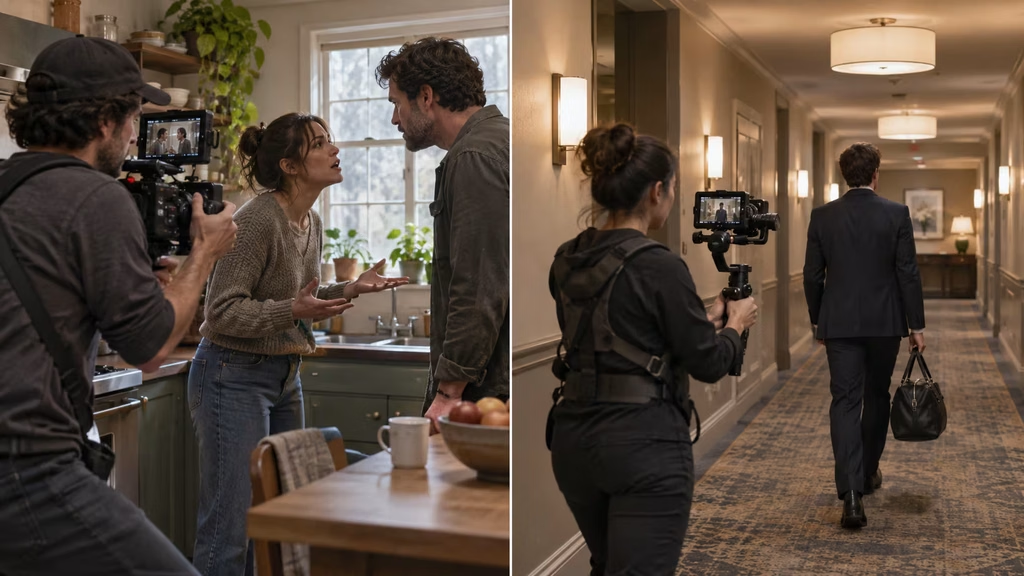
Stabilization is a creative setting
Stabilization can be physical, electronic, optical, or added in post. Each option changes the image. A tripod and fluid head protect framing. A shoulder rig gives an operator repeatable contact points. A gimbal smooths rotation and travel. In-camera or lens stabilization can reduce minor shake, while post stabilization can crop and warp an image to calm it further.
Do not apply stabilization automatically. Strong post stabilization can make edges bend, crop out intended framing, or turn a deliberate handheld image into something that feels oddly detached from the actor. Test it with the actual lens, focal length, shutter settings, and movement style you plan to use. A short rehearsal tells you more than a general rule about what a system can handle.
Focal length changes how movement appears. Wider lenses tolerate closer handheld work because small shifts appear less severe. Longer lenses magnify every shake and pan correction. A move that feels calm at 24mm may look nervous at 100mm. If you need a long-lens moving shot, consider more support, a slower path, or a composition that does not demand perfect edge control.
Rack focus is not camera movement
A rack focus shifts focus from one subject or plane to another while the camera remains physically still. It is a lens operation, not a camera move. The distinction matters in communication. If you ask for “a push in with rack focus,” you are asking for two separate actions that must be timed together. If you say only “focus moves to her,” the camera team may not know whether the frame itself should travel.
Rack focus directs attention inside one composition. A foreground hand can become sharp while a face falls soft. A speaker in the background can take focus after an offscreen remark. A rack can reveal that a figure behind glass has been present all along. It is useful when the relationship between subjects matters more than the physical journey to them.
The move needs a focus destination. Beginning sharp on a coffee cup and ending sharp on an actor is not automatically meaningful. The cup may represent a clue, a routine, an absence, or a handoff. If it does none of those things, the focus change can look like a demonstration of shallow depth of field.
A rack focus becomes harder at wider apertures, longer focal lengths, closer distances, and with subjects moving toward or away from the lens. Build a repeatable plan. Mark actor positions, choose whether the focus pull follows dialogue or action, and leave enough time at each end for the audience to recognize what is sharp.
| Technique | Does the camera change position? | What changes | Best use | | — | — | — | — | | Rack focus | No | Plane of focus | Redirect attention between subjects or layers | | Zoom | No | Focal length and field of view | Optical emphasis from a fixed position | | Pan or tilt | No | Camera orientation | Reveal or follow across the frame | | Dolly or truck | Yes | Camera position and perspective | Change viewer relationship to the scene | | Crane or pedestal | Yes | Camera height, often position | Reveal vertical scale or status |
Motivation: make the move answer the scene
Motivation is the reason a camera begins, changes, or stops moving. It does not have to be literal. The camera does not need to follow every actor step like a surveillance device. It does need a relationship to the scene’s dramatic logic.
There are several dependable kinds of motivation:
– Character motivation: the camera follows a person because their action matters. A truck move holds them beside a storefront while they search for someone. – Information motivation: the camera reveals a person, object, or space when the story needs it. A pan reaches the open door after a sound is heard. – Emotional motivation: the movement changes the viewer’s distance from a feeling. A slow push begins as someone realizes they have been betrayed. – Spatial motivation: the movement clarifies geography. A gimbal follow connects a hallway, stairwell, and room before an action scene begins. – Rhythmic motivation: the camera moves with a musical, comedic, or physical beat. This works best when the rhythm is already present in performance, blocking, or sound.
A motivated move may be almost invisible. In a dialogue scene, the camera can drift a little closer as the balance of power shifts. The audience experiences the new proximity before they notice the move. That restraint is often more useful than a large obvious track.
When a shot feels overdesigned, ask where it should start and why. If the honest answer is “because the image felt static,” solve the staging first. Move the actor, change the foreground, alter the lens, or cut to a better angle. Movement should not compensate for a scene that has no visual idea.
Speed, acceleration, and stopping points
Camera speed should match the duration and intensity of the beat. A slow creeping push can sit beneath a quiet admission. A quick whip pan can turn a delayed reaction into comedy or alarm. A medium-paced lateral move can keep a conversation alive without telling the audience how to feel.
The beginning of a move matters as much as its top speed. A camera that snaps into motion feels reactive. One that eases in can feel observant or controlled. The finish matters too. A hard stop can make a revelation land. A gradual settle can let the viewer absorb the new composition. These are not fixed emotional codes, but they give you a vocabulary for rehearsal.
For planned shots, write approximate timing alongside direction. “Push in over six seconds, begin on the pause after the question” tells the operator more than “slow push.” If the performance changes, protect the beat rather than protecting a stopwatch. An operator who understands the reason for the move can adjust it intelligently.
| Speed and behavior | Typical effect | Planning note | | — | — | — | | Very slow continuous move | Suspicion, attention, intimacy | Needs a performance beat that can sustain it | | Slow move with delayed start | A thought arriving | Begin after the audience understands the initial frame | | Medium follow | Presence and continuity | Match subject pace but keep a composed frame | | Fast pan or whip | Surprise, impact, comedic transition | Give the audience a clean landing frame | | Sudden stop | Alarm, discovery, interruption | Avoid accidental-looking stops during calm scenes | | Ease out | Reflection and release | Leave enough hold time after the camera settles |
Coverage: build an editable scene
A beautiful moving master does not replace coverage. Before committing to a complex shot, decide what the editor needs if timing, performance, sound, or blocking changes. The answer depends on the scene, but a useful baseline includes a master that explains the geography, singles or over-the-shoulders that protect performance, and inserts that can manage time or emphasis.
Movement can shape coverage rather than merely decorate it. A slow truck can turn a two-shot into a single as one person steps away. An orbit can travel through several useful angles if actors stay readable and the lighting holds. A gimbal move may function as a master while passing doors or dark foreground that provide natural edit points. Plan those points rather than hoping they appear in the footage.
Do not assume a moving shot must be the master. A locked wide can be more reliable for continuity, while a moving close shot captures the emotional turn. If you have limited time, protect the shots that carry dialogue and story information before attempting the elaborate move. The best camera move in a scene is of little use if the edit has no clean way to cover a line or a missed mark.
Coverage checklist for a moving setup
1. Capture a static safety version when the location and schedule permit it. 2. Confirm entrance and exit marks for every actor who crosses the camera path. 3. Record a clean beginning and ending hold, not only the movement itself. 4. Watch background extras, practical lights, reflections, and crew shadows during rehearsal. 5. Identify where an editor could cut if the move is imperfect. 6. Get inserts that show objects, hands, reactions, or feet when they carry story value. 7. Check whether the shot’s sound can survive the rig, floor, and operator route.
Lens choice and blocking change the movement
A movement cannot be selected in isolation from lens and blocking. A wide lens close to a character makes a small push feel personal and physical. It also exaggerates distance between foreground and background. A long lens flattens space and can make a truck move look like the background slides slowly behind the subject. Neither is universally more cinematic. The scene decides.
Blocking can motivate the camera without dialogue. If an actor crosses in front of a foreground object, a truck can reveal their face at the exact moment they change their mind. If two characters walk in opposite directions, a static frame may let the separation play better than a follow. If a character stops while the camera continues forward briefly, the frame can create a sense that their world has moved beyond them. Rehearse this in the actual space. Diagrams rarely reveal the awkward corner, low ceiling, or background distraction that determines whether the move works.
Use foreground deliberately. A lamp, doorway, tree, shelf, or passing person gives a moving camera layers to travel through. It also offers concealment for a transition or a cut. Do not place foreground clutter near lens only to make the frame look busy. It needs to help depth, framing, or story.
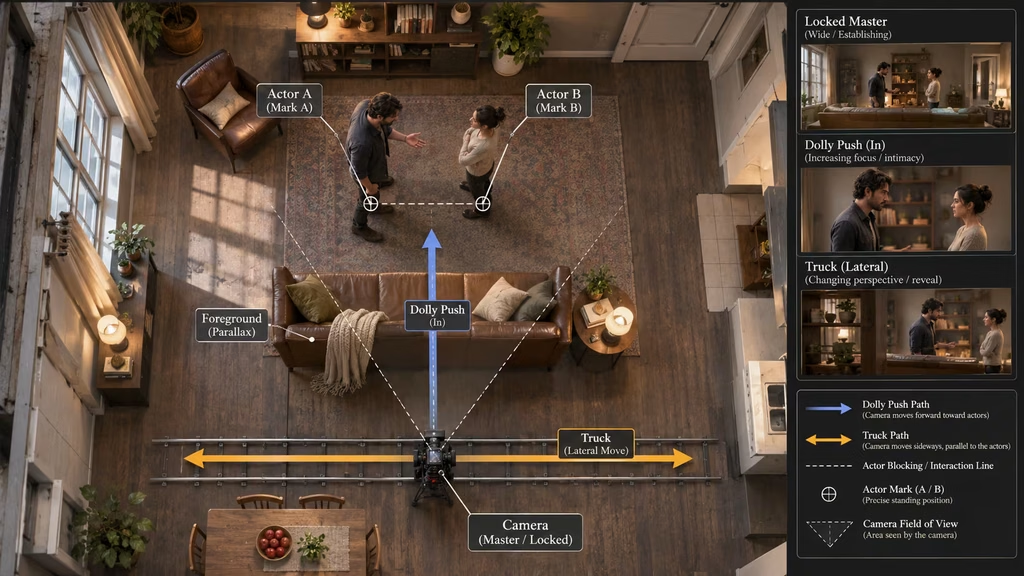
Quick movement cheat sheet by dramatic purpose
| Dramatic purpose | Movement options | A practical direction | | — | — | — | | Reveal hidden information | Pan, tilt, truck, crane | “Hold on her, then pan to the open doorway after the sound” | | Increase pressure | Dolly in, push in, slow handheld advance | “Begin a subtle push as he refuses to answer” | | Create distance after an emotional beat | Dolly out, pull back, crane up | “Pull back once she is alone in the frame” | | Follow decisive action | Truck, gimbal, handheld | “Stay beside him as he crosses the room and reaches the exit” | | Show a status reversal | Pedestal, crane, dolly with reframing | “Pedestal up from the papers to her standing over him” | | Create unease | Handheld, restrained orbit, imperfect follow | “Handheld close behind her as she enters the dark hall” | | Make space legible | Gimbal follow, truck, slow pan | “Travel with them from lobby to elevator without losing direction” | | Mark a realization | Push in, rack focus, a small reframe | “Rack from the photograph to her eyes, then hold” | | Add energy to a transition | Whip pan, fast truck, gimbal pass | “Whip right on the door slam and land on the next subject” | | Preserve stillness | Locked tripod or minimal drift | “Hold the wide; let the actor’s movement do the work” |
AI video prompt wording for camera movement
AI video systems respond better to a clear relationship among subject, direction, pace, camera position, and visual constraint than to a list of generic film terms. “Cinematic camera movement” does not tell the model what to do. Describe a physical path and the moment that motivates it.
Start with the shot type and subject. Add the movement direction. Add pace and stabilization. Add environmental context that makes the path possible. Finish with the intended behavior of the frame. Keep the prompt concise enough that the movement remains the priority.
A dependable template is:
> [Shot size] of [subject] in [location], camera [movement and direction] at [pace], [stabilization or rig feel], while [action or story beat]. Keep [framing constraint], natural [lighting detail], realistic motion.
Examples:
– “Medium close-up of a tired chef in a narrow restaurant kitchen, slow handheld push in as she reads an unexpected text message, restrained natural body movement, keep her eyes centered and the busy kitchen soft behind her, warm practical lighting, realistic motion.” – “Wide shot of two siblings crossing an empty parking garage, camera trucks left parallel to them at walking pace, stabilized gimbal movement, concrete pillars create foreground parallax, keep both actors in frame, cold fluorescent lighting, realistic motion.” – “Close-up of a detective at a motel window, slow dolly in from medium close-up to close-up as he notices a car outside, smooth controlled movement, rain streaks on glass in foreground, keep the face sharp, muted night lighting, realistic motion.” – “Overhead wide shot of a wedding reception, crane rises slowly above the dancing crowd to reveal the full hall, graceful stable camera path, warm string lights and moving guests, preserve clear spatial geography, realistic motion.” – “Static medium shot of a woman holding a key in the foreground, rack focus from the key to a man in the background after he speaks, camera remains locked, shallow depth of field, soft afternoon window light, realistic focus transition.”
Avoid contradictory directions. “Handheld gimbal glide with shaky perfectly stable framing” gives the model incompatible goals. Choose the dominant behavior. If you want slight imperfection, say “subtle handheld energy” or “light natural camera sway” rather than asking for violent shake. If you need a long complex move, split it into shots. Generation quality often improves when a shot has one readable action and one camera path.
Prompt vocabulary that stays specific
| Need | Useful wording | Avoid | | — | — | — | | Forward movement | “slow dolly in,” “gentle push toward her face” | “make it more cinematic” | | Backward movement | “pull back to reveal the empty room” | “dramatic zoom out” when a physical move is intended | | Lateral travel | “truck right alongside him” | “camera moves around” | | Rotation | “pan left from the letter to the doorway” | “camera swings” without an endpoint | | Vertical reveal | “tilt down from the sign to the waiting child” | “camera goes down” | | Smooth travel | “stabilized gimbal follow at walking pace” | “smooth handheld” unless you mean a supported handheld look | | Controlled instability | “restrained handheld, minor natural sway” | “shaky camera” | | Focus change | “camera locked, rack focus from foreground glass to her eyes” | “camera shifts focus” when camera position must remain still | | Orbit | “slow half orbit around the pair as the argument turns” | “360 camera move” without subject, arc, or reason |
On-set wording that prevents confusion
A useful instruction states the start frame, path, timing trigger, end frame, and any constraint. For example: “Start on the wide two-shot. Truck right with them as they walk to the window. Do not pass the lamp in the foreground. Settle when she turns back.” This lets the operator understand both mechanics and story.
For a small crew, reduce the language further: “Start medium. Slow push on her pause. End close, leave room left for his entrance.” The point is not formal terminology for its own sake. The point is avoiding a take where the director imagines a push, the operator performs a pan, and the editor gets neither useful framing.
If you are directing an actor and operator at once, separate their cues. Give the actor an action cue and the operator a visual cue. The actor may begin crossing on “after the word tomorrow.” The operator may begin the truck when the actor clears the table. Those are different marks, and combining them into one vague instruction produces inconsistent timing.
Common mistakes and repairs
Movement starts before the beat
The shot begins creeping in while characters are still exchanging setup dialogue. By the time the meaningful line arrives, the camera has nowhere left to go. Reset the move. Hold the opening composition longer, then begin on the word, look, or silence that changes the scene.
The operator follows without framing
A follow shot can become a loose chase if nobody defines headroom, lead room, and the intended side of frame. Decide which direction the subject should travel, where their eyes should sit, and what background should accompany them. If the subject turns, decide whether the camera crosses the line or lets them reverse direction in frame.
Stabilization removes the scene’s texture
A tense scene is shot with a gimbal because smooth footage seems safer. The result feels detached. Try a shoulder-mounted or lightly handheld version. The goal is not to manufacture chaos. It is to let the camera share the physical stakes when the scene calls for it.
A complex move has no coverage backup
A long crane or gimbal shot fails because an actor misses a mark, a focus pull drifts, or a background extra looks at lens. Capture a reliable static or simpler moving alternative before schedule pressure removes the option.
The move advertises the tool
A crane rises, an orbit circles, or a whip pan arrives because the crew has access to the gear. Ask what the new frame says. If the answer is only “it looks expensive,” use a simpler shot and put the time into blocking, lighting, or performance.
Final planning checklist
Before shooting or generating a camera move, confirm the following:
– What does the audience learn, feel, or re-evaluate by the end of the move? – What is the start frame, and can it hold for a moment before the move begins? – What is the end frame, and does it deserve a hold after the move settles? – Is the movement a pan or tilt, a physical repositioning, a focus change, or a zoom? Name it accurately. – Does the lens support the movement style and the available focus control? – Does the location give the camera a safe, clean path with useful depth? – What is the intended speed, and what performance beat triggers it? – Does stabilization support the emotion, or does it smooth away useful tension? – What coverage protects the edit if the moving take does not work? – If using an AI video model, does the prompt state one clear path, one pace, and one framing priority?
The cheat sheet is simple on purpose. Pick the movement that changes the scene, give it a clear beginning and end, and shoot a version the editor can use. That is usually more cinematic than adding motion everywhere.
Continue reading
Further insights from the Journal

Have a story in mind?
Bring your next project into focus.
Tell us what you are creating and what you want the audience to feel.