The story in brief
A long take is a shot that continues without a visible cut for an extended period. The camera may remain still, follow a character, move through a location, or change its relationship to the action. What matters is the uninterrupted stretch of…
Inside this story
A long take is a shot that continues without a visible cut for an extended period. The camera may remain still, follow a character, move through a location, or change its relationship to the action. What matters is the uninterrupted stretch of time. The audience stays inside one continuous event instead of receiving the event through a series of editorial jumps.
The technique can feel effortless when it works. A character crosses a room, walks through a corridor, enters a vehicle, and discovers something waiting inside. The audience experiences the path with them. There is no cut to provide relief or hide a mistake. Every step occupies the same stretch of time as the character’s journey.
That is why a long take can create pressure. The viewer knows the shot cannot escape easily. If something goes wrong, the camera and the performance have to carry the moment forward. The shot asks the audience to wait, and the waiting becomes part of the story.
A long take does not need a complicated camera move. A locked-off shot lasting several minutes can be a long take. A simple handheld follow can be one. A Steadicam shot moving through a building can be one. The technique is about continuity, not spectacle.
For AI filmmaking, the long take creates a different problem. Most image-to-video systems work best with short clips, and long generated sequences often drift in identity, architecture, lighting, and motion. The solution is to plan the long take as a chain of controlled segments, preserving the same visual DNA at every transition. You can also use one short continuous clip when the action is simple enough for the model to hold.
What makes a long take different from an ordinary shot
A normal shot can hide time through cuts. A character can begin an action in one angle and finish it in another. The editor can remove a pause, change the rhythm, or jump to a useful detail. A long take gives up much of that protection.
The audience sees the relationship between actions. A door takes time to open. A character has to cross the room. A reaction cannot be removed without breaking the continuity of the shot. That duration changes how the scene is felt.
The camera may move, but movement alone does not make a long take interesting. The action inside the shot needs to develop. A character can move from confidence to doubt. A quiet room can become crowded. A conversation can turn while the camera remains beside the participants. The shot has a beginning, a middle, and an end even when the edit does not interrupt it.
A long take also creates a strong relationship between the viewer and the physical space. Because the camera does not cut away, the audience builds a mental map. They notice where the doors are, who stands near the window, and how far the character has to travel. If the geography changes without a visible reason, the shot feels broken.
Why long takes build tension
Tension grows when the audience expects an event but does not know when it will happen. A cut can reset that expectation. A long take lets the expectation stay alive.
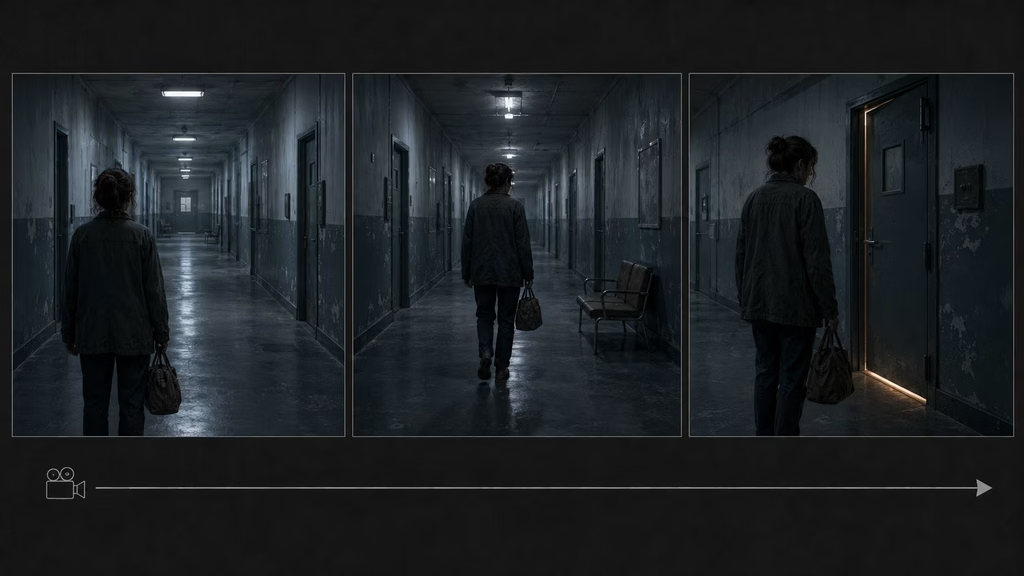
A character might walk toward a room while the audience knows someone is waiting inside. The camera stays with the walk. Every second adds pressure. The viewer watches the handle, the corridor, and the character’s pace. The shot refuses to skip ahead.
The same idea works with a still camera. Hold on a doorway while a character listens off-screen. The audience cannot see the source of the sound, but the unbroken frame makes the waiting concrete. The camera does not provide a reaction shot or a closeup. The viewer has to remain with the uncertainty.
A long take can also build tension through distance. The camera follows a character toward a location while the environment slowly reveals clues. A discarded object, a light under a door, or an empty chair changes the meaning of the walk. The camera’s continuous path gives the audience time to notice those details.
Tension is not always fear. The same endurance can support grief, anticipation, embarrassment, or intimacy. A character may cross a room to say goodbye, and the length of the crossing lets the audience feel the decision before the words arrive.
Immersion and real time
The long take creates the feeling that the event is happening now. The viewer is not being shown a memory of the event through assembled fragments. They are watching the event continue.
This can make a performance feel more exposed. An actor cannot rely on a cut to remove an awkward pause. They have to carry the emotional transition through the entire duration. The audience sees the change happen instead of receiving only the polished result.
Real time also makes physical effort visible. A character running through a building becomes tired. Someone carrying a heavy object has to keep carrying it. A conversation takes the time of a conversation. These details can give the scene a grounded quality.
The technique can be immersive without being realistic in every sense. A camera may glide through walls or move in a way no operator could manage. The continuity still creates a shared experience. The viewer accepts the path because the action remains connected from beginning to end.
If the shot is meant to feel realistic, avoid unnecessary camera movement. Let the camera respond to the action. A character enters a room, so the camera follows. A sound comes from behind, so the camera turns. That relationship makes the movement feel motivated.
Types of long takes
Locked-off long take
The camera stays fixed while the action changes inside the frame. This is the simplest form and often the most demanding for the audience. The composition must hold attention without camera movement.
Use a locked-off long take when the stillness matters. A character may wait for a phone call, sit with a difficult decision, or remain in a room while people enter and leave. The frame becomes a container for time.
A locked-off take also works for comedy. A character can attempt a task while the camera refuses to cut away. The audience sees every failed attempt and every reaction in the same composition.
Handheld long take
Handheld movement brings the operator’s body into the shot. Small shifts, breathing, and changes in balance create immediacy. A handheld long take can feel documentary, urgent, or unstable.
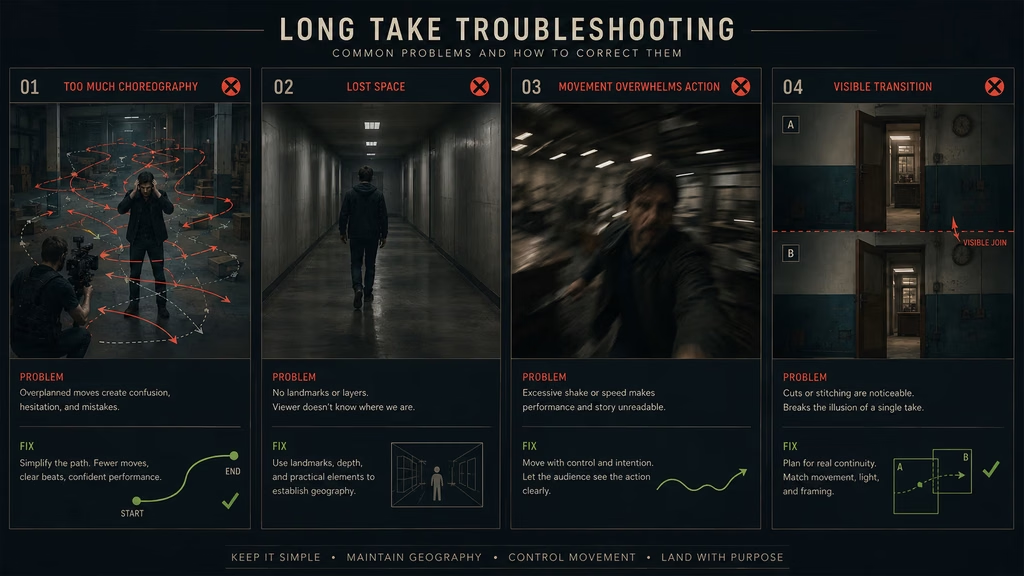
Keep the intensity controlled. Constant violent shaking becomes tiring and can make the geography difficult to follow. The camera can become less stable as the character loses control, but the change should have a reason.
For AI video, request subtle handheld life rather than uncontrolled shaking. Models often interpret extreme shake as image distortion. A stable start frame and a short movement path will usually give a cleaner result.
Steadicam long take
A Steadicam long take glides through a location. The camera can follow a character around corners, through doors, and up stairs while maintaining a smooth relationship with the action.
The smoothness creates a floating feeling. It can be calm, eerie, or grand. The technique depends on choreography. Actors, camera, lighting, focus, and sound all need to work together.
Use the Steadicam when the viewer should travel with the character. The camera may move behind them during a search, beside them during a conversation, or ahead of them while they approach a new space.
Crane or aerial long take
A crane or drone can sustain a long take while changing scale. The shot may begin close to a person and rise to show the landscape. It may travel over a crowd and descend toward one important detail.
The change in scale gives the shot a clear arc. Start with a human point of view, then reveal the world around it. Do not rise only to show empty sky. The wider view should change the audience’s understanding of the subject or location.
Hidden-cut long take
Some shots appear to be unbroken but use hidden cuts. The camera passes behind a dark object, crosses a black frame, or moves quickly through a blur. The editor joins two segments where the image is temporarily unreadable.
Hidden cuts are useful in productions that cannot sustain a true long take. They preserve the feeling of continuity while allowing the team to reset actors, camera, lighting, or location. The cut should be motivated by the movement and hidden from the audience.
Designing the beginning, middle, and end
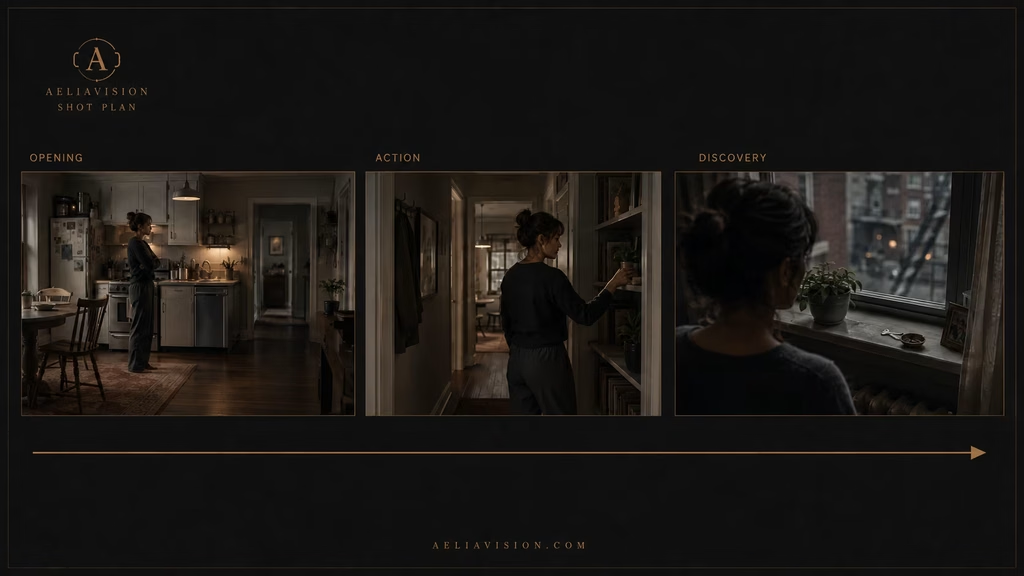
A long take needs structure. Start by defining the opening image. Where is the audience placed? What can they understand immediately? A wide room, a character’s face, an empty hallway, or a moving vehicle creates a different promise.
Then define the change in the middle. The camera may follow an action, reveal a new person, cross into another space, or remain still while the emotional situation shifts. The middle should not be a waiting area between the opening and the ending.
Finally, define the destination. The shot may land on a face, an object, a doorway, a group, or a new wide view. The destination gives the movement a reason to exist.
A useful planning sentence is:
“The shot begins with the character alone in the kitchen, follows her through the apartment as she searches for the missing key, and ends when she sees it on the table beside the open window.”
That sentence provides a path, an action, and a final discovery. The camera can then be designed around the story.
Blocking for a long take
Blocking is the movement and position of people inside the space. In a long take, blocking replaces some of the work normally done by editing.
An actor can move closer to the camera to create a closeup. They can cross behind another person to change the composition. They can enter a pool of light, sit at a table, or turn away from the audience. The shot size changes because the actor’s position changes.
This requires a clear floor plan. Mark doors, windows, furniture, and the path the camera will take. Decide where each person starts and what causes them to move. If the actor crosses the room without a reason, the movement becomes visible as choreography instead of story.
The camera can also hold while the blocking changes. A person enters the foreground and takes over the frame. Another person leaves, creating negative space. A group breaks apart after an argument. These changes can create editorial rhythm without a cut.
For AI generation, describe the blocking in simple stages. A model may struggle with a long chain of complicated actions, so split the sequence into segments and preserve the final frame of one segment as the starting reference for the next.
Camera movement and motivation
A long take should not move simply because the shot is long. The camera needs a reason to start, change direction, or stop.
A character walks, so the camera follows. A sound comes from behind, so the camera turns. A new person enters, so the camera widens or shifts. A character realizes they are being watched, so the camera moves closer to their reaction.
Motivation can be physical or emotional. The camera may circle a couple after a decision changes their relationship. It may pull away from someone who has been rejected. It may remain still while the person leaves the frame.
The viewer does not need to understand the camera’s reason consciously. The movement simply needs to feel connected to what is happening. If the camera performs an unrelated move in the middle of a serious exchange, the audience notices the filmmaking instead of the scene.
Long takes and focus
Focus becomes more difficult as the camera and actors move through space. A long take may require a focus pull from a foreground object to a person in the distance, then back to another actor crossing the frame.
Plan the focus points with the blocking. Mark where the subject becomes important and where the camera should shift attention. A focus pull can replace a cut, but it should have a clear destination.
For AI video, moderate depth of field often works better than extreme shallow focus. Keep the important face or object readable while allowing the background to soften. If the model loses focus during a long move, split the shot into shorter sections or use post-production masking.
A prompt can state:
“Single continuous take. Begin focused on the letter in the foreground, then rack focus to the woman as she enters the room. Keep both the letter and her face readable during the transition.”
That is more useful than simply writing “cinematic focus pull.”
Long takes in dialogue
A long dialogue take can change the power relationship without cutting between faces. The camera may begin in a two-shot, move beside one character, circle the table, and end behind the person who has lost control of the conversation.
The actors need a clear rhythm. Pauses, interruptions, movements across the room, and changes in distance can create visual structure. The camera can respond to those changes, but it should not interrupt every sentence with a new movement.
A still long take can be equally effective. Hold both characters in one frame and let the audience study who speaks, who avoids eye contact, and who moves away. The absence of a cut makes the silence visible.
For AI workflows, a full conversation is usually too long for one generation. Create a master shot and several short reaction clips with matching camera height and lens language. Assemble them so the sequence retains the feeling of continuous time, even if the final version uses hidden cuts.
Long takes in action scenes
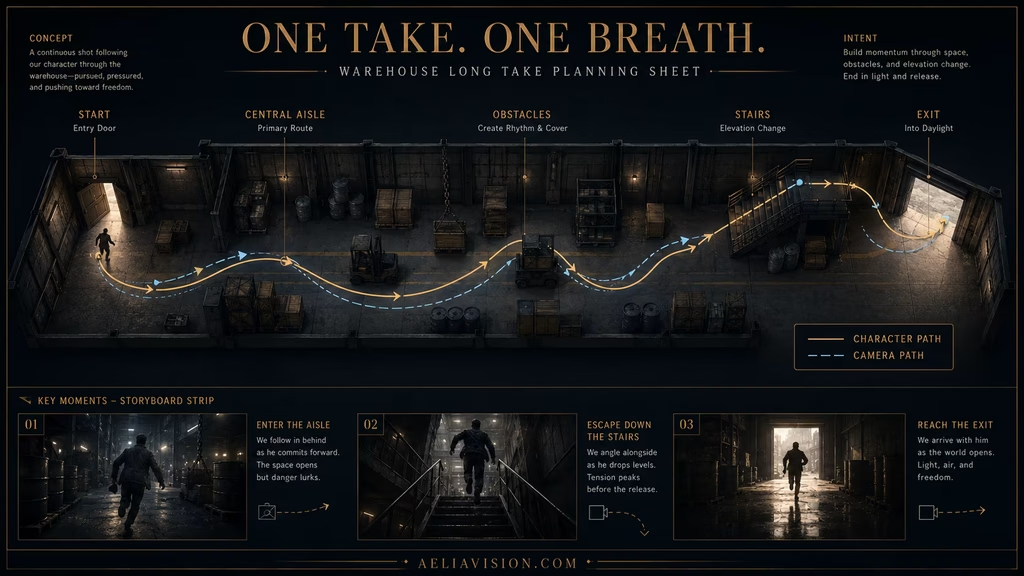
Action long takes create a sense of physical effort and direction. The viewer follows the character through a fight, chase, or escape without receiving a series of disconnected highlights.
The geography must be clear. Establish where the doors, stairs, obstacles, and opponents are. The audience needs to understand the route so each movement carries pressure.
Vary the intensity inside the take. Begin with controlled movement, introduce a problem, accelerate through the central action, then slow down or stop on the consequence. If every second is equally fast, the viewer has no sense of escalation.
For AI video, generate the action as short connected beats. Keep the character’s clothing, body shape, lighting, and direction consistent. Use a final frame from one segment as a visual reference for the next. Avoid asking a model to perform a complex fight, camera orbit, explosion, and location change in one clip.
Long takes and sound
Sound carries continuity even when the camera changes direction. Footsteps, breathing, room tone, traffic, machinery, and dialogue connect the spaces the camera travels through.
A long take exposes sound problems. A room that suddenly changes tone, a footstep that does not match the floor, or a voice that jumps in distance can break the illusion. Record or design a stable ambience bed for the location.
Use sound to motivate camera movement. A voice from another room can pull the camera forward. A sudden impact can turn it around. A change in music can mark the transition from calm to urgency.
For AI films, sound is often built separately. Generate the visual segments first, then create a continuous sound layer that bridges them. This can make several short clips feel like one event. Keep the room tone and reverberation consistent across the entire sequence.
Hidden cuts and stitching AI segments
The practical AI approach to a long take is often a stitched sequence. Each segment should have a clear entry and exit frame.
Create the first clip with a stable starting composition. End on a moment that can hide a transition, such as a character passing close to camera, a dark doorway filling the frame, a fast pan, or a foreground object crossing the lens.
Use the final frame as the reference for the next segment. Preserve the character, wardrobe, location, light direction, lens feel, and camera height. Change only the action required for the next beat.
In the edit, cut at the moment when the image is least readable. Add motion blur or a sound bridge only when it supports the action. A visible mismatch in the middle of a static frame will be much harder to hide.
The final result can feel continuous even though the production used several short generations. The audience experiences one route because the transitions respect the movement and geography.
Common long-take mistakes
Showing off instead of telling the story
A long take can be impressive, but spectacle is not a substitute for structure. If the camera has no relationship to the action, the audience starts watching the camera rather than the scene.
Making the route too complicated
Every extra turn, entrance, prop interaction, and focus change adds risk. Design the simplest route that delivers the emotional or narrative change.
Keeping the same emotional temperature
A long take needs variation. Change the distance, pace, blocking, sound, or information inside the shot. A continuous image with no development feels long because it is long.
Losing the geography
If the viewer no longer knows where the characters are, the tension disappears. Establish the space before the camera begins a complex route and keep landmarks visible.
Moving the camera without motivation
A random orbit or push-in calls attention to itself. Tie the movement to a character, sound, discovery, or emotional shift.
Using extreme shallow focus during complex motion
The face may leave the focus plane, or the background may become an unstable blur. Use moderate focus for movement unless the loss of clarity is intentional.
Asking AI to generate too much at once
Long, complicated prompts often produce identity drift, warped objects, and impossible motion. Divide the take into manageable beats and use reference frames.
Forgetting sound
Visual continuity alone does not make a long take believable. Keep footsteps, ambience, dialogue distance, and transitions connected.
Long takes for AI image-to-video
A reliable AI long take begins with a simple visual plan. Choose one main camera relationship, one main subject action, and one destination. Then decide whether the model can handle the complete movement in a short clip.
If the shot is simple, use a direct prompt:
“Single continuous 8-second Steadicam take following the woman through the gallery, smooth forward movement, paintings pass on both sides, she stops at the final portrait, camera settles behind her shoulder, preserve face and wardrobe, no cuts.”
If the shot is complex, divide it:
- Start with the character entering the first space.
- End with a foreground object or doorway that can hide a transition.
- Use the final frame as the next reference.
- Continue the route with one new action.
- Join the segments at movement or darkness.
Keep prompts consistent. Do not rewrite the character description from scratch each time. Use a reusable DNA block for identity, wardrobe, lighting, environment, and camera style.
A practical long-take workflow
Write the emotional beat first. What changes between the opening and final frame? If the answer is unclear, the shot may not need to be a long take.
Draw the route on a simple floor plan. Mark the starting point, camera direction, subject path, landmarks, and destination.
Choose the camera style. Locked-off, handheld, Steadicam, dolly, crane, and drone create different relationships with the action.
Set the speed. Slow movement supports waiting and discovery. Moderate movement supports following. Fast movement supports urgency, but it increases the chance of blur and drift.
Plan the blocking. Give each movement a cause. Decide where the subject turns, stops, enters light, or changes position in the frame.
Plan focus and sound. Mark important focus points and create a continuous ambience bed.
For AI, generate a clean starting frame. Test the hardest transition first. If the transition fails, redesign the route before generating the entire sequence.
Assemble the clips with hidden cuts only where the movement supports them. Check the final sequence without sound first, then add sound and review the continuity again.
Long takes and the AeliaVision workflow
A long take belongs in the shot plan beside the emotional beat, route, blocking, lens, camera movement, and sound plan. AeliaDirector can treat the shot as a sequence of connected states rather than a single camera adjective.
For each segment, record:
- Starting frame and ending frame
- Character and environment DNA
- Camera position and lens feel
- Subject movement
- Camera movement
- Focus priority
- Sound bridge
- Hidden-cut opportunity, if needed
This record helps protect continuity when the shot is generated in pieces. It also makes the decision easier to review. If a long take adds no information or feeling, replace it with a shorter shot and cut where the story benefits.
Conclusion
A long take keeps the audience inside an event. It makes time visible, exposes performance, builds tension through waiting, and turns movement through space into part of the story. The camera can remain still or travel through a location. It can be handheld, stabilized, on a dolly, or in the air. The technique works because the event continues without editorial relief.
Use a long take when the path matters. Give the shot a beginning, a development, and a destination. Plan the geography, blocking, focus, sound, and camera motivation before adding complexity. In AI filmmaking, use short connected segments when a single clip cannot hold the full action. Preserve the final frame, visual DNA, and sound between each segment.
A long take is not automatically more cinematic than a cut. It is useful when continuity itself carries meaning. Let the audience stay with the character long enough to feel the distance, the pressure, or the change.
- Steadicam Guide
- Tracking Shot Guide
- Dolly Shot Guide
- Motivated Movement Guide
- Camera Movement Library
- Start/End Frame Workflow
- Image-to-Video Guide
- Visual Rhythm Guide
- Long Take Planning Template
- Camera Path Storyboard Sheet
- AI Video Segment Continuity Checklist
- AeliaDirector Shot Planning Workflow
Continue reading
Further insights from the Journal
Have a story in mind?
Bring your next project into focus.
Tell us what you are creating and what you want the audience to feel.