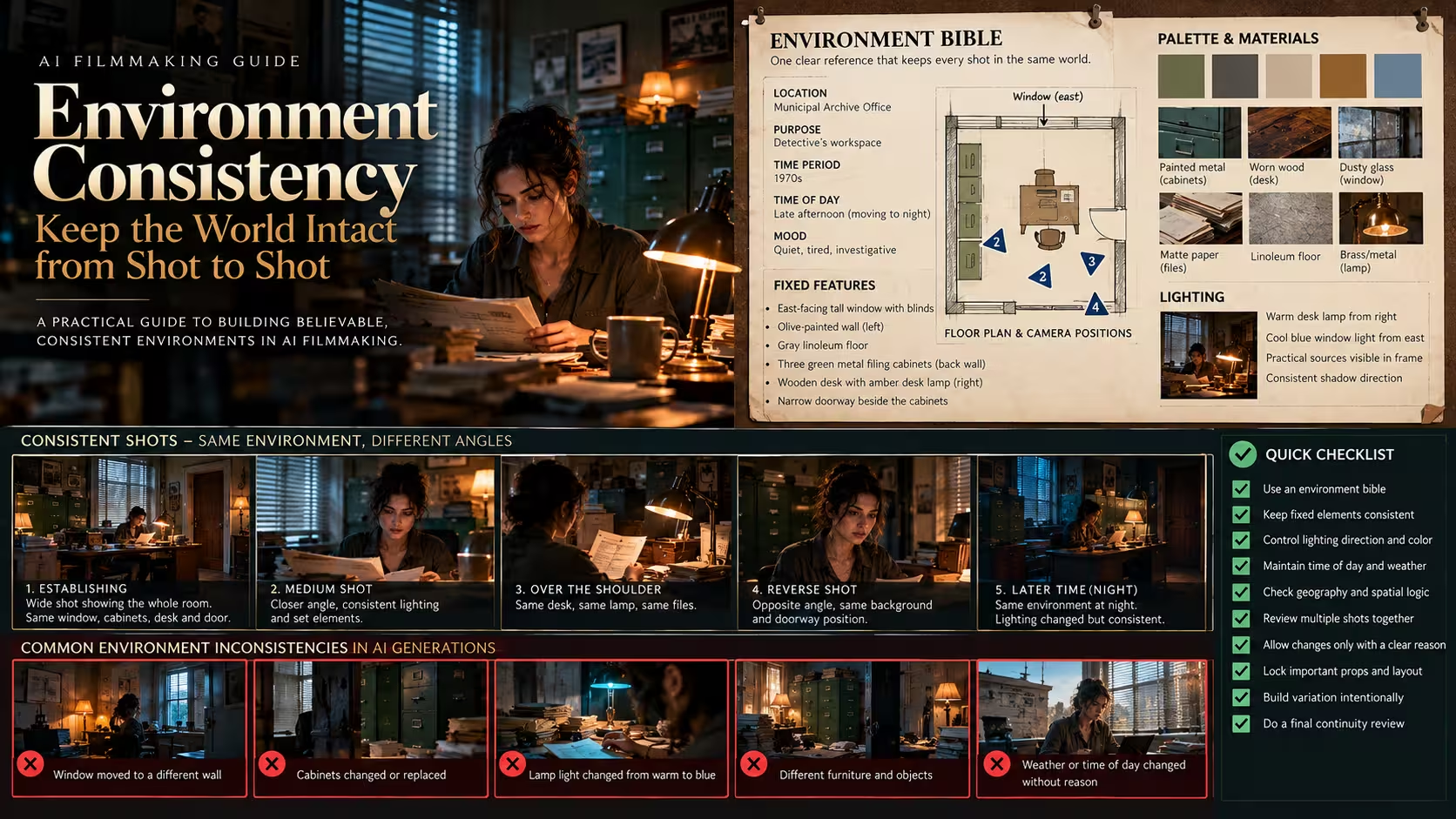
The story in brief
A practical guide to keeping AI film locations consistent from one shot to the next.
Inside this story
A generated shot can look convincing in isolation and still fail the moment it meets the next one. The coat changes shade. A window moves to the other wall. Rain disappears. A practical lamp flips from warm to blue. A street that felt empty becomes crowded. None of these errors may be dramatic enough to ruin a single clip, yet together they tell the viewer that every shot came from a different world.
Environment consistency is the work of making a place feel like one place over time. In conventional filmmaking, a production designer, cinematographer, script supervisor, location team, and editor all help carry that burden. In AI filmmaking, the same burden remains, but the tools do not remember a set the way a crew does. They infer it again for every prompt, image, extension, and video generation. The filmmaker has to supply the memory.
This guide explains how to build that memory into an AI workflow. It covers the environment bible, reference frames, spatial logic, lighting, weather, continuity notes, prompting, shot design, review, and repair. The goal is not sterile sameness. A room can grow darker, a street can become wetter, and a character can move from one side of a building to another. The goal is for each change to have a cause the viewer can follow.
Treat the environment as a cast member
A location is not background decoration. It affects how characters move, what they can see, where sound comes from, how light falls, and what an edit feels like. A narrow kitchen creates different behavior than a hotel lobby. A bus shelter in cold rain carries a different emotional charge than the same shelter at noon. When a generated environment changes without explanation, the audience loses more than visual detail. They lose the rules of the scene.
Start by describing the location in plain language before writing a cinematic prompt. Name its purpose, size, condition, period, time of day, season, and mood. “A small municipal archive room in a 1970s concrete office building, late afternoon, dusty blinds, green metal shelving, one working desk lamp” is much more useful than “moody retro office.” It gives you elements that can be checked later.
Then separate what is fixed from what may change. Fixed features are the things that should survive most shots: floor material, wall color, window placement, main furniture, architecture, recurring props, exterior geography, and the basic lighting motivation. Variable features are things that can evolve: a door opens, blinds shift, a coffee cup moves, dusk turns to night, fog thickens, a person leaves a jacket on a chair. This distinction makes it easier to permit change without accidentally accepting drift.
The environment also needs a point of view. Decide which details the audience is meant to notice. A detective story may need a visible file cabinet, a water stain, and a blocked fire exit. A product film may need clean negative space around the hero object and a material palette that supports its color. A romantic scene may rely on a window, a shared table, and warm pools of practical light. Do not ask a model to protect every object in a dense room with equal priority. Pick the details that carry story, then make them clear.
Build an environment bible before the shot list
An environment bible can be one page. It is not a ceremonial document. It is the reference record that stops each new generation from reinventing the set.
Begin with an identifying paragraph. Include the location name, narrative function, time period, current time of day, and the dominant feeling. Follow it with a fixed-features list. Use concrete nouns and measurable relationships: one tall east-facing window behind the desk; olive-painted wall on the left; gray linoleum floor; three green filing cabinets along the back wall; amber desk lamp on the right; narrow doorway beside the cabinets. If the scene is outdoors, describe the road direction, building faces, terrain, major landmarks, vegetation, weather, and traffic level.
Add a palette, but keep it practical. Three to five color families are enough. For example: faded olive walls, charcoal metal, nicotine cream, warm amber practicals, cool blue window light. Include materials because they often matter more than color: scratched painted steel, dusty glass, matte paper, worn vinyl, damp asphalt, chipped plaster. A tool may improvise exact hues, but material and contrast relationships help preserve the overall impression.
Record lighting as a diagram in words. Where does the key light come from? Is it a window, overcast sky, fluorescent ceiling fixture, lamp, neon sign, or fire? What direction does it travel? Which sources are visible in frame? If a character crosses the room, their face should not receive a different key light in every angle unless they have actually crossed into a different pool of light. Explain that logic before prompting.
Include the current state of the environment. Is the room orderly or recently searched? Is the table set for two or cluttered with paperwork? Is the street dry, wet, or actively raining? Are windows closed? Are lights on? State changes should be logged as they occur. The bible is a living page, not a locked description from preproduction.
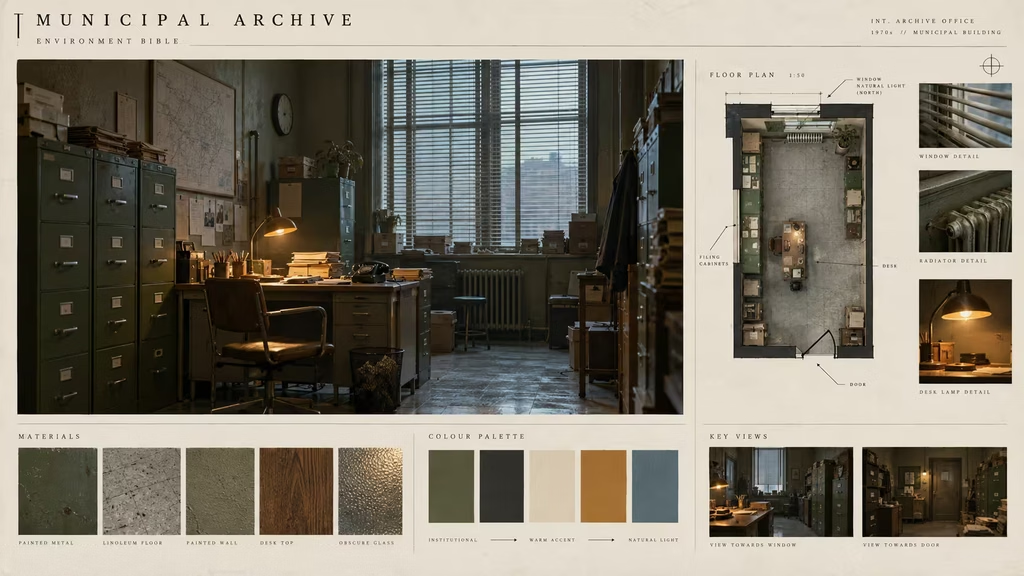
An editorial film-preproduction reference board for a small archive office. Show a central realistic room still, a simple top-down floor plan, material swatches, five muted color chips, and concise callouts for window direction, filing cabinets, desk lamp, doorway, and room state.
A reference board should not become a substitute for decision making. Its value comes from the next generation: you can compare a new frame to it and say exactly what changed. The filing cabinets moved, the window became a square, the lamp lost its warm glow, or the walls became teal. Specific notes lead to specific corrections.
Make a master frame and supporting reference views
Most AI video workflows benefit from a master frame: a carefully made image that establishes the place in its clearest, most complete form. It is not necessarily the opening shot. It is the frame that best communicates the layout, palette, materials, and lighting logic you need the rest of the sequence to inherit.
Choose a view with useful information. A very shallow close-up may look beautiful but cannot establish a room. A wide frame that shows every wall can become too busy and distort scale. A medium-wide, three-quarter view often works well because it gives the model foreground, middle ground, depth, and a clear relationship between key objects.
Create supporting views deliberately. For an interior, make a reverse angle, a closer view of the hero area, and a transitional view toward any doorway or window that will matter in the edit. For an exterior, make a broad establishing frame, a street-level angle, a closer detail view, and a reverse direction if characters travel through the space. Do not assume that the model will understand the unseen side of a building just because it generated one convincing facade.
When possible, generate or edit these references in the same sitting with the same base prompt and visual settings. Lock the terms that define the environment and vary only camera placement. If you use an image model with reference-image controls, feed the master frame back in. If you work manually, keep a short copyable core prompt beside the project. Consistency often fails because each prompt writer describes the same place with different adjectives and silently changes its design.
A reference frame is still an interpretation, not a blueprint. Inspect it for impossible geometry before treating it as canon. Does the doorway lead somewhere plausible? Do the shelves meet the wall? Does a window have a consistent height? Are chairs, steps, counters, and street curbs usable? A small flaw may be hidden in the master frame but turn into a major problem once the camera travels.
Keep the reference set named and versioned. Use simple names such as `archive-office-master-v03`, `archive-office-reverse-v03`, and `archive-office-doorway-v03`. If you revise the room, do not continue using old frames by accident. A single newer lamp design or wall color can split a sequence into two incompatible sets.
Establish spatial logic before you cut
The audience does not need a complete architectural plan, but it does need orientation. They need to know roughly where the character is, what they are looking at, and how the next shot relates to the previous one.
Draw a rough top-down map. It can be ugly. Mark walls, doors, windows, furniture, key props, and likely character positions. Add camera positions for the first few planned shots. This catches simple errors early: a door appears on the left in a wide shot but a close-up treats it as if it is behind the actor; a window sends light from the wrong direction; a character exits screen right and arrives in the next room from a direction that cannot connect.
Use the 180-degree principle as a practical editing aid rather than a rigid law. Imagine a line between two characters or between a character and the object they face. Keep most camera placements on one side of that line so screen direction remains stable. If you cross it, show the move, use a neutral front-facing shot, or create a deliberate transition that resets orientation. AI-generated coverage can make accidental line crossings especially easy because shots are often built independently.
Screen direction should appear in your continuity notes. If a character walks toward the doorway on the right side of frame, the next shot should usually let them enter from the left and continue moving right. If their gaze is fixed toward the window, a cutaway to the window should place it in the expected direction. These relationships are simple, but they make a generated space feel navigable.
Depth is part of spatial logic. A nearby plant, door frame, or shelf edge can give a room a repeatable foreground layer. A table or character can sit in the middle ground. The window, corridor, street, or back wall can provide the background. Reusing a distinctive foreground feature across compatible angles helps the viewer accept that shots share a location. Do it quietly. A foreground object that appears in every frame regardless of camera position becomes its own continuity error.
Keep time, weather, and exposure on a controlled track
Environmental consistency includes time. A location may change across a scene, but a scene needs a documented clock.
Write a time and weather track for the sequence. It can be as simple as: shots 1 through 4, blue-hour rain; shots 5 through 8, rain easing and street reflections remain; shots 9 through 12, night, practicals dominate. This makes later prompting easier because each shot inherits a state rather than asking for “cinematic rain at night” from scratch.
Weather needs physical behavior. If rain has been falling for several shots, pavement should stay wet even when visible raindrops are reduced. Characters should carry moisture on coats or umbrellas if they have just come inside. A streetlight can reflect on asphalt. Wind should have a direction, especially if it moves hair, curtains, smoke, paper, or tree branches. You do not need to describe every effect in every prompt. You need enough recurring evidence that the weather feels present.
Cloud cover and light color also shift gradually unless the story calls for a sudden change. Overcast daylight is soft and broad. A clear sunset has a directional warm source. A sodium streetlight and a cool storefront might mix in a night scene, but their locations should stay fixed. The most common problem is not that a generated shot looks wrong by itself. It is that its contrast, color temperature, or shadow direction belongs to another hour.
Exposure deserves its own note. Decide whether the sequence protects highlights in windows, embraces deep silhouettes, or maintains a readable midtone look. In AI generation, models often brighten dark scenes to show more detail, then darken a matching angle for mood. Neither choice is inherently bad. The cut becomes bad when the shift has no reason. Establish a target frame and compare brightness across the contact sheet before editing.
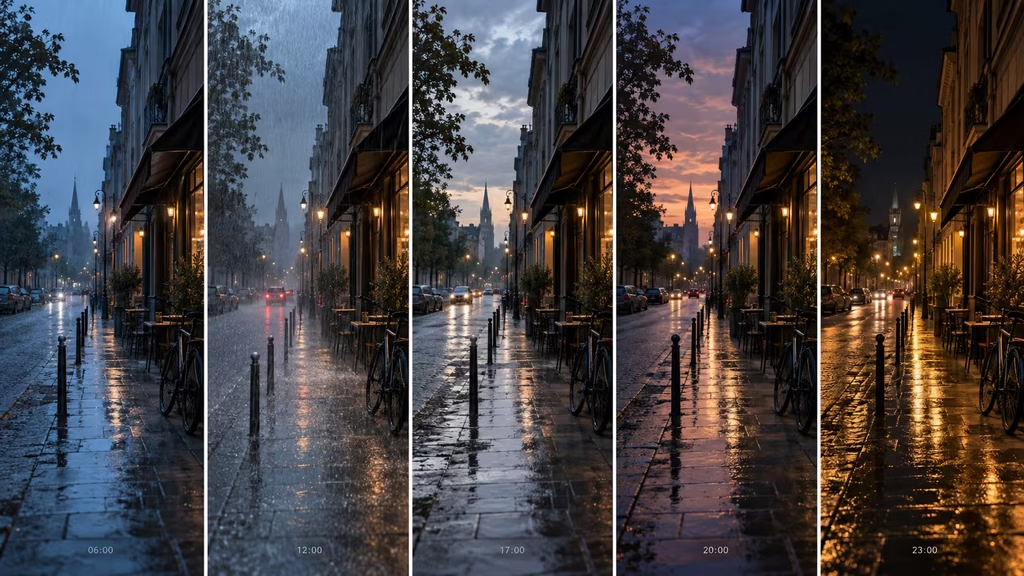
A horizontal sequence of five matching street frames shows controlled progression from light rain at blue hour to wet night under practical streetlights. Keep the same storefront, curb, parked bicycle, road direction, and camera side while rain density and light levels change gradually.
A time track also helps when you need variation. If every shot must look identical, the sequence can feel pasted together. Let the environment change in measured ways: a bus passes, rain weakens, a lamp switches on, distant office windows go dark. The viewer reads the progression as time rather than inconsistency because the underlying place stays intact.
Prompt from constraints, not mood alone
A prompt for environment consistency should preserve the elements that cannot drift and leave room for the specific shot to do its work. Long prompts that restate every object are not always better. They can bury the important instruction and lead to stiff or noisy results.
Build a reusable environment anchor. It should include location type, architecture, palette, materials, time, weather, lighting motivation, and a few signature features. For example: “small municipal archive office, 1970s concrete building, faded olive walls, gray linoleum, green metal filing cabinets on back wall, tall blinds behind desk, cool late-afternoon window light with one amber desk lamp, dusty practical realism.” This anchor belongs in all shots from the room.
Then add a shot layer. State the framing, camera side, subject position, active prop, action, and any state change. “Medium close-up from the doorway side. Mara sits at the desk facing screen right and opens a manila file. Preserve the back-wall filing cabinets, tall blinds, olive walls, cool window light, and amber lamp on desk right. No change in furniture layout.” That prompt does not need to repeat every material swatch. It tells the model what it must protect.
Use negative constraints carefully. “No altered room layout, no extra windows, no text changes, no new furniture, no sudden sunlight” can help when the tool honors exclusions. But a large wall of prohibitions may create strange compromises. Fix the source and reference strategy first. A model cannot consistently preserve a room it has never been shown, especially if the shot demands a new angle with no visual basis.
For image-to-video, describe the environmental motion separately from camera and character motion. “Locked camera. The desk lamp remains steady. Dust drifts in the window light. Mara turns one page.” This makes it clear that the room is not meant to reconfigure itself. If the camera moves, name its path and scale: “slow two-foot truck right past the doorway, keeping desk and blinds in the same relationship.” Restraint is a useful constraint when continuity matters.
Avoid conflicting adjectives. “Abandoned but immaculate,” “dark room with bright soft daylight,” or “busy empty street” may be workable artistic tensions, but they need an explanation. Models often resolve contradictions by choosing a new interpretation for each frame. Name the concrete condition instead: “unused archive room, clean desk, dust on shelves” or “quiet street with sparse distant traffic.”
Carry state forward shot by shot
A continuity log is where AI filmmaking becomes less magical and more reliable. After every approved shot, record what the next shot needs to inherit.
Use a short template: shot number; camera direction; subject position; wardrobe; hero props; environmental state; lighting; weather; visible landmarks; changes introduced. A note could read: “S04, medium from doorway, camera faces north. Mara seated at desk, coat on chair, file open, desk lamp on, blinds half closed, light rain outside, green cabinets behind her. She places brass key beside file.” The next shot can now preserve the key, chair, blinds, and camera relationship.
Track prop state honestly. If a mug sits near the edge of a desk in one shot, it cannot appear full, empty, moved, or missing in the next without a reason. Generated props are especially prone to change because they seem minor to the model. If an object matters, frame it clearly, mention it in the prompt, and log it. If it does not matter, avoid cutting on it or making it visually prominent.
Characters affect environment state. A wet coat darkens a chair. A door left open changes the light spill and background view. Papers handled in one shot should look disturbed in the next. A chair pushed back from a table should remain pushed back until someone resets it. These small traces make a space feel occupied by people rather than regenerated between cuts.
Do not try to preserve every accidental detail. Continuity is selective. A stack of anonymous books may change slightly if no one notices. A distinctive red folder, a broken window pane, or a framed photo near the central action should not. The right level of tracking follows story attention.
Design shots around what the environment can support
The easiest way to break consistency is to ask a location to perform impossible coverage. A close portrait might establish a person beautifully but tell the model nothing about the rest of the room. A wide aerial can establish geography but fail when you cut to an interior that has no plausible connection to the building below.
Use establishing shots to introduce durable facts. Show where the road runs, where the building entrance is, which direction weather travels, or where the important window faces. In an interior, show the desk relative to the door and window. You do not need a grand crane shot. A readable medium-wide shot is often more valuable.
Use inserts to protect fragile details. If a character must pick up a key, generate a dedicated hand-and-key insert rather than forcing a wider performance to preserve face, hand, desk layout, and prop action all at once. In editing, the insert gives you a chance to bridge minor changes between wider shots. It also prevents the environment from carrying more complexity than it can sustain.
Transition shots can save a sequence. A view through a rain-streaked window, a door closing, a corridor wall passing near camera, or a close-up of a lamp can bridge different generations while retaining location identity. These shots work because they belong to the world. They should not be random visual filler inserted only because two frames do not match.
If you need to move from exterior to interior, create an explicit connective image: the entry door, lobby, stairwell, or view through the window. If you cut directly from a street facade to a room that shares no identifiable relationship to it, the viewer may accept it once, but the sequence has lost an opportunity to establish geography.
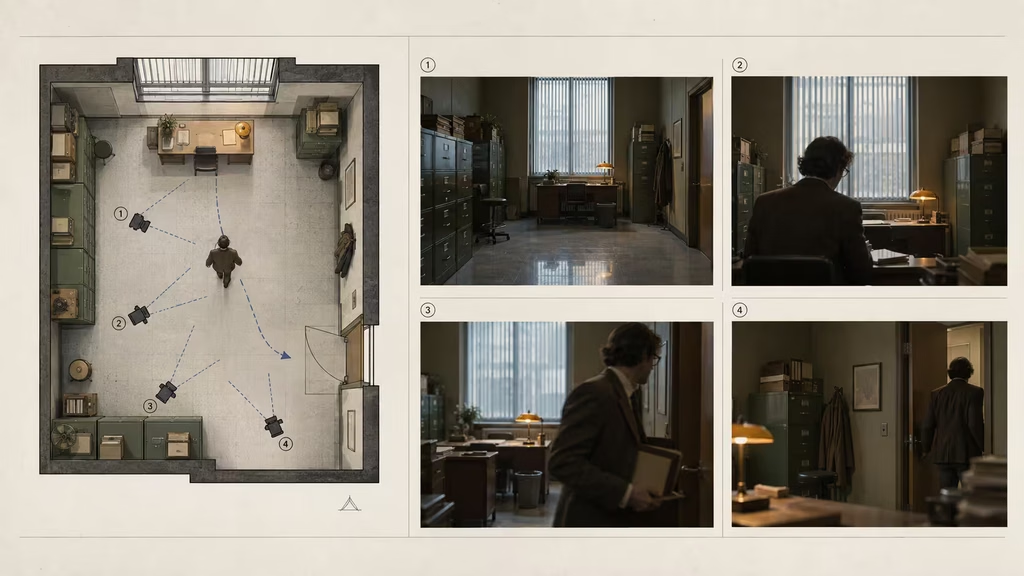
A clean production diagram pairs a simple top-down archive office plan with four small matching frame thumbnails. Mark desk, filing cabinets, tall window, doorway, character path, camera positions, and the screen-right exit direction.
A shot plan should state what each shot proves. The first wide shot establishes the desk, window, and door. A medium shot protects performance and wardrobe. An insert confirms the key on the desk. A reverse angle preserves the filing cabinets and the character’s eyeline. Once you know each shot’s purpose, you can avoid redundant images that increase the chance of drift without adding information.
Review generations as a sequence, not a gallery
AI tools invite a gallery mindset. You generate ten beautiful frames, choose the prettiest one, and move on. Environment work requires a sequence mindset. Put candidate shots beside the master frame and the adjacent shots they will cut with. The right result is often the slightly less spectacular one that matches the world.
Review in passes. First, compare major geometry: doors, windows, floor direction, building shapes, horizon, furniture, and landmark placement. Second, compare color and lighting: time of day, key direction, practical light sources, exposure, shadows, weather. Third, compare state: props, clothing moisture, open or closed doors, clutter, traffic, background activity. Fourth, compare texture and style: lens character, grain, sharpness, contrast, and depth of field.
Watch at normal speed. A mismatch that seems small in a still can flash loudly on a cut. Then step through frames around the edit. If a lamp jumps from one side of a desk to another, a cutaway may hide it only if the audience has not used the lamp for orientation. If the lamp is central, regenerate the bad angle. Editing can solve some problems, but it cannot make an incoherent set become coherent through wishful pacing.
Use a simple traffic-light system. Green means the shot matches without a special explanation. Yellow means it works if you adjust color, crop, use a cutaway, or accept a minor non-story detail. Red means it contradicts a fixed feature, time state, screen direction, or key prop. Red shots should not remain in the timeline merely because their lighting is attractive.
Color correction can unite minor variation. Match exposure, white balance, saturation, and contrast before judging whether a location is truly broken. A consistent grade can make separately generated images feel related. It cannot move a door, change a different building facade into the correct one, or repair a wet street that has become dry. Separate grading problems from design problems.
Repair drift without restarting everything
When one shot drifts, diagnose the type before regenerating. Geometry drift means the physical layout changed. Palette drift means the dominant colors or materials shifted. light drift means the sources, direction, or exposure changed. State drift means an object, weather condition, or character trace has changed. Style drift means the image has a different lens, texture, or rendering language.
For geometry drift, use an approved reference image and simplify the requested angle. Move closer to a known view rather than asking for a dramatic new orbit. Crop away the contradictory area if it is not essential. Inpaint a specific object only when its relationship to surrounding geometry is stable. If the whole room is wrong, a local repair can make it worse.
For palette and lighting drift, correct in post before spending another generation. Match the window light and practical warmth to the master frame. If a source has an unmotivated sunbeam, removal may be easier than rebuilding the shot. If the lighting direction changes facial modeling or cast shadows, treat it as a deeper issue and regenerate from a clearer anchor.
For state drift, decide whether the change can become a story event. A lamp that turns on may be useful if the character just touched it. A rain change may work if time has passed. If you cannot supply a cause, repair or replace it. Audiences are generous about intentional transitions and unforgiving about unexplained ones.
For style drift, standardize the generation settings, reference strength, aspect ratio, and finishing grade. Sometimes a sequence contains a nearly perfect shot rendered with a different lens feel. A crop, grain adjustment, depth-of-field treatment, or subtle diffusion pass may bring it home. If the image has a fundamentally different visual language, it will keep announcing itself.
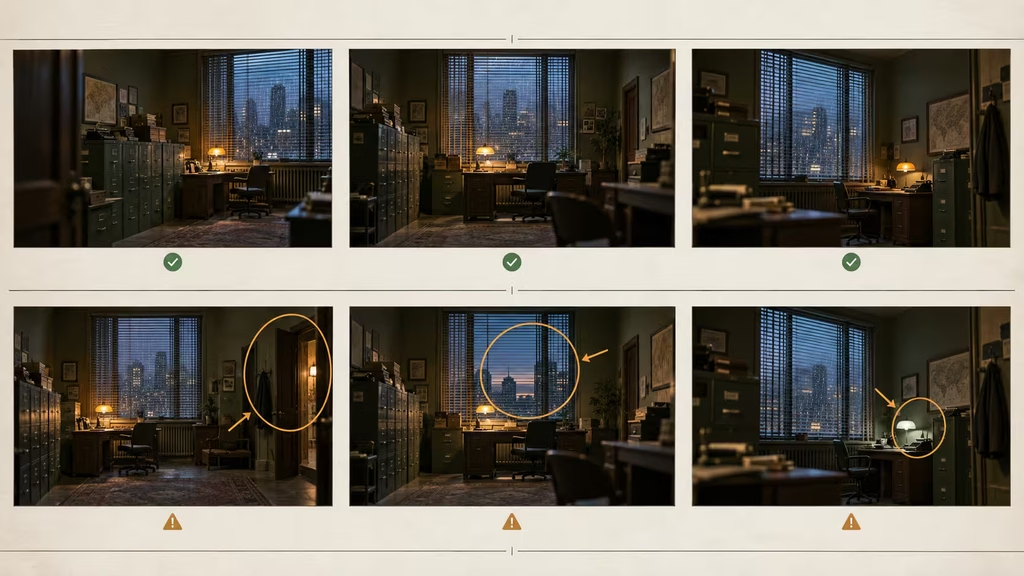
A film editor review board shows six thumbnails of the same archive office scene in two rows. Green check marks identify consistent layout lighting and state, while restrained amber notes point to a shifted doorway, dry pavement outside, and incorrect lamp color in drifting examples.
The repair question is always practical: can the audience understand the scene after this cut? If yes, make the smallest correction that protects the sequence. If no, return to the reference set and generate a replacement with tighter constraints. A polished replacement is cheaper than spending hours trying to disguise a broken location.
A repeatable environment consistency workflow
Start with the environment bible and master frame. Make supporting reference views before you generate performance coverage. Draw the rough map and set the initial environmental state. Choose the first shot because it establishes facts, not merely because it is dramatic.
For each new shot, copy the environment anchor and add only the shot-specific instructions. Use approved references when the tool allows them. Generate several short variations rather than one long, ambitious clip. Mark the version that best matches the current state, even if another version is more decorative.
After approval, update the continuity log. Record any change introduced by action: coat off, key moved, door open, rain stronger, lamp on, character now in corridor. Do this immediately. Reconstructing state from a folder of near-identical exports is slow and error-prone.
Before editing, build a contact sheet in story order. Compare each cut point for geography, screen direction, lighting, weather, props, and style. Apply a base grade to normalize minor differences. Replace red-flag mismatches before sound design or final finishing makes them expensive to revisit.
During revision, protect the master facts. It is tempting to approve a striking frame that bends the set because it looks expensive. That decision spreads. The next shot will either follow the wrong frame or clash with it. A consistent, slightly quieter world usually feels more expensive than a sequence of individually impressive images that do not agree.
Practical preflight checklist
Before generating: confirm the location name, environment anchor, fixed features, time and weather state, current props, character position, camera side, and the one visual change in the shot.
Before approving: compare the result to the master frame and prior shot. Check geometry, screen direction, light source direction, color temperature, weather evidence, key props, and any distinctive foreground or background landmark.
Before editing: review shots in order at normal speed. Flag every mismatch as green, yellow, or red. Fix red contradictions. Use crops, cutaways, grades, and sound bridges for yellow issues only when they preserve the story rather than hide a broken world.
The audience rarely congratulates a film for keeping a window in the same place. They simply stay inside the scene. That is the point. Build a location with rules, carry its state forward, and let each new image inherit the decisions that made the first one believable.
Continue reading
Further insights from the Journal
Have a story in mind?
Bring your next project into focus.
Tell us what you are creating and what you want the audience to feel.